
The finance team can't close the month. The master spreadsheet is locked because the one person who knows how it works is on PTO. That's not a hypothetical. It's the moment most businesses decide to build custom database software: a crisis with a deadline attached, not a calm decision. Sometimes it's an operations director finding a $40,000 invoicing error that sat unnoticed for three months. Neither is an edge case. They're the standard breaking point before investing in a system built around how the business actually works.
When we start discovery on a database project, the first thing we do is ask clients how data moves through their business today. Nine times out of ten, someone pulls up a spreadsheet with a tab called "DO NOT DELETE." That's a decision deferred for years. Our job is to stop deferring it.
This guide covers why businesses make the switch, where no-code tools stop being sufficient, and how discovery, frameworks, and agency selection work.
What custom database software actually is (and what it isn't)
Custom database software refers to a database system specifically designed and built to meet the unique operational needs of a particular business or organization. Unlike off-the-shelf or no-code online databases, this type of software is tailor-made—from how data is structured and stored to how it’s accessed, integrated, and visualized.
It’s especially valuable for businesses that:
Have complex, proprietary workflows that can’t be mapped to generic systems
Require unique data relationships, security levels, or reporting capabilities
Need tight integration with legacy systems or custom internal use software
Want full control over scalability, performance, and feature evolution
Instead of conforming your team’s processes to fit into a prebuilt database solution, custom database software development allows you to mold the software around your processes. This results in more efficient operations, stronger reporting, and often, a major competitive advantage.
Custom database software vs. no-code online database tools
While no-code online database tools (like Airtable or Notion) are often marketed as easy solutions for non-technical users, they come with serious limitations for growing or process-heavy organizations.
These tools can work for light use cases, but they typically fall short when you need:
Complex data relationships across multiple tables
Advanced user permissions or compliance capabilities
Custom integrations with ERP, CRM, or legacy systems
Optimized performance at scale
Ownership and long-term flexibility
When should businesses invest in custom database software?
Here are the most common scenarios where custom development makes sense:
You’ve outgrown your spreadsheets or off-the-shelf tools
You’re dealing with siloed data across departments or systems
You’re building or modernizing internal software for business process automation
You need to replace a legacy database with something more secure, scalable, and user-friendly
You require a system that can evolve with your business, not hold it back
Whether the goal is digital transformation, operational efficiency, or more insightful reporting, a custom database lays the foundation for scalable innovation.
Most database projects begin because one or more of these operational problems has become impossible to work around. The pattern repeats across industries: a tool that worked fine at one size starts failing as data volume, team count, or compliance requirements grow. Here's what that breaking point actually looks like once you're living inside it.
When spreadsheets and no-code tools stop scaling with your data
You can tell exactly when a spreadsheet has crossed the line from useful to liability. It's not when it gets big. It's when maintaining it costs more time than the work it supports. A team that started with one clean tab ends up with workarounds stacked on workarounds. Manual cross-checks, copy-paste between tools, and cells nobody touches because nobody remembers why the formula is there.
Data entry errors compound here because there's no validation logic stopping a bad number from spreading downstream. A custom database closes that gap with rules that catch mistakes before they save.
What DevSquad finds: The businesses that call us have usually reached a specific version of the same problem. Someone on the team has become the unofficial spreadsheet guardian, the person who knows which cells to not touch and what the backup file is called. When that person goes on vacation, operations slow down. That's not a technical problem. It's a data infrastructure problem.
"I like to understand how users will actually use the system, what causes them pain, and what they see value in. With that understanding, it becomes much easier to design features and enhancements that will have a real impact on their day-to-day work." — Sandro Bocon, Technical Product Manager, DevSquad
When your data relationships are too complex for a no-code platform
No-code tools hit hard limits that most businesses don't see coming until they're past them. Airtable's Enterprise plan caps out at 500,000 records per base, with performance degrading noticeably around the 100,000-record mark.
Record limits are only part of the picture. Most no-code platforms lack real granular permissions, so role-based access ends up bolted on. Many-to-many relationships create duplication instead of clean joins. And if your data needs to live somewhere you control for compliance, self-hosting usually isn't on the table.
What DevSquad finds: The no-code ceiling appears faster than most businesses expect, usually when a team starts creating lookup columns to connect records that should sit in a relational table, or when IT manually exports and reimports data every month because the platform doesn't support the integration they need.
"When replacing a SaaS stack with a custom internal solution, one of the most common challenges is getting used to large structures full of relationships. I recommend creating a similar and objective foundation focused on solving the core problem first, making the transition smoother and more direct with a clear alignment from the start." — Caio Alves, Technical Product Manager, DevSquad
When compliance and data ownership are non-negotiable
Healthcare runs on HIPAA. Finance runs on SOC 2. Manufacturing runs on audit trails that have to hold up under scrutiny years later. In all three, Airtable's cloud-only, closed-source architecture is a disqualifier, not a tradeoff. Some large enterprises ban it outright for exactly this reason, regardless of how well it fits everything else the team needs.
Custom database software gives you full ownership of schema and source code, with no vendor roadmap dependency. You choose your hosting environment and set your own encryption standards. You build audit logs that match your specific regulatory requirements instead of whatever the platform vendor decided to support. None of that ownership exists when your data lives inside someone else's infrastructure on someone else's terms.
What DevSquad finds: The compliance conversation almost always surfaces late, after the no-code tool has already been deployed. A security or legal review flags the vendor's data processing agreement, and suddenly there's a migration project stacked on top of the original project. Scoping for compliance during discovery prevents this. It's one of the first things we ask about, before a single screen gets designed.
A mid-market healthcare operations company was running patient scheduling and billing coordination in Airtable. A compliance audit flagged that patient data sat on a cloud-only platform with no BAA in place. The migration to a custom Laravel-based database took three months. Discovery itself took two weeks, and those two weeks surfaced structural problems in the data model the team had quietly worked around for 18 months. The rebuild solved both the compliance gap and the underlying data model, cutting scheduling workflow time by 40%.
When you're modernizing legacy data systems
Plenty of businesses are still running daily operations through Microsoft Access, FileMaker, or a Visual Basic application someone built a decade ago. These systems work, technically, the same way a car with 250,000 miles still drives. The real cost shows up in developer time and security exposure, plus the risk of something breaking with no one left who understands why.
Migrating to a modern custom database beats stretching a legacy system never built for your current scale or complexity. DevSquad's discovery process includes a full audit of the existing data architecture before any modernization begins. The scope you think you have rarely matches what's actually there.
What DevSquad finds: Legacy database projects almost always reveal more than they were scoped to address. The original ask is usually "move the data from Access to a new system." What we find in week one is typically three other tools the Access database has been unofficially feeding, none of which were in the original requirements.
When your database needs to power internal tools and automation
A database that only stores records is doing half its job. The other half is driving workflows: triggering notifications, assigning tasks, and updating statuses without a person pushing every step by hand. For operations-heavy businesses, that distinction is the difference between a system you maintain and a system that maintains itself.
DevSquad builds databases designed for extensibility from the start. The backend that supports your CRM today can power business process automation tomorrow without a rebuild. The foundation matters more than any single feature on top of it.
What DevSquad finds: Teams usually come to us asking for a database. What they actually need is a database that can talk to the rest of their stack: triggering an alert when a status changes, routing a task to the right person, updating a dashboard without anyone refreshing it manually. Building that in from day one costs less than retrofitting it later.
When you're building operational IP and competitive advantage
If how your business operates is part of what makes you competitive, the system running those operations should belong to you. A vendor's roadmap doesn't know your business. It knows its other customers, averaged together, and builds toward whatever serves the largest segment of them.
Custom database software puts the architecture, the logic, and the long-term direction in your hands instead of a platform's release schedule. That difference compounds over years, not months, which is exactly why it's easy to underweight early and expensive to ignore later.
Custom database software vs. no-code tools: when to build and when to buy
No competitor in this space offers a real side-by-side comparison with data ownership, performance, and compliance as the deciding factors. Here's how the two paths actually differ.
Data ownership: what you control vs. what the vendor controls
On Airtable, your data lives in their cloud, governed by their data processing agreement and limited by their API rate limits. It's effectively locked away without an export. On a custom system, data lives where you configure it, accessed through your own APIs, backed up and recovered on your own terms. For regulated industries, this isn't a preference. It's the baseline requirement that determines whether a platform is even eligible for consideration.
Performance limits: where no-code tools break down
Airtable starts showing noticeable slowdowns around 100,000 records per base and hits a hard ceiling of 500,000 on Enterprise plans. SQL databases don't carry an arbitrary row cap. If your data volume is going to grow, staying on no-code means planning for a migration eventually. That migration adds cost on top of whatever disruption comes with switching systems mid-operation. Building custom from the outset removes that future expense entirely.
The cost comparison: subscription vs. ownership
No-code platform costs climb with seats and record volume. Custom database costs front-load into development, then stay flat. The exact break-even point depends on your organization. For mid-market businesses with 50 or more users and growing data complexity, the custom build typically pays for itself within 2 to 3 years. That comparison has to include developer time spent managing no-code workarounds, not just the subscription line item.
How DevSquad runs discovery for custom database projects
Before building any custom database software, you need to lead with discovery. Discovery is not a brainstorming session or a surface-level questionnaire. It’s a structured, strategic process that aligns business goals, user needs, and technical requirements—so that development work is focused, fast, and valuable from day one.
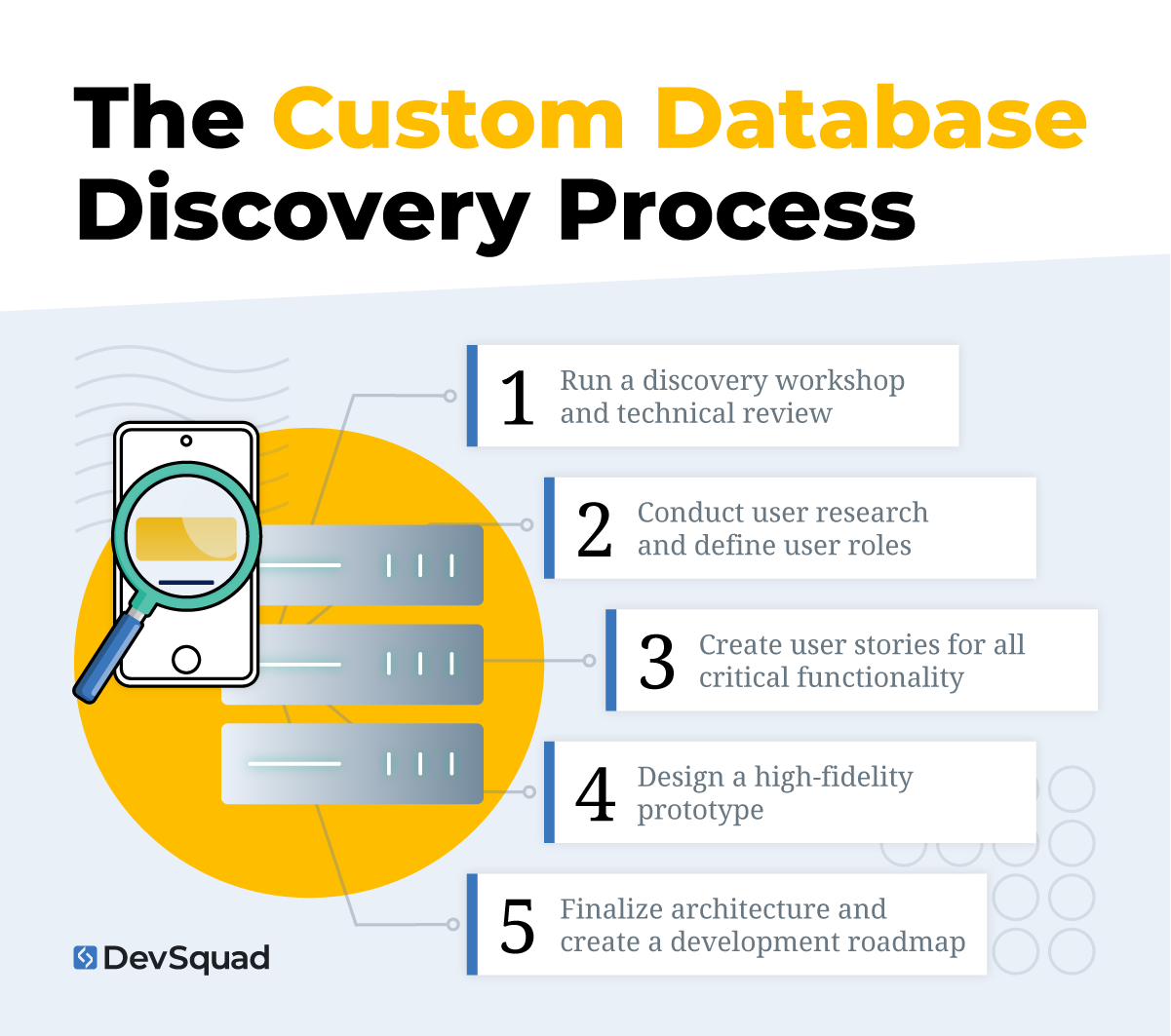
Here’s how to run a discovery process that leads to a successful custom database build:
1. Run a discovery workshop and technical review
Start with a working session between product stakeholders, key internal users, and a technical lead. Clarify the core problem the database needs to solve and document existing processes. If you’re replacing or modernizing a legacy system, include a full audit of your current data architecture and code base.
This phase should produce:
A mapped overview of your internal workflows and data flows
A list of current frustrations or limitations
Technical requirements such as scalability, compliance, or integrations
A shared vision for what success looks like
Avoid jumping into wireframes or technical architecture at this product discovery stage. Your job is to surface real constraints and opportunities before making decisions about the solution.
2. Conduct user research and define user roles
Build a clear understanding of who will use the database, what they need to accomplish, and what success means for them. User research requires interviewing actual users—whether they’re internal teams, external partners, or customers—and documenting how they currently complete relevant tasks.
Focus on:
What actions each user type takes
What information they need at each step
What slows them down or causes errors
Define clear user roles and access levels. These will guide the way your database is structured, how permissions are set, and how data is surfaced.
3. Create user stories for all critical functionality
Translate what you’ve learned into a prioritized set of user stories. A user story is a short, action-driven statement that describes what a user wants to do and why.
User story examples:
“As an operations manager, I want to search by invoice ID so I can quickly locate a customer’s billing record.”
“As a warehouse lead, I want to update inventory counts in real time so fulfillment is accurate.”
Each story must map to a business goal or operational need. Group and prioritize user stories by how essential they are to day-to-day work.
4. Design a high-fidelity prototype
Turn your core user stories into a clickable, high-fidelity prototype that simulates the interface and experience of using the final product. This should include real user flows, data interactions, and the logic behind how key actions function.
Use the prototype to:
Validate assumptions with users and stakeholders
Improve workflows before development starts
Expose gaps in the original plan
Align everyone around what’s being built
Your prototype should reflect the true complexity of the system, not just a simplified version.
5. Finalize architecture and create a development roadmap
Once the prototype is validated, work with your technical lead to define the best architecture and framework for the build. Prioritize tools and frameworks that are developer-friendly, well-documented, and scalable. Laravel is an excellent choice for backend development because it’s fast to implement, easy to maintain, and has wide community support.
From here, create your product roadmap and break development into clear phases:
Now: What will be built in the initial release (MVP)
Next: What will be validated and expanded after launch
Later: Long-term opportunities or enhancements
Include infrastructure decisions, integration timelines, and a plan for continuous delivery. At this point, development work can begin with a validated plan, fully scoped priorities, and minimal risk of rework.
5 best frameworks for building custom database software
When building custom database software, the framework you choose will have a lasting impact on performance, scalability, and developer productivity. The right framework accelerates development, reduces maintenance, and allows your team to focus on functionality instead of boilerplate code. Below are five of the best frameworks to consider, starting with the top recommendation.
1. Laravel (Best for backend development)
Laravel is a modern PHP framework that’s known for its clean syntax, powerful ORM (Eloquent), and strong support for RESTful APIs. It’s widely used in enterprise applications and SaaS platforms due to its stability and ease of use.
Why use Laravel:
Elegant syntax and powerful built-in features
Active developer community and excellent documentation
Scales well for mid-size to large database applications
Built-in support for queues, scheduled jobs, and email
Tight integration with MySQL, PostgreSQL, and other databases
Fast to develop with, which lowers project cost and timeline
Laravel pairs well with frontend frameworks like Vue.js or React for building interactive UIs.
2. Django (Python)
Django is a high-level Python framework used to build secure, scalable web applications. It includes everything needed to build a full-stack application, including a built-in admin panel and robust database management tools.
Why use Django:
Mature framework with a strong security model
Built-in ORM and admin tools for managing database records
Clear support for PostgreSQL and other SQL databases
Great fit for data-driven or analytics-heavy applications
Used by companies like Instagram and Mozilla
Django’s emphasis on convention and reusability makes it ideal for teams that want to move quickly with fewer decisions to make up front.
3. Node.js with Express
Node.js is a runtime that allows you to run JavaScript on the server, and Express is a lightweight web application framework for Node.js. Together, they offer a flexible and performant environment for building real-time applications and custom APIs.
Why use Node.js with Express:
Lightweight and fast
Ideal for applications that need real-time features (e.g., sockets)
Easily integrates with both SQL and NoSQL databases
Large ecosystem of libraries and tools
Good fit for teams with strong JavaScript experience
For teams that want full-stack JavaScript development, pairing Express with a frontend like React or Angular creates a unified development experience.
4. Ruby on Rails
Rails is a full-stack framework built with Ruby, offering rapid development and a strong emphasis on convention over configuration. It’s often used by startups and mid-size businesses looking for quick time to market.
Why use Rails:
Fast prototyping and development
Includes tools for testing, routing, and database migrations
Strong support for PostgreSQL and other relational databases
Mature ecosystem and long history of success in SaaS
Rails is ideal for projects where speed and developer productivity are priorities.
5. Spring Boot (Java)
Spring Boot is a production-ready framework built on top of the Spring ecosystem. It’s widely used in enterprise environments that require strong type safety, modular design, and integration with Java-based systems.
Why use Spring Boot:
Strong support for enterprise-grade database applications
Deep integration with Java ecosystems and cloud platforms
Excellent performance and scalability
Extensive tools for monitoring, testing, and deployment
Choose Spring Boot if your team is already working within a Java environment or if you're building a large, enterprise-scale system.
How to choose a custom database development partner
Ready to find a custom database software development agency? Check out these top agencies building custom software development solutions.
1. DevSquad
DevSquad delivers custom database software through a fully managed, strategy-first approach. Every engagement begins with a lean discovery sprint to validate goals, prioritize user stories, and define the ideal architecture. With a focus on speed and scalability, they use modern frameworks like Laravel to deliver clean, maintainable systems that support real business outcomes.
Clients work with a dedicated squad of product strategists, developers, and QA experts who align every feature to a business goal. DevSquad emphasizes faster launch speeds, user-centered design, and ongoing iteration—making them a top choice for companies replacing legacy systems or building from scratch.
2. ScienceSoft
ScienceSoft has been building custom database software since 2005, with a focus on secure, scalable solutions for industries like healthcare, finance, and real estate. Their end-to-end services include database design, web and mobile app development, and third-party integrations. Known for their technical breadth, they support both SQL and NoSQL systems and offer low-code options through Microsoft Power Apps. Their work emphasizes data consistency, responsive UX, and long-term maintainability.
3. Chetu
With broad expertise in cloud platforms and enterprise environments, Chetu provides full-service custom database development, including design, migration, analytics, and support. Their team builds both SQL and NoSQL systems and offers on-demand database support for complex, high-scale applications. Chetu also incorporates AI-enhanced features and works across AWS, Azure, and GCP, making them a flexible option for organizations with diverse infrastructure needs.
4. CWS Solutions
CSW Solutions builds secure, scalable custom databases for businesses in healthcare, finance, manufacturing, and beyond. With Microsoft-certified engineers, they offer expertise in SQL Server, MySQL, PostgreSQL, and MongoDB—plus cloud migrations on Azure. Their services include database consulting, architecture, support, and ongoing optimization. Known for crafting future-ready systems, CSW focuses on long-term performance, automation, and flexible data access across web, mobile, and internal platforms.
5. Nick’s Software
Focused on user-friendly design and industry-specific functionality, this Melbourne-based team builds web and desktop database systems using technologies like SQL Server, MySQL, and Microsoft Access. Nick’s Software emphasizes performance, intuitive interfaces, and reporting tailored to each client’s workflow. Every project includes hands-on training, direct communication with developers, and long-term support—making it a strong choice for businesses that value both personalization and partnership.
Ready to take advantage of your own custom database software? Learn more about our custom software development process.
Custom database software FAQs
Cost depends on scope, complexity, and the depth of integrations required. Most mid-market projects land in a range shaped by discovery findings, not a flat rate. The clearest way to understand realistic figures is to review actual custom software development cost breakdowns. Database projects share the same key cost drivers: data modeling complexity, integration count, and compliance requirements.
Most custom database projects move from discovery to launch in 3 to 6 months, depending on complexity. Straightforward replacements for a single no-code tool land on the shorter end. Projects involving legacy migration, multiple integrations, or compliance requirements like HIPAA or SOC 2 typically run longer. Discovery takes more time to map dependencies correctly.
Yes, and it's one of the most common starting points for these projects. The migration itself is rarely the hard part. Mapping the existing data model, cleaning up years of workarounds, and validating that nothing gets lost in translation is where the real work happens. A proper discovery phase catches these issues before development starts, not mid-build.

Dayana Mayfield is a SaaS copywriter and content marketer specializing in SaaS marketing, positioning, and go-to-market strategy. She has consulted for over 195 SaaS companies, focusing on both traffic and conversions. She has been featured in Entrepreneur, Forbes, and Business Insider. Outside of work, Dayana writes SciFi novels and spends her evenings surviving auditions, rehearsals, and tech week as a proud theater mom.