
Your Procore renewal came in higher again. Nothing about how your crews use it changed. Job costing still lives in a spreadsheet beside it, and your project managers reconcile the two every Friday.
If that sounds familiar, you're probably asking whether custom construction software development makes sense for your company. It might. The answer is rarely "replace everything," though.
I'm the CTO at DevSquad, and I've watched this decision play out on four construction builds. We shipped them for a paving contractor, a building maintenance company, a cabinet remodeler, and a pool builder. The lesson held every time. You don't need to replace your platform. You need to own the parts of your system where your margin and your compliance live.
This guide covers where off-the-shelf tools stop fitting and how to choose between buying, building beside your platform, or building from scratch. It also covers what a build actually costs. Then it gets specific about the systems that decide your margin: accounting integration, field data, job costing, subcontractors, and compliance. For the wider picture of how we work, see our custom software development approach.
Where off-the-shelf construction software stops fitting
You bought a good product, and it probably earned its place. Procore, Buildertrend, and platforms like them solve real problems for thousands of contractors. That breadth is also the catch. A platform built for everyone makes decisions for you before you ever log in. Early on, you barely notice. As your crews, job types, and revenue grow, three of those decisions start to pinch hard.
Pricing that grows with your volume, not your usage
Your software bill rises when your business grows, even if your usage stays flat. Procore charges an upfront annual fee per product, based on Annual Construction Volume. That volume is the total dollar value of construction work across your projects.
Read that from a finance seat. A strong year raises your software cost. Your crews didn't log in more. Your estimators didn't adopt new modules. You simply won more work.
That model can still be worth paying for. Just price it forward before you commit, which the cost section below walks through.
A data model built for someone else's jobs
Every platform decides in advance which records exist and how they connect. When your crew structure or estimating logic doesn't match those decisions, the spreadsheet comes back.
Transparent Maintenance hit exactly this wall. Standard job management tools assume everyone doing the work is an employee following one process. Transparent needed outside contractors pulled into its own process, on crews that change from job to job. That mismatch made custom construction software the practical choice.
I treat this as a data modeling problem. A record type the platform never planned for can't be configured into existence.
If you build homes, your decision looks different
Residential builders face their own set of problems. Buyer selections, draw schedules, buyer portals, and warranty work drive that decision. Those workflows deserve separate treatment, because the buyer sits inside your process in a way a commercial owner rarely does. If that's your business, our guide to custom home builder software covers it. The rest of this guide stays with general contractors and trade contractors. Your pressure sits in job costing, field data, and subcontractors.
Build, buy, or just build the missing piece?
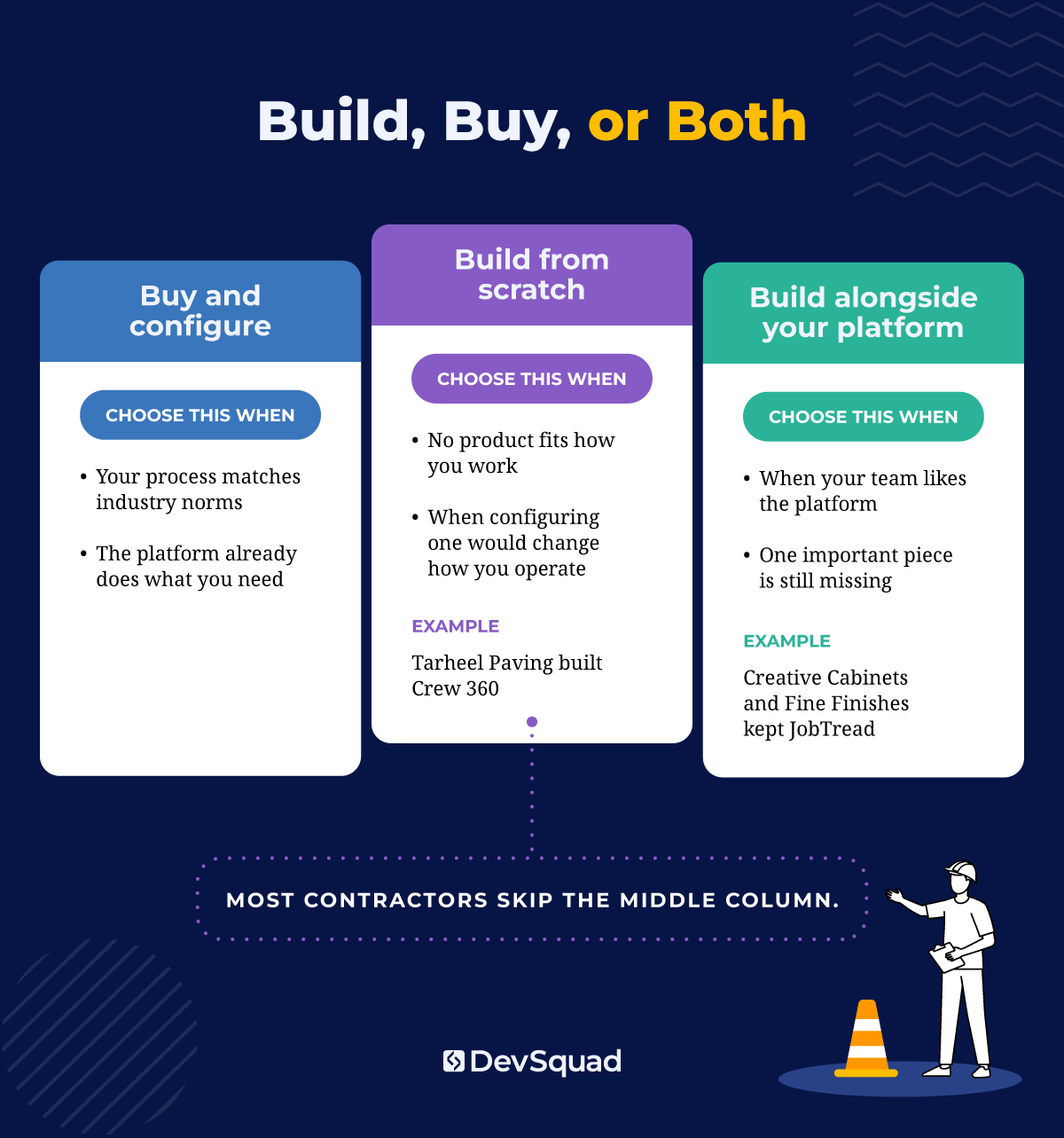
You have three paths. Buy and configure. Build alongside the platform you already run. Or build from scratch.
The middle path is the one you're most likely to skip, and it's often the right fit for custom software development for construction. Two of the four builds in this guide kept JobTread exactly where it was.
When buying still wins
Buying is often the correct call, and a good partner should tell you so. If your process matches how the rest of the industry works, building it costs more to own than to rent.
Buying fits when:
Your document control and submittals already run cleanly in the platform
Your RFI and change order workflow looks like every other GC's
Nothing about that work sets you apart from competitors
For the full scoring approach, I wrote a separate guide on build vs buy.
When you build alongside the platform you have
Keep the platform your team already knows. Build only the piece it can't do. Adoption stays high, because nobody has to learn a new home for their daily work.
Creative Cabinets and Fine Finishes, an Atlanta remodeler running about 75 projects at once, took this route. Replacing JobTread would have cost more and solved a problem the team didn't have. DevSquad built a platform beside it instead, leaving users, files, and the job pipeline in JobTread with permissions carried over automatically.
The new layer handles what JobTread couldn't: one dashboard of every outstanding material across all active jobs. Overdue items flag themselves. Purchasing exports one vendor at a time, covering every job that vendor supplies. It reached production in four months.
Before, the owner opened jobs one by one to find what was overdue. Now he checks a single screen in about a minute. As you can see, one screen now replaces opening seventy-five jobs
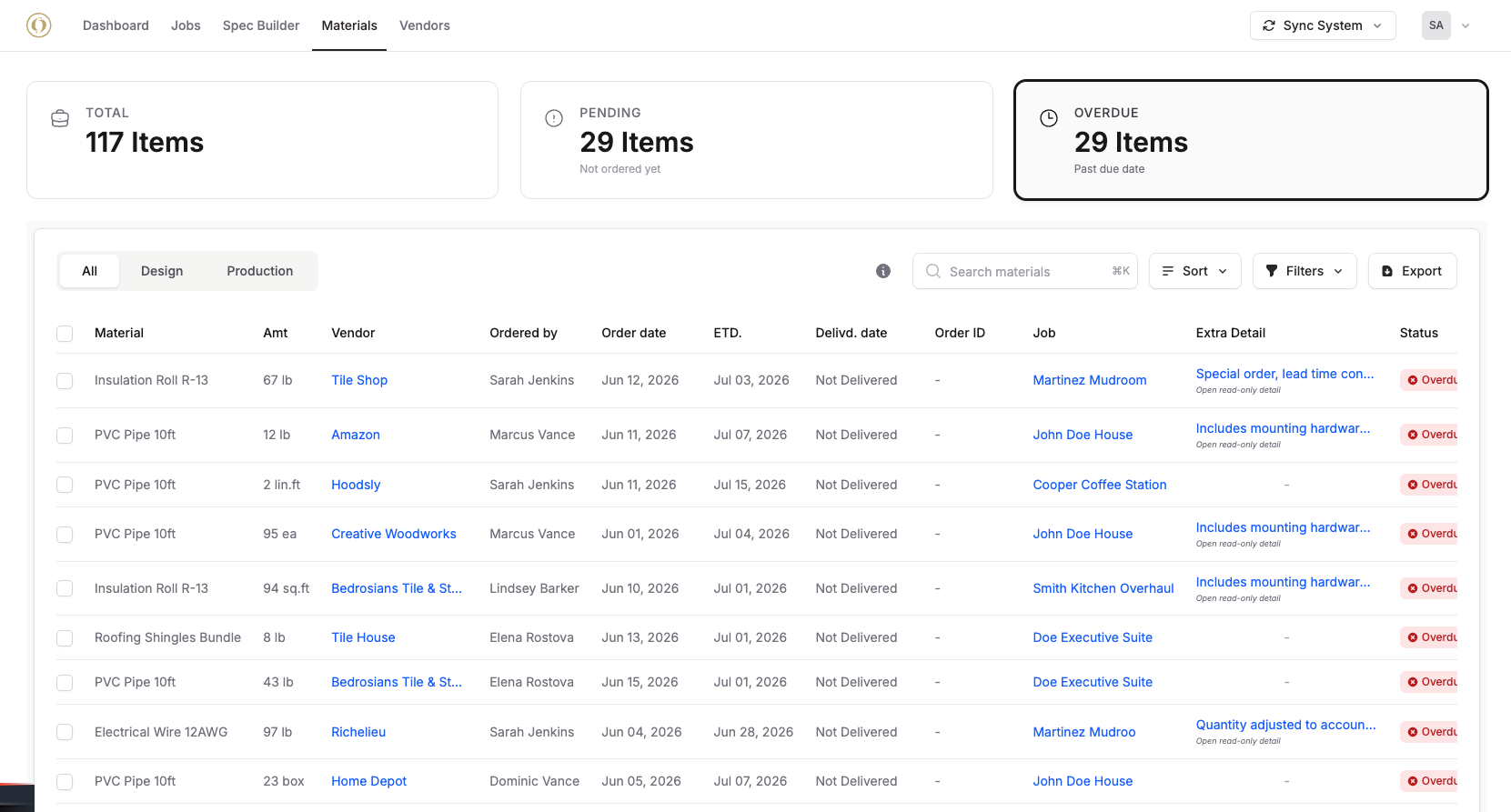 That's what internal software looks like when it respects the tools you already rely on.
When there is nothing to configure
Sometimes no product fits, and forcing one changes how your business runs.
Tarheel Paving has laid asphalt in Western North Carolina since 1979. Nothing it could buy matched how its estimators worked. DevSquad studied their Excel process and built Crew 360 around the same sequence, formulas, and job types.
Square yards and stone depth now produce tons of material, and tonnage sets the truck count. The first working version shipped in under three months. Contract creation on small and medium jobs dropped from about an hour to about 25 minutes. Estimators went from four or five proposals a day to ten to fifteen.
Tarheel now sells Crew 360 to other paving companies.
What construction software actually costs
What does construction software cost? That depends on whether you rent it or own it. Renting shows up as one clean line on an invoice. Owning shows up as a build, then as steady work to keep it healthy. Compare both honestly, over at least five years, before you choose.
The subscription line is the smallest number
Your subscription is the number you see. It's rarely the number you pay. Around every platform sit costs that never appear on the renewal:
Implementation and onboarding
Add-on modules for work the base product skips
Integration work to connect accounting and field tools
Staff hours spent keeping spreadsheets beside the platform
The volume-based pricing covered earlier sits on top of all of it. Our breakdown of software development costs goes deeper on both sides.
Tarheel's results show the other side of the ledger. The office secretary recovered 10 to 15 hours a week once paperwork stopped being retyped. A paid time-tracking subscription was retired. Tarheel estimates it avoids $50,000 to $60,000 a year in miscommunication and wasted crew and truck time.
Owning software carries its own bill, though. You're taking on maintenance, and I'd budget for it from day one.
What drives the price of a custom build
Scope sets the price of a build. These drivers move the number most:
How many systems the software must integrate with
How much data you migrate out of old tools
Whether field apps must work offline
How much compliance and audit logic you need
How many user roles need their own views
DevSquad's custom construction software development services run on a fixed monthly fee based on squad size. You're billed month to month, and every engagement starts with discovery. Most DevSquad plans run between $12,000 and $16,000 a month, and most builds launch in three to nine months. Multiply the two, and a typical build costs roughly $36,000 to $144,000 to reach launch, before ongoing maintenance.
Where you land in that range depends on scope. Here's how long our four construction builds took to launch:
Coastal Pools, one sales workflow beside JobTread: 3 months to production
Tarheel Paving, the first working version of Crew 360: under 3 months
Creative Cabinets and Fine Finishes, specifications and materials beside JobTread: 4 months
Transparent Maintenance, the entire operation from quote to payment: 6 months
Accounting and ERP integration: where builds succeed or stall
The integration worked in the demo. Three months later, your job cost report and your accounting system disagree, and nobody can say why. Treat integration as a decision about who owns the data. If a full ERP is part of your plan, our custom ERP guide covers that build.
Decide which system owns each record
Every record needs exactly one owner. Every other system reads from it. Here's a sensible starting split for a general contractor:
Jobs: your project management platform
Cost codes: your accounting system
Commitments and subcontracts: the system where project managers approve them
Invoices: your accounting system
Payroll hours: the field app where crews clock in
Two-way sync on the same record is where drift starts. Each system edits its copy, and one change quietly disappears.
Crew 360 follows the rule. Crews clock in and out in the field app, and those hours sync to QuickBooks payroll. The field app owns the time record. Payroll consumes it.
The first question I ask on any integration is which system owns the job cost record. When two systems both think they own it, the sync works in the demo and quietly breaks your books a few months later.
Plan around the systems you don't control
Your accounting package, your platform, and your customers all set limits you can't change. Map them during discovery, before anyone writes code. Our guide to integrating legacy systems covers the patterns.
Coastal Pools kept JobTread as its system of record. Antônio Salla, who led that build, describes the boundary:
"You do not have to replace the tool your business already runs on. A construction client kept their project management platform and asked us to build only the piece it could not do. We pull projects and budgets out of it, we push signed documents back into it, and we deliberately avoid editing anything on their side. Every project detail still lives where it always lived." — Antônio Salla, Product Manager, DevSquad
Coastal Pools' roadmap adds native project creation, so the system could stand alone if its platform situation changes. Some connections should never be built, as the build vs buy guide explains.
Field-to-office sync that survives the jobsite
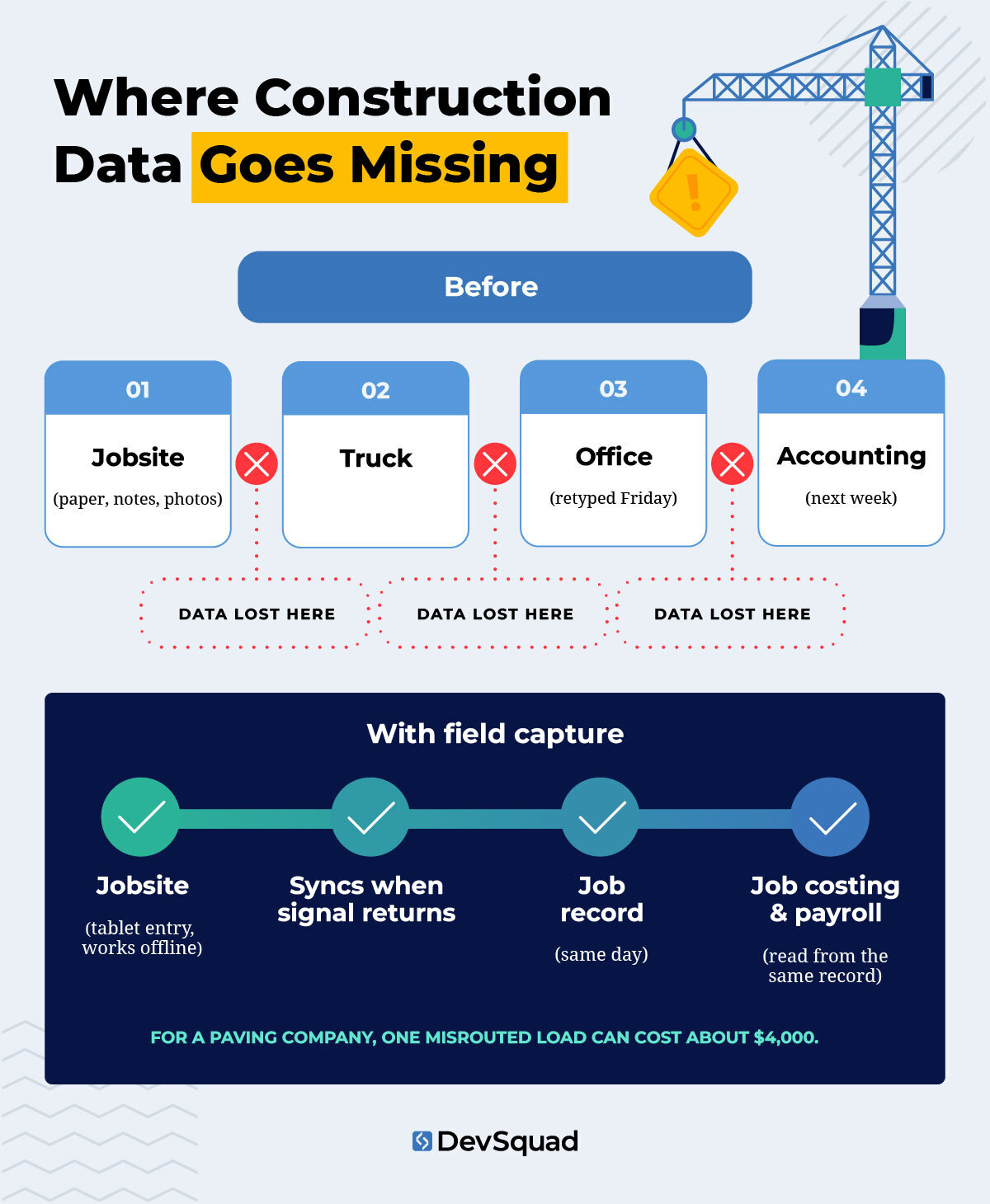
Your foreman's notes reach the office on Friday. The problem happened Tuesday.
At Tarheel, a delay like that has a price tag. Paving runs on perishable material. A dump truck sent to the wrong place costs about $110 an hour, and one misrouted load can run about $4,000.
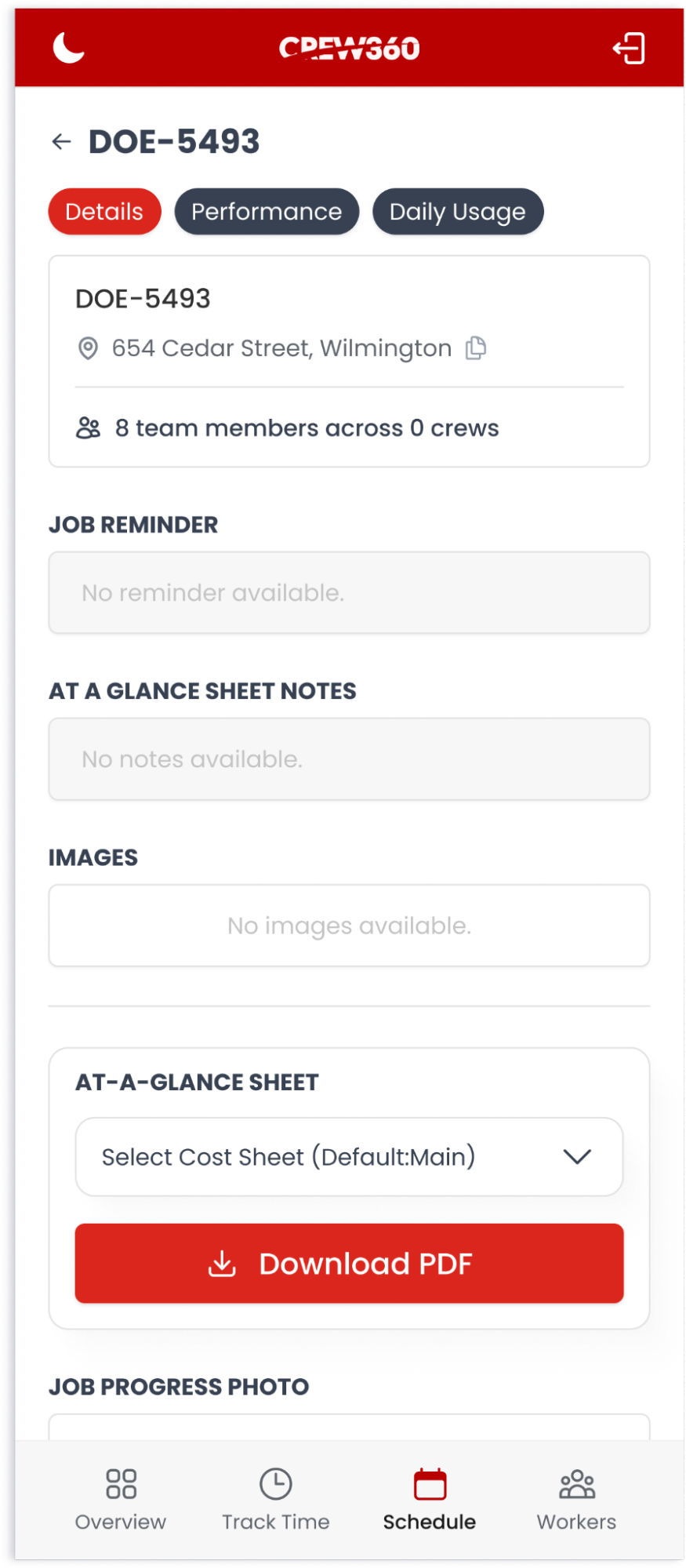
Capture at the source closes that gap. Records get created on a phone or tablet where the work happens, and they attach to the job immediately. In Crew 360, the job reaches the crew's phones before they leave the yard. That means the address, schedule, truck and crew assignments, and drawings.
Here's what the foreman sees on his phone before the crew rolls out. Crew members clock in and out from the same app. Everything the crew needs is now in their pocket.
 Sandro Boçon, DevSquad's product manager on Crew 360, saw the change at Tarheel's job sites:
"Estimators used to sketch the job on paper at the site and photograph it afterward. Now they draw it on a tablet standing in the same spot, label the measurements, and it is attached to the job before they get back in the truck. Paper is not a small problem in field work. It is the gap where information goes missing between the site and the office." — Sandro Boçon, Product Manager, DevSquad
Capture at the source only works if the app survives the jobsite. Basements, rural lots, and steel structures all kill your signal. Treat these as requirements:
Capture works with no signal at all
Entries queue on the device until signal returns
Sync runs without creating duplicate records
Every entry lands on the right job record
Offline mode is the feature I test hardest on field apps. A form that works on office Wi-Fi and fails in a basement is not a finished feature.
 Job costing that updates while the crew is still working
You find out the margin is gone when the invoice gets reconciled. By then, there's nothing left to fix.
Live job costing moves that moment earlier. It follows a simple sequence:
The estimate sets expected materials, hours, and equipment
Crews log actual use from the site as work happens
The system compares actuals against the estimate as entries arrive
Variance shows up while there's still time to act
Why does this matter more now? Your material costs move mid-job. Roughly 70% of commercial construction firms report being affected by tariffs this year.
A price you quoted in spring may not hold by the time the crew shows up.
In Crew 360, the trucks and materials set during estimating carry forward to the foreman, who logs what was actually used. At Tarheel, Sandro Boçon explains what changed once estimates followed the crew:
"The estimate stops being a document once the crew starts working. A foreman logs materials used from the site, and when the job approaches what was estimated, the system flags it. Somebody can act while the job is still running instead of finding out the margin disappeared when the invoice gets reconciled." — Sandro Boçon, Product Manager, DevSquad
Subcontractors and equipment: tracking what you pay for
Subcontractor hours and equipment look unrelated, but they share one problem. If nothing tracks them, you can't know what you actually paid for. You pay the invoice, file it, and hope it matches the work that happened on site.
Subcontractor hours and accountability
Good subs are hard to replace. 57% of contractors named an insufficient supply of workers or subcontractors as a top concern for 2026.
Your software has to hold subs accountable without driving them away. Two designs work, and Transparent Maintenance and Creative Cabinets chose opposite ones:
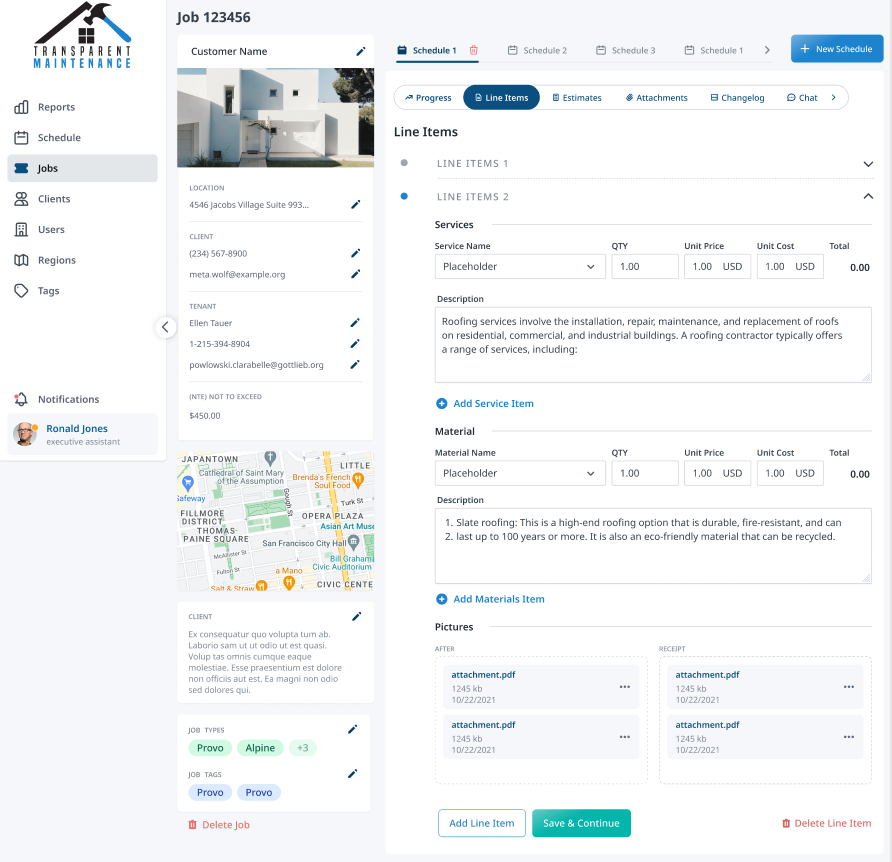
Transparent Maintenance brings subs inside. Contractors become users when they're assigned a job. They confirm the price first, need approval for extra materials, and get finished work approved before invoicing.
Creative Cabinets keeps subs outside. A login would have been ignored from day one, so its most important output is a PDF. Each trade gets only its own specifications, and the plumber sees plumbing and nothing else.
Caio Alves, DevSquad's product manager on Transparent Maintenance, explains why hours came first:
"The problem was subcontractors billing more hours than the job took, because nothing tracked the job. Now time gets logged against the work from the site. He is not accusing anyone. He simply had no way to know. An hour a day, across every contractor, every week, is a number that gets large quietly." — Caio Alves, Product Manager, DevSquad
In Transparent's platform, time runs against each assignment as the work happens. Crews upload photos straight into the job record, so the proof of the work builds itself as the job runs. Hours are tracked against the job, and evidence is attached to it.
 Equipment tracking
Give every piece of equipment its own record. Each one should hold:
Current location
The job it's assigned to
Hours run
Maintenance due
With that in place, equipment cost lands on the right job instead of in overhead. Maintenance gets scheduled before a breakdown pulls a machine off a job for a week. When you ask what a machine earned last year, you get an answer in seconds instead of a week of digging through invoices.
Tarheel is heading in this direction now. Crew 360's job history is expanding to cover fleet and equipment, so the record that exists for a paving job will exist for a truck.
Prevailing wage and compliance belong in the data model
Certified payroll week arrives. Someone copies hours from the field app into a spreadsheet, then into payroll. One typo, and your report is wrong.
The federal baseline leaves little room for that. The Davis-Bacon Act applies to federal construction contracts over $2,000. Covered contractors must pay workers weekly and submit weekly certified payroll to the contracting agency (U.S. Department of Labor, Fact Sheet #66).
Build compliance into the data model, so reports come straight from the records. Capture these at entry:
Job classification for each worker
Hours by classification, per job
The applicable wage rate
Fringe benefits
When the field app records classification and hours together, the weekly report becomes a query. Nobody retypes anything, and every number traces back to the entry a crew member made on site.
Your state may add its own prevailing wage rules on top of the federal ones. Confirm your obligations with counsel before you design the system around them. Then have the software enforce exactly those rules.
I don't trust a compliance report that someone assembles by hand on Friday afternoon. If certified payroll depends on a person copying hours between systems, that software was built to run, not built to be audited.
How to scope your first construction build
Where do you start? With one process. Pick the one that costs you the most time or margin today, and map it exactly as it runs now. Our discovery sprint starts there, before anyone designs a screen.
Transparent Maintenance shows that having no software yet is no reason to wait. The company ran on direct messages, spreadsheets, hand-filed photos, and paper invoices. DevSquad launched one platform covering the whole operation in six months, maintained it for six more, then handed quality assurance to Transparent's own team. Once jobs were structured and tagged, regional reporting showed where work was concentrated, and the company used it to decide where to advertise.
A sensible sequence looks like this:
Pick the process that costs you the most
Map it as it runs today, workarounds included
Ship a first version your team uses daily
Move to lighter maintenance, or start on the next process
Engagements often shift to lighter maintenance once the core features are done. When you're choosing a company for custom construction software development, ask how they handle step two. Our guide on how to vet a custom software development partner lists what to look for.
Start with the process that costs you most
Keep the tools that already work. Own the records where your margin and your compliance live. That split is the whole strategy, and it costs far less than replacing everything.
If your job costing, field data, or subcontractor tracking runs on spreadsheets beside your platform, you already know where to begin. That process is your first conversation. You don't need a finished spec to start. You need a clear picture of where the work breaks today.
Our internal software development team starts every engagement with discovery. Bring the process that hurts most, and we'll map it with you before anyone writes a line of code.
Custom construction software development FAQs
Scope drives the cost more than industry does. The biggest drivers are integrations, data migration, offline field requirements, compliance logic, and the number of user roles. DevSquad charges a fixed monthly fee based on squad size, billed month to month, and starts every engagement with discovery. Budget for ongoing maintenance too. After launch, you own the software and its upkeep.
Yes. Custom software can sit beside your existing platform and handle only what it can't. Two DevSquad construction builds kept JobTread in place, reading project data from it and sending finished documents back. The same pattern works with other platforms, as long as you decide which system owns each record. Map your platform's integration limits during discovery, before the build starts.
Scope sets the timeline. DevSquad's four construction builds reached production, or a working first version, in anywhere from under three months to six months. A single workflow built beside an existing platform lands at the short end. A system running your entire operation takes longer. Across all internal software projects, DevSquad's products launch in three to nine months.
Buy when your workflow matches the rest of the industry and the platform already handles it well. Build when no product fits how you work, or when configuring one would force you to change your operation. Consider the middle path first: keep your platform and build only the missing piece. That approach protects adoption and keeps your build smaller.

Rafael Lunardelli is the CTO at DevSquad and founder of Pinguim Academy. With nearly two decades in software development, he specializes in scalable systems, DevOps, QA, and modern PHP development. Rafael has led enterprise projects at KPMG and now teaches thousands of developers through his Laravel-focused courses, conference talks, and online content.