
When comparing building versus buying software, most guides assume you are choosing a tool for the first time.
But most likely, you’re not.
You probably signed the contracts three years ago, trained forty people, and now the business runs on them. Most companies are actually considering replacing their software versus sticking with what they’re already paying for.
So the question is narrower than build or buy. It is which of the tools you already pay for are worth owning outright, and if so, which one you should replace first.
Waiting has a price. Of IT leaders surveyed for Zylo's 2026 SaaS Management Index, 61% cut projects because of unplanned SaaS cost increases. Every year you leave the renewal alone, it takes a little more of the budget you had planned to spend elsewhere.
This guide covers how to make that call for one tool at a time, and which tools should stay bought no matter what the math says.
“Buy when the workflow is standard across your industry. Build when your workflow is your competitive adventure or when no product can represent your business without manual workarounds.” — Rafael Lunardelli, CTO, DevSquad
Build vs buy: the short answer
Buy when the workflow is standard across your industry, when the vendor carries regulatory or liability risk on your behalf, or when nobody can be named as the owner of a build eighteen months from now. Build when the workflow is how you compete, when no product's data model can represent your business without manual workarounds, and when five years of renewals cost more than owning the software outright.
That answers it for a tool you are choosing. For a tool you already bought, trained your team on, and now run the business through, the decision has a third column most comparisons leave out: what it costs to get out. The rest of this covers that column.
The “build vs buy” decision changes when the software has already been bought
Every page ranking for this term answers a question you stopped asking a while ago. Should we build this or buy it? You bought it. Forty people were trained on it. Finance closes the month inside it.
That changes the shape of the decision. A greenfield comparison has two clean columns: what a build costs, and what a subscription costs. Yours has three. What you pay now, what you would pay to build, and what it costs to get out.
Nobody models the third column. It is frequently the largest. Getting out means extracting data, rebuilding undocumented logic, and running two systems at once for months. None of that appears on a vendor's pricing page or in an agency's estimate.
I am replacing several SaaS tools inside DevSquad right now with one internal system built around our own processes. The surprise was not the engineering. It was how many of those processes had never been written down anywhere except inside the tools we were leaving.
Choosing to replace SaaS with custom software is not a fringe strategy anymore. Klarna stopped using roughly 1,200 SaaS suppliers in favor of an internally built stack, a decision its CEO described publicly in 2025.
You are not Klarna, and the number is not the point. The direction is. Sometimes replacement is the wrong move entirely, so understand what a modernization actually involves before committing either way.
Building versus buying: what the numbers say
Both sides of this number get underestimated, in opposite directions, for opposite reasons. The subscription side looks visible, so nobody audits it. The build side gets priced as a build, and nobody prices the ownership.
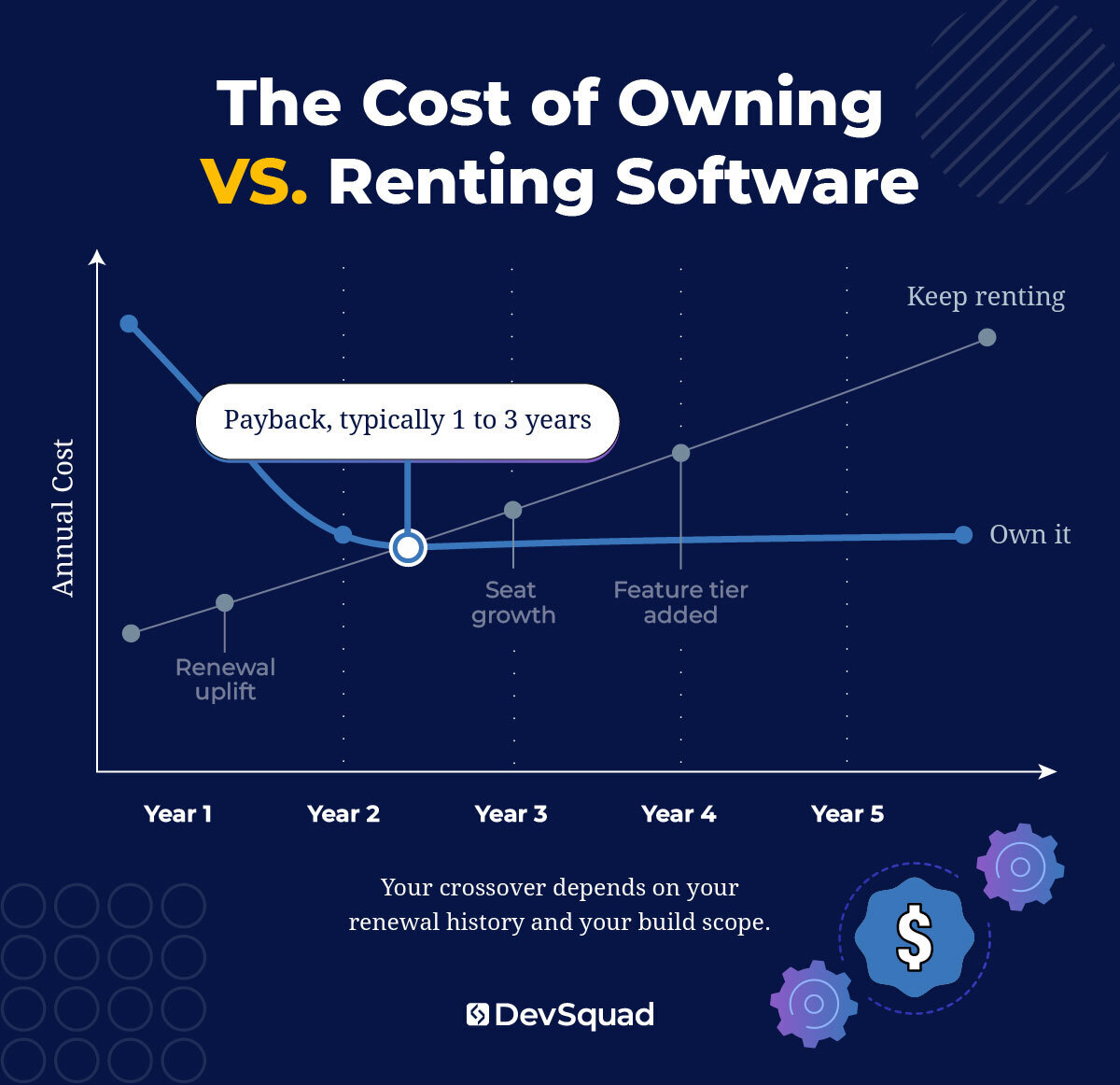 What per-seat pricing does between now and 2031
Your subscription line grows on its own. Three forces do it, and they compound:
Renewal uplift. The base contract reprices upward every cycle. Rarely dramatically, always upward, and it applies to a number that already absorbed last year's increase.
Seat growth. The bill tracks headcount whether or not usage does. You hire twelve people and pay for twelve seats. Four of them open the tool twice a quarter. Growth is what you are optimizing for, which is exactly why this goes unnoticed.
Feature tiering. Capability you had last year returns this year as a paid tier, sitting one line up in the quote.
Total your software licensing costs across every tool touching the workflow you might replace. Model it forward five years using the uplift you have actually experienced, not the one the contract promised. That is your do-nothing baseline.
The ranges sit in our guide, 8-Figure Systems: Software Strategy for Replacing Costly, Off-the-Shelf Tools. This free asset is available to download, no email required.
What a build actually costs after it launches
The number in your head is the development cost. It is the smallest line in the five-year picture.
Underneath it sit costs that rarely make the estimate:
Hosting, infrastructure, and observability
Security review and access control
Engineering time for fixes and dependency updates
Documentation that stays current
Onboarding, every time a new person learns the system
Two more never reach the spreadsheet at all. The parallel run, where you pay the vendor and your own infrastructure at once. And ownership itself. You are not buying a tool. You are becoming the owner of a product, which carries a different total cost of ownership. In our experience payback lands between one and three years, with maintenance continuing after that.
What holding the stack together costs
Nobody bills you for this one, which is why it survives.
Somebody re-keys the same record into three systems. Somebody reconciles two reports that should already agree. Somebody rebuilds the automation that broke overnight, again. That automation layer holds your stack together and never appears on a budget line. It is paid in payroll, which is precisely why the real cost of holding a legacy stack together goes unmeasured for years.
"The first Zapier is awesome. But then you get to number ten, and now you're reworking your flows and doing hacks just to get everything to work." — Phil Alves, CEO, DevSquad
What you should continue to buy
Some of this stack should never be built, and the math has nothing to do with it.
Four categories where the answer is buy, regardless of what any scorecard says:
Regulatory liability. If the vendor files, certifies, or carries risk for you, you are not buying software. You are buying indemnity, and indemnity has no build option.
Identity and authentication. The cost of getting this wrong is unbounded, and getting it right is already priced by someone who does nothing else.
Payroll and accounting. Standard requirements, changing rules, and a vendor whose whole business is tracking those changes for you.
Anything your customers log into. They did not sign up for your first login flow.
One test settles the rest. If you cannot name a specific time, cost, or revenue benefit, it is not time to build.
Replacing off the shelf software is not all or nothing either. Own what carries your differentiation. Keep renting the rest. If you are earlier in this than you thought, our comparison of custom versus off-the-shelf software covers the decision before the purchase.
The operator’s build vs buy framework
You are not scoring a category. You are scoring one tool.
That distinction is the whole framework. Deciding whether to build or buy software in general produces a debate. Running one line item through six criteria produces a decision. It comes back three ways: own it, keep renting it, or keep renting it and build the layer you need on top.
Score the tool, not the category
Score each criterion high or low. Finish one tool before starting the next.
Usage share. How much of the product do you use? Under twenty percent means you are funding a roadmap written for a different company.
Workflow specificity. Is this how you compete, or how your whole industry works? Standard workflows already have vendors.
Vendor risk absorption. Does the vendor carry regulatory or liability exposure for you? If yes, this build vs buy decision framework stops here.
Integration density. How many systems does it touch? High density raises build cost more than any feature list will, for reasons covered below.
Five-year delta. Your own renewal history against a real build estimate. Not a benchmark from a blog post.
Named owner. Can you name the person accountable in eighteen months? Not a team. A person.
Criterion | You should build | You should buy | Go for hybrid |
Usage share | You use under 20% of the product | You use most of what you pay for | Heavy use of one module, none of the rest |
Workflow specificity | The process is how you compete | The process is industry standard | Standard core, one step that is yours |
Vendor risk absorption | No liability transfers to the vendor | Vendor files, certifies, or indemnifies | Vendor holds the risk, you build above it |
Integration density | Few connections, or you own both ends | Vendor APIs already fit your stack | Vendor core, custom connective tissue |
Five-year delta | Renewals exceed build plus ownership | Subscription stays below build plus ownership | One module is expensive, the rest is fair |
Named owner | A person, with a maintenance budget | Nobody, or a team with no budget | An owner for the layer, not the platform |
Run one through it. A workflow tool your team barely opens, running the way you specifically quote jobs. No vendor liability. Costing more every renewal, with an operations lead who would own it. That is a build. Invert all six and you have a clear keep. Most tools land between, which is what the hybrid answer exists for.
3 answers that override the score
Three answers settle this regardless of the total.
First, the categories above. If the vendor absorbs regulatory or liability risk, the score is irrelevant. Buy.
Second, if you cannot name an owner and a maintenance budget, buy. Unowned internal tools do not fail loudly. They rot, and two years later somebody proposes replacing them with SaaS.
Third, and this decides the most projects: if your own process is undefined, a build encodes the confusion rather than fixing it. You pay to make the mess permanent. The instinct is to write a spec. The correct first step is mapping how the work happens today, including the parts that embarrass you. Software cannot resolve a disagreement your organization has never had.
"When a company has not defined its internal processes, a custom build just encodes the confusion. Map the processes first. Then decide whether you actually need to own the software." — Antônio Salla, Product Manager, DevSquad
Once the scorecard says build, the next question is who builds it. How to vet the partner who builds it covers what to watch for.
Vendor lock-in is a data problem before it is a contract problem
Read your termination clause. Then notice how little it actually decides.
Notice periods and auto-renewal terms are the easy half of vendor lock in SaaS creates. The contract is not what holds you. The data model is. Your business logic has been sitting inside somebody else's schema for years, and an export gives you rows. It does not give you rules.
Approval thresholds, routing logic, what makes a record valid—none of that arrives in a CSV. The real migration cost is rediscovering the rules your vendor has been quietly enforcing. Nobody at your company can currently state most of them out loud.
Then there is history. Five years of records, possibly behind an export tier you never priced. Read the exit clause before the kickoff meeting.
The export question to ask before you sign the renewal
Do not review your contract. You will not do it. Request a full export instead, while you still have leverage, and look at what comes back.
Four things to check:
Does audit history come with it?
Do attachments and documents come with it?
Does configuration come out, or only records?
How far back does retained history actually go?
Before anyone signs a renewal, I want to see what the export actually produces. Not whether an export exists. What comes out, in what format, and how much of the business logic comes out with it.
One more thing, worth being honest about. A vendor facing a costed, credible internal alternative negotiates differently than one facing a bluff.
Integration debt is the biggest line item in the build
Competitor guides list integration as one factor among fifteen. That is why your estimates are too low.
For a mid-market operator, integration is routinely the single largest cost in the build. It is largest because the replacement has to coexist with everything you are not replacing:
Accounting
Payroll and HR
Whatever industry-specific system runs the core operation
Whatever your last acquisition brought with it
Feature work is visible. The connective tissue underneath is where the months go. If that core system runs a construction business, our guide to how contractors build custom construction software starts with deciding which system owns each record.
Some systems need connecting, not replacing. If each tool works and only the seams break, connect it instead of replacing it. Some connections should never be built at all.
"We did not connect the client’s platform to their bank. Their customers pay how they want to pay, cash included, so a two-way bank connection would have captured only part of the money and forced the rest into a workaround. Payment gets issued in their own banking app and recorded in the platform." — Caio Vinicius Alves, Product Manager, DevSquad
Migration risk, and why nobody rips anything out
You are not afraid the build will fail. You are afraid the business stops while it happens.
The fear is correctly placed and the failure mode is almost never the code. It is the cutover. Forty people arrive on a Monday to a system doing ninety percent of what the old one did. The missing ten percent is the part they touch hourly. By Wednesday somebody has rebuilt a spreadsheet.
Adoption resistance gets named constantly and explained almost never. Here is the mechanism. Your team is comfortable with the current process because it works well enough to operate. Every undocumented shortcut they rely on is a requirement nobody wrote down. Any SaaS migration to custom software that skips those people collects half the requirements and finds the rest in production.
Involve the daily users early. They know what the system does.
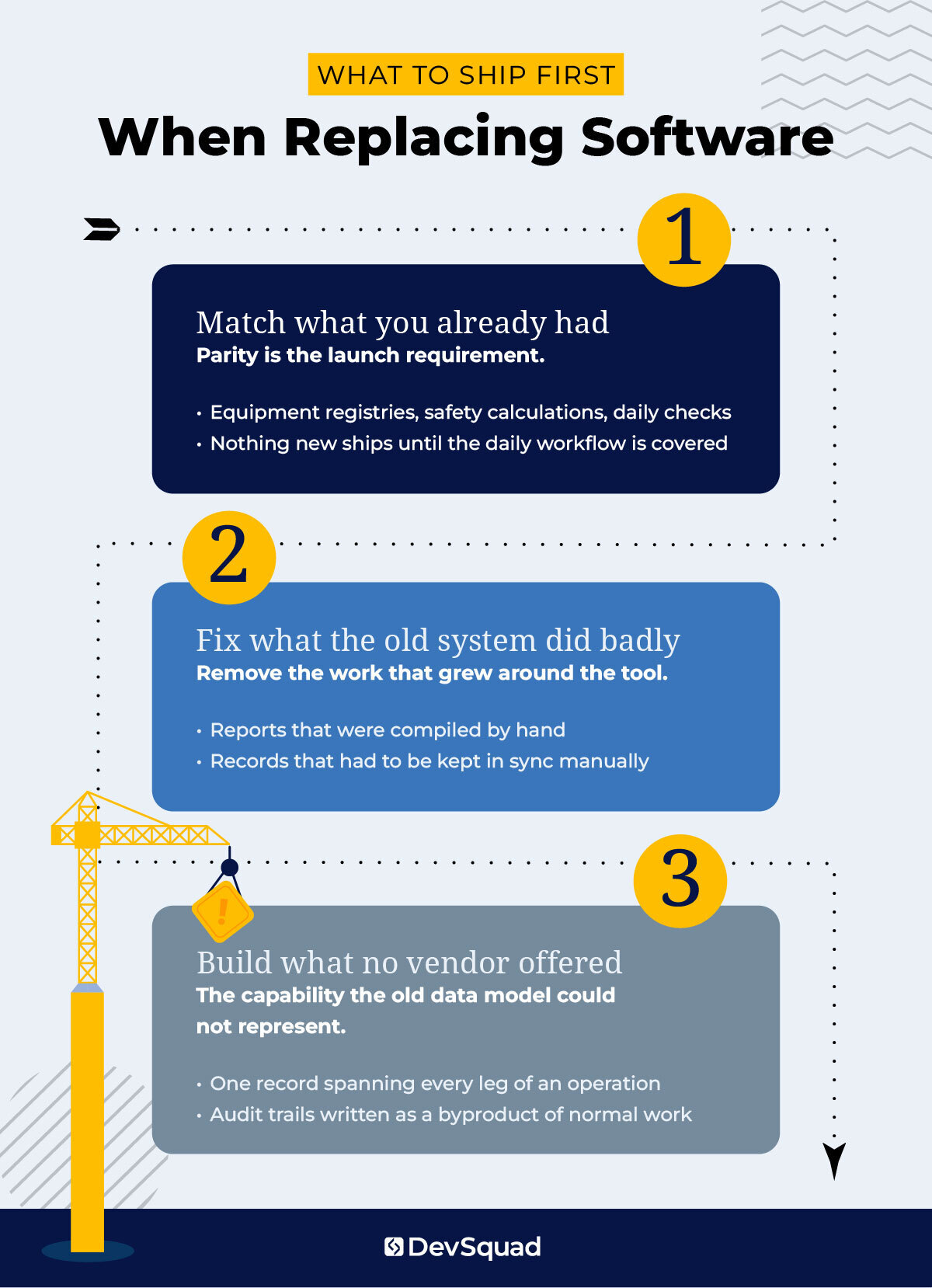 Parity first, then everything you actually wanted
The first release has to do what the old tool already did. All of it.
That sounds obvious and almost nobody sequences it that way, because parity work feels like paying to rebuild what you have. Launch with exciting new capability and a gap in the daily workflow, and the capability will not save you. The gap is what your team talks about.
The aviation platform was built this way deliberately. Parity came first: aircraft registries, weight and balance limits, hover performance, pre-flight checks, flight logs. The genuinely new capability arrived only once it was live.
Budget the parity work as real work.
When a team plans a single cutover weekend for a system forty people depend on, I already know what that Monday looks like. Run both systems and pay for both for a while. That parallel cost is the cheapest insurance in the project.
Start with the tool that costs the most and gets used the least
Rank every tool by annual cost divided by weekly active users. Take the top three. Run them through the six criteria above.
Most will fail, and that is the point. You are looking for the one or two that pass, not building a case for replacing everything.
For those, the first conversation is about what is broken in how the business runs today. Not a finished specification. A partner worth talking to does not expect you to arrive with the answer already worked out. Our reviews include clients sharing their experience of collaborating with us to come up with custom solutions.
Build vs buy FAQs
Rank every tool by annual cost divided by weekly active users, then score the top three against the six criteria above. Your strongest candidate is a tool you barely use, running a process specific to how you compete. No vendor liability, and someone willing to own the replacement. Deciding whether to build or buy software across a whole stack at once produces paralysis. One tool produces a decision.
Look at what the workaround involves. If someone re-types the same record into two systems, the vendor's data model cannot represent your business. Integration will not fix that. If each tool works and only the handoffs between them break, connect them. Knowing when to build custom software starts with telling those two situations apart.
Plan for months, not weeks, and budget for paying both bills throughout. The parallel run buys your ability to roll back, and any model that leaves it out produces a payback number that is wrong. Cut over one team first rather than everyone at once, and keep the old contract alive through at least one full renewal cycle.
Usually more history than expected, and almost always the undocumented rules. Approval thresholds, routing logic, and status definitions live inside the vendor's schema and do not appear in an export. Request a full export while you are still a paying customer, and check what comes back. Whatever is missing becomes rediscovery work during the build.
DevSquad builds highly customized and efficient platforms for blue-collar businesses. Learn more about custom software development services.

Rafael Lunardelli is the CTO at DevSquad and founder of Pinguim Academy. With nearly two decades in software development, he specializes in scalable systems, DevOps, QA, and modern PHP development. Rafael has led enterprise projects at KPMG and now teaches thousands of developers through his Laravel-focused courses, conference talks, and online content.