
Over the last few years, AI has accelerated software development. Developers can now move faster, automate repetitive work, and tackle complexity with more precision. This shift has opened the door to faster, more efficient custom software modernization, something that used to feel slow, expensive, and risky.
For companies still running legacy or outdated software, the opportunity is even greater.
When internal systems are cobbled together with aging code and patchwork solutions, they slow down workflows and block innovation. That's why modernizing isn't just about keeping up with the tech industry. It's a critical part of digital transformation.
I watch a lot of SaaS companies try to position themselves against faster-moving competitors. The ones running modern, API-ready infrastructure can bolt on the next feature in weeks. Pair that speed with a decent strategy, and it's usually enough to beat a competitor stuck on a six-month turnaround.
By modernizing your custom software, you position your company to:
Adapt faster to market changes
Improve security and performance
Enhance the user experience
And reduce the long-term cost of ownership
In this guide, we'll break down everything you need to know about custom software modernization. That includes identifying the right time to modernize, choosing between rehosting, refactoring, and rebuilding, and building a long-term strategy that supports growth. We'll also walk through two real DevSquad modernization projects. And if you're still not sure where your own systems stand, we'll point you to a free resource for that too.
What is custom software modernization?
Custom software modernization is the process of updating and transforming outdated, business-specific applications to align with today's technologies, infrastructure, and user expectations. This could mean moving from an on-premise environment to the cloud, rewriting legacy code using modern frameworks, or redesigning a product for better usability.
Unlike off-the-shelf software, custom applications are uniquely built to match an organization's workflows. As a result, they're deeply embedded in daily operations, and over time, they often become harder to maintain, integrate, or scale. Eventually, the cost of maintaining legacy code and outdated architecture outweighs the cost of modernization.
Modernizing your custom software goes far beyond a visual refresh. It's an opportunity to rethink how the software supports business goals, how users interact with it, and how easily it can evolve with the company's needs. Done right, software modernization reduces risk, boosts performance, and unlocks new opportunities for innovation.
Is there a difference between custom software modernization and legacy system modernization?
While these terms are often used interchangeably, they don't mean exactly the same thing.
Legacy system modernization refers broadly to updating outdated systems, whether off-the-shelf or custom-built, to improve performance, security, and maintainability.
Custom software modernization, on the other hand, refers specifically to updating proprietary systems that have been uniquely built for a business.
This distinction matters because custom software often contains specific logic, workflows, and integrations that can't be easily replaced with out-of-the-box alternatives. That makes modernization more complex, and more valuable when done right.
For example, a legacy system might be replaced entirely with a modern SaaS product. But custom software modernization often requires preserving critical business logic while transforming the underlying architecture, codebase, or user interface. This can include:
Refactoring legacy code to improve maintainability
Migrating from monolithic architecture to microservices
Transitioning from outdated tech stacks to modern frameworks
Redesigning the UI/UX for current usability standards
The goal in modernizing legacy software is to make it more adaptable, scalable, and aligned with current business needs.
Rehost, refactor, or rebuild: choosing your modernization path
Once you've decided your custom software needs attention, the next question is how much to change. Not every modernization project needs the same level of intervention. Picking the wrong level either wastes budget on unnecessary work or leaves the real problem untouched.
Rehosting
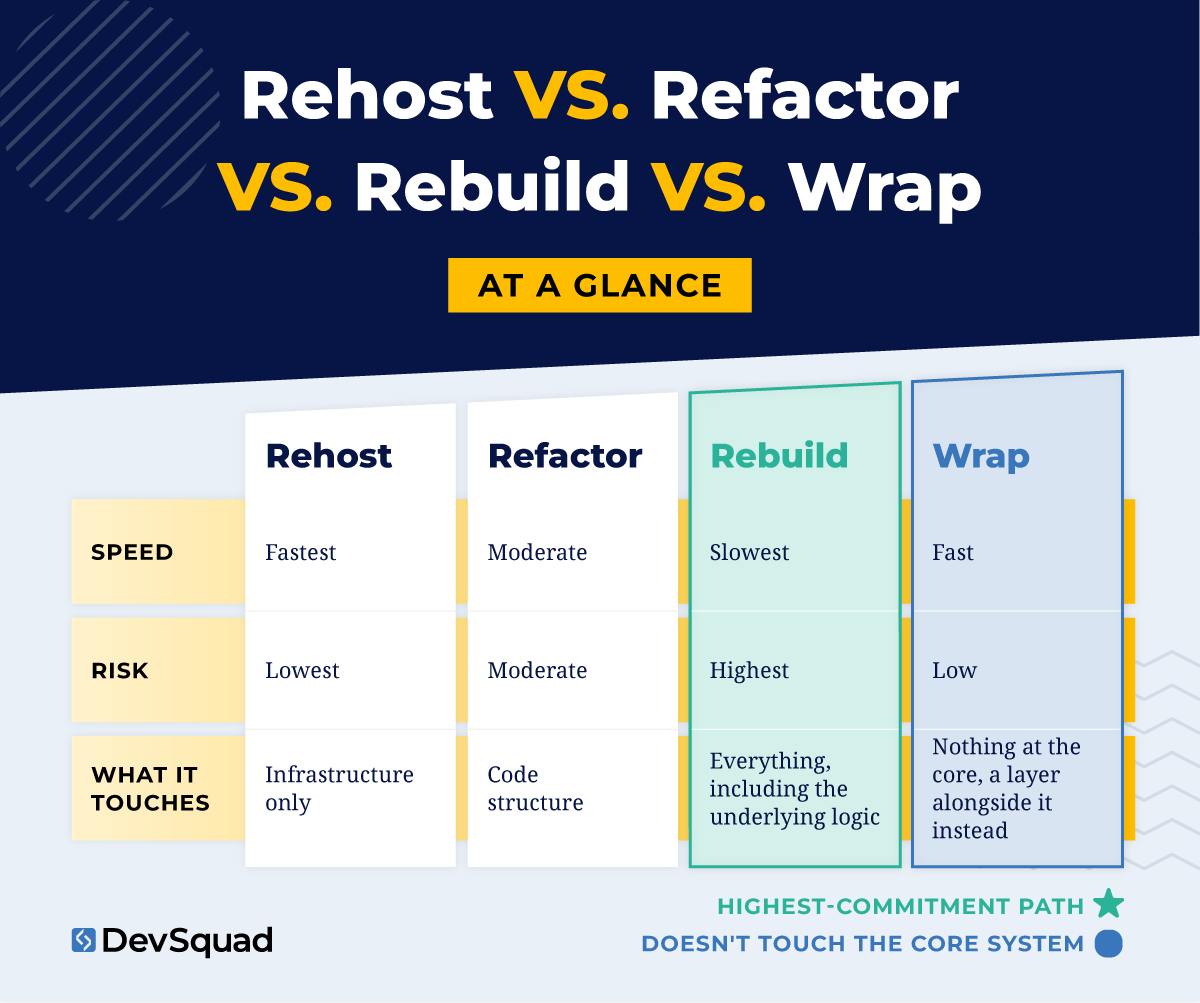
Rehosting means moving your system to modern infrastructure with minimal changes to the code itself, a lift-and-shift.
What this covers:
Aging or overpriced servers and hosting
Infrastructure that can't scale even though the code still works
Getting off unsupported or soon-to-be-deprecated platforms fast
What this doesn't cover:
Buggy or hard-to-extend code, which moves with you, untouched
A system whose logic no longer fits how the business runs
It's the fastest and lowest-risk of the four paths, but it only fixes what's underneath the code, not the code itself.
Refactoring
Refactoring means restructuring the existing code without changing what it does.
What this covers:
Code that's become hard to maintain, extend, or trust
Preserving institutional knowledge baked into years of edge-case handling
Improving structure while keeping the business logic exactly as it is
What this doesn't cover:
A system whose underlying logic no longer matches the business
Infrastructure problems that live below the code layer
Refactoring is the middle path, and it's often underrated because it protects business logic nobody wrote down anywhere else.
Rebuilding
Rebuilding means starting over with modern architecture.
What this covers:
Software built around a process, market, or model the business has since outgrown
Logic that no longer reflects how the company actually operates today
Cases where refactoring would mean preserving something that shouldn't be preserved
What this doesn't cover:
Quick wins. This is the highest-cost, highest-risk path of the four
Situations where the core logic is still sound, which is refactoring's job, not rebuilding's
It's the only real option when the gap between the software and the business itself is the actual problem.
Rebuilds also carry a second problem that rarely appears in the estimate, which is moving every existing user across to the new system. Our guide to custom education software development walks through a rewrite where roughly 50,000 users moved in a single cutover with no fallback.
Wrapping
Wrapping means building a lightweight layer alongside your existing systems instead of touching their cores.
What this covers:
One narrow, painful workflow inside a system that's otherwise working
Multiple systems that each work fine on their own but don't talk to each other
Cases where the core carries something you can't afford to lose, a compliance certification, a vendor relationship, years of earned trust
What this doesn't cover:
Systemic problems inside a single system's own code or logic
Situations where the "one painful thing" keeps multiplying into several, at that point you're patching around a core problem, not wrapping it
Wrapping is the path most guides skip entirely, but it's often the fastest route to real relief without the risk of the other three.
Making the call
Here's what these four paths look like outside the abstract.
A company running its core billing logic on a decade-old system, but paying too much for the aging servers, is a rehost candidate. The logic still works; the hosting bill doesn't.
A company whose code has turned into a tangle nobody fully understands, but whose business rules are still exactly right, is a refactor candidate.
A company whose software was built around a sales process the business abandoned two years ago is a rebuild candidate. No amount of code cleanup fixes a system solving the wrong problem.
And a company that's happy with its core platform but dreads the one manual workaround bolted onto the side of it is a wrap candidate.
Getting started on any of these four paths is its own hurdle, separate from picking the right one.
"The biggest hurdle is having the patience to get that first start going. Once you push past that first barrier, everything gets smoother, and the features start delivering real value." — Rafael Lunardelli, CTO, DevSquad
One gut check applies no matter which path you're leaning toward. If you can't name the specific person who will own this system in a year, that's a sign to slow down and reconsider scope. That's true regardless of which path looks technically right on paper.
When you should consider modernizing your custom software
Not every legacy system needs to be replaced right away, and depending on your business integrating your legacy system may be the way to go. The idea here though is that if your software is holding you back instead of moving you forward, it's time to take a closer look. Here are the most common signs that it's time to modernize.
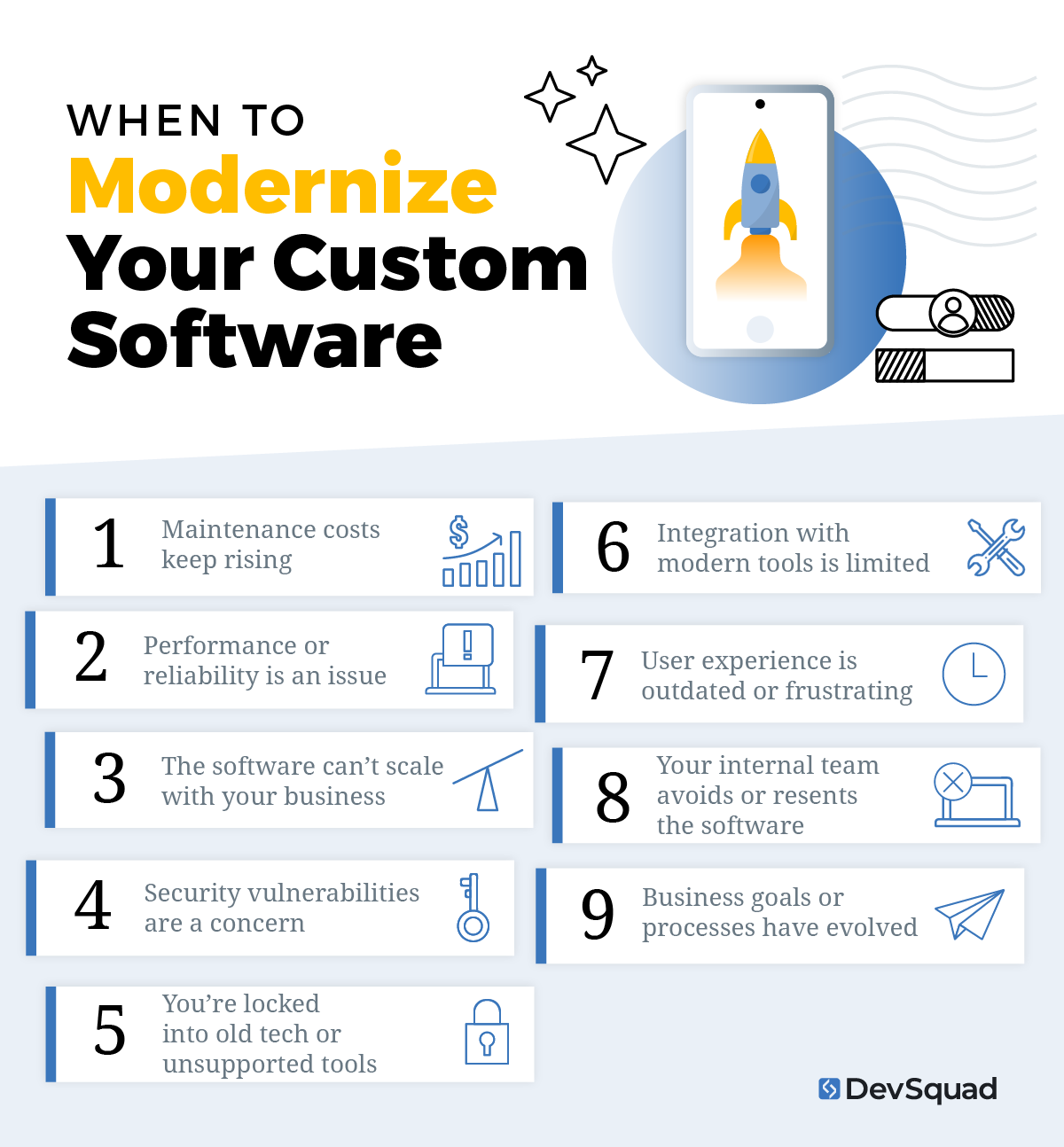
1. Maintenance costs keep rising
If more of your budget is going toward bug fixes, security patches, and temporary workarounds, you're not just maintaining your software, you're investing in a liability. Be aware of the costs of maintaining legacy systems so you can see the signs that it's time to modernize. Think of modernization as a shift from reactive maintenance to proactive development that drives value.
2. Performance or reliability is an issue
Slow systems, crashing applications, and frequent outages are productivity killers. If your software can't consistently support daily operations without interruptions, it's not reliable enough for your team or your customers. Modern architecture and clean code can dramatically improve performance.
3. The software can't scale with your business
Custom software should support your growth, not block it. If you're adding more users, expanding to new locations, or launching new features, and the system can't keep up, it's time to modernize. Modern platforms are built for flexibility, scalability, and speed, helping you move without constraints.
4. Security vulnerabilities are a concern
Older systems often rely on outdated frameworks, deprecated libraries, and unsupported platforms. All of which are prime targets for cyberattacks. If security updates are no longer available or hard to implement, modernization becomes a necessity to protect data and maintain compliance.
5. You're locked into old tech or unsupported tools
If your application is built on obsolete technologies, or if you're stuck with vendors or tools that are no longer supported, you're putting your entire operation at risk. Obsolete software modernization helps future-proof your systems and gives your team access to a wider talent pool for development and support.
6. Integration with modern tools is limited
Disconnected systems, manual workarounds, and siloed data make it harder to operate efficiently. If your software can't integrate with modern platforms, like CRMs, ERPs, or analytics tools, you're missing out on automation, visibility, and speed. Modernization opens the door to better workflows and smarter operations.
7. User experience is outdated or frustrating
Outdated user interfaces slow down workflows, frustrate employees, and reduce adoption. Today's users expect clean, fast, and intuitive experiences. As part of a custom software modernization project, redesigning the front end improves productivity and makes your system easier to use across teams.
8. Your internal team avoids or resents the software
If employees avoid using the system, or constantly complain about how hard it is to navigate, that's a clear warning sign and one of the biggest reasons you should replace that legacy software ASAP. When your team resorts to spreadsheets or workarounds, you're not getting the value you paid for. Legacy software modernization helps rebuild trust in your tools by making them easier and more enjoyable to use.
9. Business goals or processes have evolved
Even well-built software can become a mismatch over time. If your business model has changed, your customer needs have shifted, or your internal processes have been restructured, your old system may no longer be the right fit. Custom internal software development should adapt to your strategy, not the other way around.
The benefits of custom software modernization
Think of modernizing your custom software as a business strategy. Here are the tangible benefits companies gain when they move forward with a thoughtful, well-executed modernization effort:
Lower operational and maintenance costs by replacing expensive patchwork solutions with streamlined architecture
Improved performance and reliability through faster load times, fewer crashes, and modern infrastructure
Stronger security thanks to updated frameworks, supported libraries, and compliance-ready systems
Better user experience (UX) that reduces friction, increases adoption, and enhances team productivity
Scalability for future growth with flexible, modular architecture that supports business expansion
Faster time to market for new features and updates, supported by cleaner code and modern dev workflows
Easier integration with modern APIs, tools, and cloud platforms—opening the door to automation and smarter workflows
Increased system stability through code refactoring and infrastructure upgrades
Access to modern development talent familiar with current frameworks and best practices
Improved decision-making by eliminating data silos and enabling better reporting and analytics
More efficient internal processes through improved workflows and reduced manual effort
Competitive advantage by removing technical roadblocks and positioning your product or operations for faster innovation
Enhanced team morale when users no longer have to fight with outdated tools or slow systems
Alignment with business strategy by retooling software to support your current and future objectives instead of past ones
Real DevSquad modernization case studies
Frameworks are useful, but seeing how they play out on a real system is more useful. Here are two real, named DevSquad modernization projects, what the starting problem was, and what changed. Neither one started with a clean, textbook decision already made.
US Ski and Snowboard Team: connecting a fragmented system
The US Ski and Snowboard Team supports 450 sports clubs across the country and more than 30,000 members. Their membership application wasn't integrated with their core systems. That created real risk to athlete and member data, alongside constant manual reconciliation work. DevSquad worked with the organization to connect their e-commerce, membership application, and other operational systems, building a custom API to tie it all together.
The result was a fully integrated operational system that saved hundreds of hours a month. It also opened up a new revenue channel through e-commerce that the fragmented system had never supported.
This is a clean example of wrapping: the individual systems mostly worked on their own, but nothing talked to anything else. Rehosting wouldn't have fixed that. Neither would refactoring any single system in isolation, or rebuilding one from scratch. The fix was a connective layer alongside all three, exactly the kind of move wrapping is for.
MMToolParts.com: rebuilding a 75-year-old business's ecommerce backbone
MMToolParts.com is a family business with more than 75 years serving the woodworking, construction, and power tool community. As the company's online presence grew, its aging ecommerce platform became a real blocker. More than 500,000 products and thousands of diagrams, plus significant organic traffic, were running on a system that was fragile and hard to manage. The marketing team had almost no visibility into user behavior.
DevSquad rebuilt the entire ecommerce experience from the ground up, migrating the full product catalog, customer data, and order history to a modern, scalable architecture. The team also added business intelligence tools the marketing team had never had access to before.
The result was higher conversions, better product page performance, and a marketing team that could finally see what was actually working.
This one was closer to a true rebuild. The scale and age of the platform meant refactoring around the edges wouldn't have solved the underlying visibility problem. Starting over with modern architecture was what actually moved the numbers.
"For custom internal software, the fastest path to value is often replacing what the business is already using today, whether that's an outdated system, manual spreadsheets, or expensive subscriptions. Replace first, improve second, innovate third." — Mauricio Kiyama, VP of Product, DevSquad
Two different systems, two different starting problems, and two different points on the framework above. That's usually how it goes. The right path depends on what's actually broken, not on which one sounds the most thorough. Neither of these projects started with a company already certain which path it needed. Both started with a real conversation about what was actually costing them time and money. That's the same starting point the framework above is meant to help you find on your own.
13 best platforms for custom software modernization
Modernizing custom software requires rethinking the entire architecture. You’ve got to consider the backend, frontend, infrastructure, and database layers of a custom system. These tools support better scalability, performance, security, and developer productivity.
Backend frameworks
Modern backend frameworks make it easier to build scalable, secure, and maintainable applications. These platforms support rapid development, clean architecture, and seamless integration with modern tools.
Laravel: A developer-favorite PHP framework known for its elegance and productivity. It includes built-in support for routing, authentication, and database management—making it ideal for custom applications that need to scale quickly without adding unnecessary complexity.
Node.js: A runtime that lets you build server-side applications using JavaScript. It’s fast, event-driven, and perfect for real-time apps like chat tools, streaming services, or collaboration platforms.
Django: A high-level Python framework with a strong focus on security and rapid development. Django is great for teams that prioritize clean code, clear structure, and scalability.
Spring Boot: For teams working in Java, Spring Boot brings modularity and simplicity to large, enterprise-level systems. It's often used when modernizing monolithic applications in regulated or complex environments.
Frontend frameworks
Modernizing the user experience means moving away from clunky, server-rendered pages toward fast, interactive, component-based interfaces. These frameworks allow teams to build responsive and intuitive UIs that today’s users expect.
Vue.js: A lightweight and flexible JavaScript framework that’s easy to integrate into legacy applications. Vue is especially useful when you want to gradually improve your frontend without a complete rewrite.
React: One of the most widely used frontend libraries, maintained by Meta. React allows you to build fast, component-based user interfaces and is ideal for single-page applications and high-interaction dashboards.
Angular: A full-featured frontend framework maintained by Google. Angular provides more structure out of the box, making it a strong choice for large-scale applications that need consistency and robust tooling.
Cloud platforms
Most modern applications benefit from cloud infrastructure, which improves scalability, security, and reliability. These cloud platforms offer a range of services that support custom software modernization, from storage and hosting to deployment and automation.
Amazon Web Services (AWS): The most mature and widely used cloud provider, AWS offers everything from virtual machines to fully serverless architecture. It's a top choice for custom systems that need flexibility and global scalability.
Microsoft Azure: Ideal for organizations that already rely on Microsoft products or operate in compliance-heavy industries. Azure integrates well with Windows-based environments and supports hybrid cloud models.
Google Cloud Platform (GCP): Known for powerful AI and machine learning tools, GCP is a good fit for data-driven applications or teams already working with containerized architectures like Kubernetes.
Databases
Custom applications often rely on outdated, rigid databases that make scaling and adapting difficult. Modern databases offer better performance, flexibility, and integration with other tools in your stack.
PostgreSQL: A powerful, open-source relational database with strong support for advanced data types and transactions. It's reliable and scalable, and works well for both small systems and enterprise applications.
MongoDB: A document-oriented NoSQL database that provides flexibility for handling semi-structured or unstructured data. It’s a solid choice when your data model needs to evolve quickly over time.
Firebase: A real-time database by Google that syncs data across users instantly. Ideal for applications that require live updates, such as messaging platforms or collaborative tools.
6 steps for a successful custom software modernization
Modernizing custom software requires a structured, strategic process that blends business needs, user experience, and technical improvements. These are the key steps to getting it right:
1. Discovery and strategy alignment
The first step is clarifying the purpose of modernization. This includes interviewing stakeholders, identifying pain points in the current system, and aligning on business objectives. It’s not just about what the software does, but also what it needs to enable in the future.
Key goals:
Define what’s broken or outdated
Identify gaps between business processes and software
Outline success criteria
2. Deep technical audit
Next comes a thorough review of the legacy application. This includes analyzing the codebase, architecture, infrastructure, and integrations to assess the feasibility and scope of modernization.
Focus areas:
Outdated frameworks or dependencies
Security risks and compliance gaps
Data structure and accessibility
Performance and scalability limitations
3. Prototype and validate the vision
Instead of guessing, build a clickable prototype based on reimagined user flows and functionality. This allows for early feedback before investing in full development. It also validates that the new direction will actually improve usability and meet strategic goals.
Why it matters:
Saves time by identifying flaws early
Clarifies the intended user experience
Creates alignment across technical and non-technical stakeholders
4. Build a modernization roadmap
With clarity on the goals and technical approach, a structured roadmap is developed. This guides the sequence of changes and avoids overwhelming the organization or users.
What’s included:
“Now, Next, Later” breakdown of priorities
Technical milestones (e.g. decoupling services, migrating databases)
UX and UI improvements tied to business impact
5. Execute in agile sprints
Modernization happens in phases. Agile development allows the team to work in short, iterative cycles, continuously delivering updates and validating progress.
Benefits of this approach:
Faster delivery of usable features
Ongoing user feedback
Reduced risk compared to big-bang rewrites
6. Continuous delivery and improvement
Even after a major release or milestone, modernization is not a one-and-done effort. Systems need to evolve alongside the business. Post-launch work focuses on performance, usability, feature expansion, and roadmap refinement.
What this includes:
Fixes and enhancements based on real usage
Continued codebase cleanup or refactoring
Monitoring performance and usage patterns
Incorporating stakeholder and user feedback
The importance of finding the right modernization partner
Modernizing custom software is high-stakes work. It touches critical business logic, long-standing workflows, and potentially your core operations. That’s why choosing the agency for modernizing custom software is critical.
Modernization is rarely a straight line. It involves moving parts, overlapping phases, competing priorities, and unexpected challenges. You need a team that brings more than just engineering skills, you need strategic thinking, product discipline, and experience working with legacy systems at scale.
Here’s what to look for in a legacy software modernization services partner:
Strategic guidance, not just execution: The right partner won’t jump straight into development. They’ll start with deep discovery and help align the modernization effort with your business objectives.
Experience with legacy software: Rebuilding custom applications requires a lot more than technical talent. It requires judgment, context awareness, and the ability to deal with incomplete documentation or outdated infrastructure.
UX and product thinking: Modernization shouldn’t just replicate old software on a new stack. A strong partner will reimagine the user experience and streamline workflows to match how the business operates today.
Agile execution and validation: Projects best succeed when they’re delivered iteratively. Your partner should offer structured sprints, continuous feedback loops, and regular stakeholder demos, not a black box of development.
Customization over cookie-cutter: Every modernization effort is unique. A valuable partner will adjust their approach based on your systems, goals, and internal capacity instead of pushing you through a one-size-fits-all process.
Transparency and ownership: From roadmap planning to sprint demos, your team should have full visibility into the process, and complete ownership of the software.
Long-term mindset: The right partner helps you shift from putting out fires to building systems that propel the business forward. This includes reducing the cost of ownership, improving maintainability, and setting the stage for future growth.
Custom software modernization FAQs
Buying new software means replacing what you have with an off-the-shelf product built for a general market. Custom software modernization means updating or rebuilding software that was built specifically for your business. It preserves the workflows and logic that make it yours while fixing what's actually broken. The two aren't mutually exclusive. Sometimes modernizing means recognizing that a piece of your custom system should be replaced with a SaaS tool instead of maintained in-house. Sometimes it means the opposite. It's recognizing that the off-the-shelf tool you're stretching to fit your workflow should actually be replaced with something built around how you work.
It depends on what's actually broken. If your infrastructure is the bottleneck and the code itself still works, rehosting is usually enough. If the code has become hard to maintain but the underlying logic still fits your business, refactoring is the better fit. If the logic itself no longer matches how you operate today, rebuilding is typically the only path that actually solves the problem. And if the system carries something you can't afford to lose, but only one part of it causes pain, wrapping is usually the fastest option. It gets you relief on that one workflow without touching anything else. See the full breakdown above, including concrete examples of each, for a closer look at where your own situation fits.
It depends heavily on which path fits your situation. A rehosting project can move in weeks, since the code itself isn't changing. A refactor typically takes longer, since it involves restructuring code without breaking existing functionality. A full rebuild is the longest of the three. It follows an arc similar to the six-step process outlined earlier in this guide: discovery and technical audit, prototyping, roadmap planning, and iterative execution.
Yes. The US Ski and Snowboard Team and MMToolParts.com case studies above are two real, named examples. One is an integration project connecting fragmented systems; the other is a full ecommerce rebuild for a 75-year-old business. Neither started as a rebuild by default. Both came out of a real conversation about what was actually broken. For more examples across other industries, see our full software modernization guide.
Ready to modernize your custom software? Learn more about DevSquad’s custom software solutions.

Dayana Mayfield is a SaaS copywriter and content marketer specializing in SaaS marketing, positioning, and go-to-market strategy. She has consulted for over 195 SaaS companies, focusing on both traffic and conversions. She has been featured in Entrepreneur, Forbes, and Business Insider. Outside of work, Dayana writes SciFi novels and spends her evenings surviving auditions, rehearsals, and tech week as a proud theater mom.