
You have two quotes on your desk for the same SaaS idea. One says $50,000. The other says $250,000. Both agencies sounded sharp on the call, but the numbers are worlds apart.
So which one is the better answer?
Probably neither. They're pricing very different things, making it difficult to compare them. That's why SaaS development cost feels impossible to pin down. You search for an answer and get feature ladders, hourly rate tables, and wide ranges.
This guide gives you something simpler: one line of math you can check any quote against.
You'll see what each stage of a build costs and what quietly adds months. You'll see what AI really changes and what happens to your spend after launch.
Across the 100-plus products I've helped launch, the founders who overspent typically chose the wrong agency, who in turn promised a too-large scope.
SaaS development cost, in one line of math
How much does it cost to build a SaaS? Less guesswork than you think, once you see the formula.
Your build cost is your monthly team cost times the months it takes to reach a version you can sell. Then you add run costs on top. Every section below explains one of those numbers. Learn to spot them in a quote, and you can compare any two agencies in minutes.
Here are ours. At DevSquad, a build squad costs $16K, $20K, or $40K a month. The difference is how many developers you need and how senior they are. Every tier includes a technical product manager, tech lead, QA, UX/UI design, and an AI coding assistant. Discovery comes first and is priced separately: Rapid Prototyping costs $5,000 a week. First versions take 3 to 9 months.
What does that look like in practice? A typical squad working for 6 months comes to $96K to $120K in build cost.
Now look at which number moves. Once your team size is set, the monthly rate barely changes. The month count is the variable you control. Cut two months of scope and you cut two months of cost. Add a nice-to-have feature, and the meter keeps running. That's why the rest of this guide is about months, not features. For the full picture of how we run SaaS development, start there.
3 most popular SaaS development pricing models
You lined up three quotes, and the gap made no sense. Here's the reason: each one used a different pricing unit, so each one counted something different. (The same thing happens with internal tools. Our breakdown of custom software development costs covers that side.)
1. Fixed-bid ladders price a feature list
A fixed bid feels safe. One number, one scope, done. You can take it to your board without caveats.
But the vendor priced a feature list it imagined from your pitch. Anything it missed becomes a change order, and change orders are where fixed bids get expensive. A low bid can simply mean a shorter list. Before you sign, ask what the bid assumes about integrations, subscription billing, and admin tools. If the answers are vague, your price is too.
2. Hourly quotes price time, not outcomes
A $40 hourly rate looks like a bargain next to $100. Then you count the hours. A slower or less senior team needs more of them, and you pay for every one.
You also inherit the management job. Someone has to own the backlog, check the work, and decide what ships. If that someone is you, add your own time to the bill. Your hours aren't free, even if they never show up on an invoice.
3. Month-to-month based on team size
This is how we handle pricing at DevSquad. You pay one fixed fee per month for a dedicated product team, so your total depends on months, not hours. The budgeting benefit is immediate: you know your burn rate on day one. Terms are month to month, with no long-term contract.
Our tiers differ in one way only: the developers. Basic has 2 mid-level developers. Standard has 1 senior and 1 mid-level. Pro has 2 senior and 2 mid-level. Your product manager, tech lead, QA, and UX/UI design stay the same in every tier. Need a different mix? You can build a custom squad from per-role rates, like $8,000 a month for a mid-level developer or $12,000 for a senior.
What each stage of a SaaS build costs
You're not buying one project. You're buying four stages: discovery, a first version, life after launch, and scale. Each has a different cost shape, and each ends with a decision. Make those decisions on purpose, and you control what you spend.
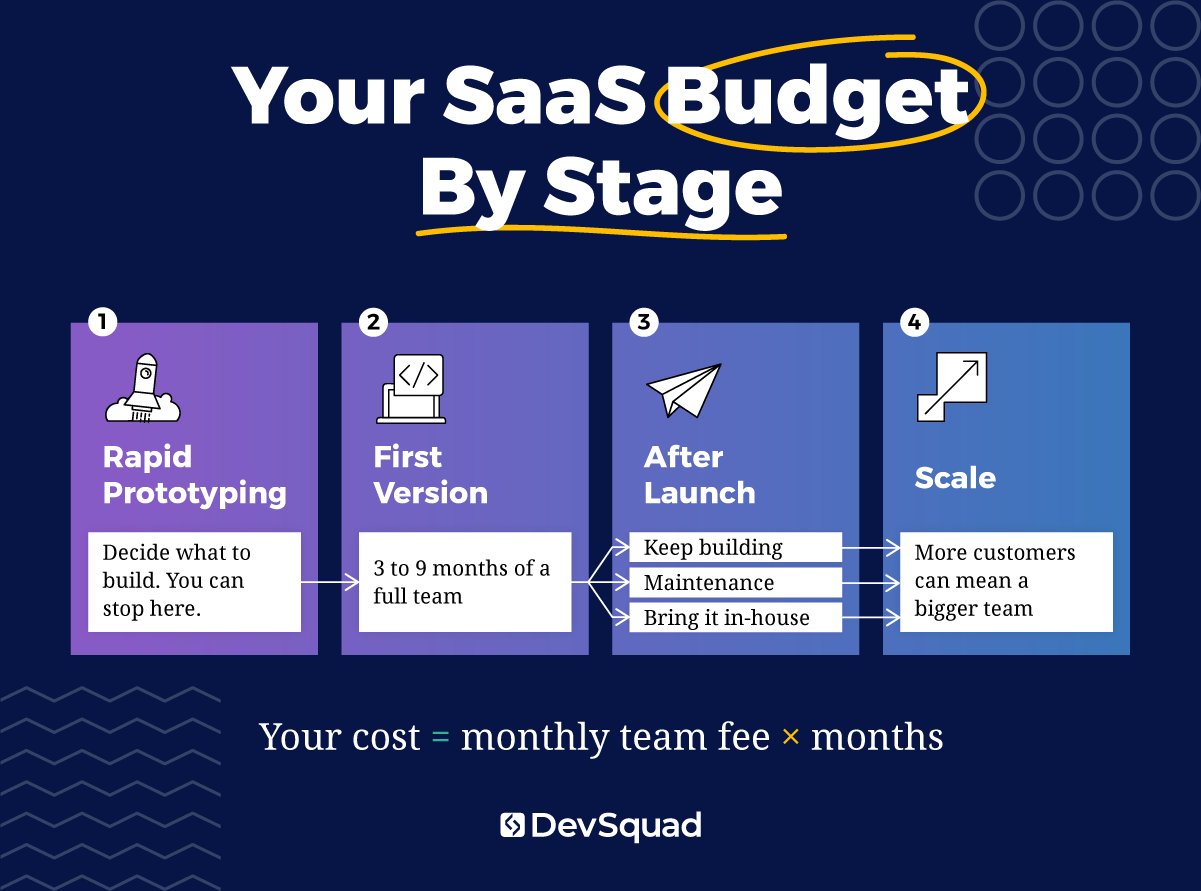
Discovery: the cheapest place to cut cost
Discovery decides how many months you'll pay for later. That makes it the highest-leverage stretch of the whole build.
DevSquad starts every new product with Rapid Prototyping. It costs $5,000 a week, and its duration depends on complexity. Your team is a solutions architect, technical product manager, and tech lead. Together, you produce four things: a problem and user definition, a clickable prototype, a technical architecture, and a prioritized roadmap.
You can also stop right there. If target users don't want the product, you find out before you fund a build. That's the cheapest "no" you will ever get. And if they do want it, you start the build with a roadmap instead of a wish list.
MVP development cost: 3 to 9 months of a full team
Your MVP development cost is mostly a question of months. At DevSquad, a first version takes 3 to 9 months, depending on complexity, integrations, and scope. Our MVP development process is built around keeping that number small.
We’ve built two SaaS products that really demonstrate the range:
Drivably had spent nine months and hundreds of thousands of dollars building internally, with nothing launched. After a two-day design sprint, DevSquad rebuilt the product and shipped a true MVP in 45 days.
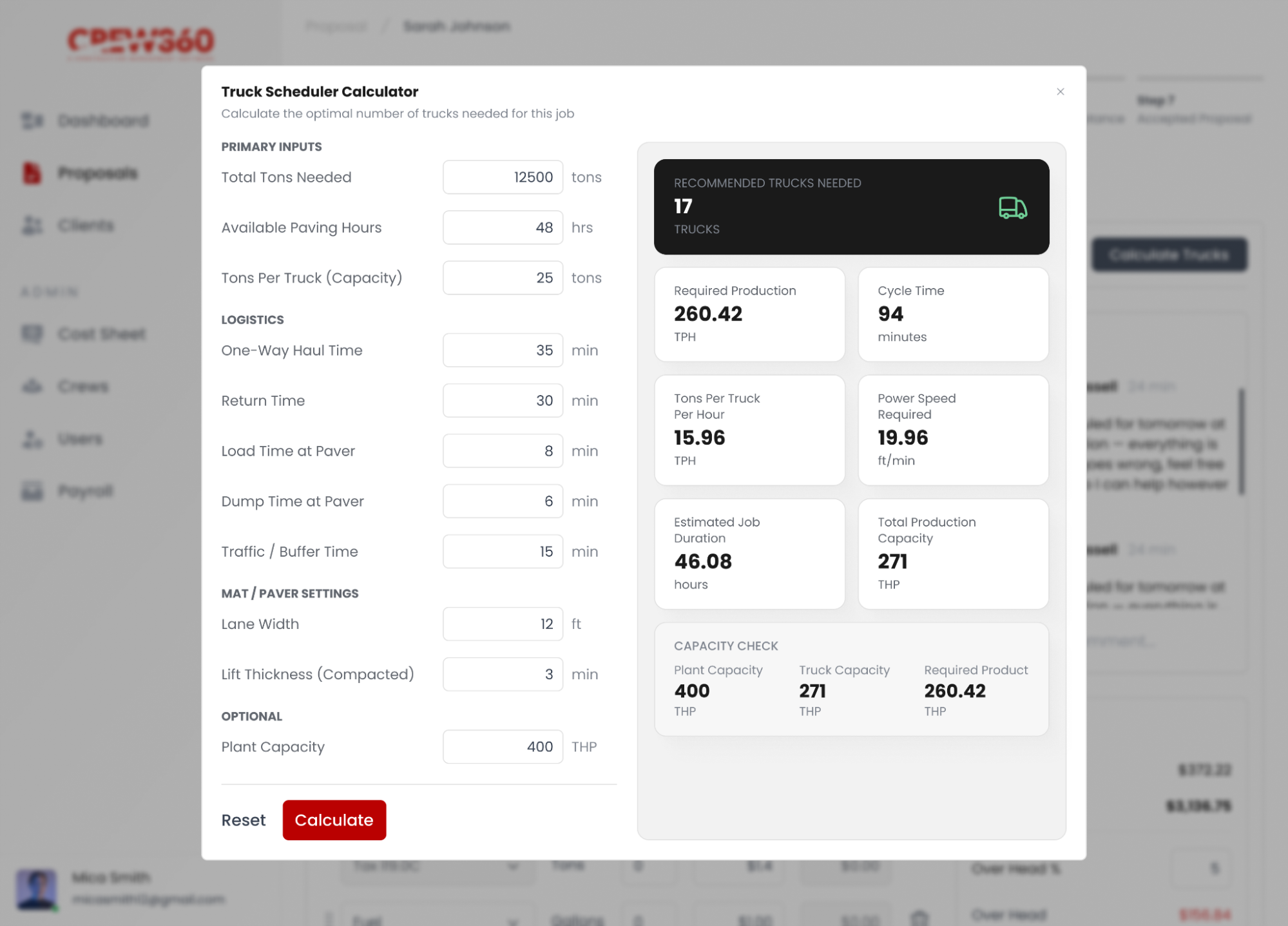
Crew 360 started in May 2025. The first working version was in the team's hands in under three months. It began as an internal tool for Tarheel Paving and is now being productized as SaaS. Below, you can see what the paving truck scheduler calculator looks like.
Neither timeline came from a cheaper rate. Both came from a small scope, decided before the first sprint. Still deciding what belongs in yours? Our guide to the SaaS MVP walks through it.
After launch: keep building or drop to maintenance
Launch day changes your cost question. You don't have to pay a full team forever. You have three paths:
Keep a full team building the roadmap.
Downgrade to a maintenance-level engagement.
Bring development in-house.
DevSquad supports all three, and month-to-month terms let you downgrade or cancel. BoosterHub took the third path. A strategic V1 launched in 6 months. Two years after Robin's first meeting with DevSquad, the product had 10,000 users, and development moved in-house with our help.
On a budget, maintenance works like a dial. Run lean for a few months, then turn development back up when the next priority is clear.
"This client spends part of each year in development and part in maintenance, and the reason is not only budget. The product cannot break. So we do not ship every day. Some software should be changed slowly on purpose." — Caio Alves, Product Manager, DevSquad
Scale: when customers change the team math
Here's the cost you probably haven't planned for: success. After product-market fit, your spend can climb again.
"More customers means more bugs, and that changes the math on team size. With a handful of tenants an owner can absorb it himself. Past that you either stop building new things while you work through what everyone is finding, or you grow the team. That decision arrives sooner than most founders expect." — Antônio Salla, Product Manager, DevSquad
So plan for a step-up in year two. That might mean moving from Standard to Pro, or adding one developer to a custom squad. If your budget assumes your launch team forever, it breaks the month your customer count takes off. Better to plan the step-up and skip it than to scramble for it.
What actually adds months to your build
Months drive your cost. So what adds them? Rarely the thing you'd guess. As covered in the discovery section, your first defense is deciding scope early. Here's what you're defending against.
Business rules, not screen count
Count your screens, and you'll underestimate your build.
"People assume the complicated builds are the ones with the most screens. The hardest project I have run had fewer modules than most and far more rules. Complexity in custom software usually comes from how strict a business is, not how big it is." — Antônio Salla, Product Manager, DevSquad
Before you ask for a quote, write down your hardest rules. Think approvals, compliance checks, and calculations that must be exact. Hand that list to every agency you talk to. The ones who come back with questions are the ones estimating honestly.
Integrations and subscription billing
Two time sinks are specific to SaaS, and both hide well in a feature list.
Every integration with an outside system brings its own testing and its own edge cases. Subscription billing has to handle trials, upgrades, downgrades, and failed payments. Nobody demos those flows in a sales call. Your customers will hit every one of them. Ask each agency exactly how it plans to handle both. Then ask how many weeks each one adds to the estimate. A clear answer means they've built these before. A shrug means you'll find out later, on your invoice.
Features you could have cut
The cheapest feature is the one you leave out of version one. At DevSquad, we're ruthless about cutting features that haven't earned their place.
The cheapest month of a build is the one you never need. Every feature I talk a founder out of for version one saves weeks of a full team, not a line on an invoice.
Try this before your next scoping call. List every feature you want. Then mark the ones a customer would pay for on day one. Everything else waits for real usage data.
How AI changes SaaS development cost in 2026
You keep hearing that AI makes software almost free to build. Maybe a vendor told you so last week. The evidence is messier.
In a randomized controlled trial, experienced open-source developers took 19% longer to finish tasks when allowed to use early-2025 AI tools (METR, 2025).
That study covered 16 developers working in large, mature codebases they knew well. METR says the result doesn't mean AI fails to help in other settings. The lesson for your budget is narrower: AI speed isn't automatic. Don't accept a quote that discounts months just because the team says it uses AI. Ask which tasks get faster, and by how much. Then ask for an example.
AI-driven tools make our team faster. Speed alone doesn't decide what to build, though. Every DevSquad build tier includes an AI coding assistant, so AI is part of your monthly fee, not an extra line.
Here's what that means for your spend. AI lowers the cost of writing code. It doesn't lower the cost of deciding what to build, and that decision is still where your money goes. For a deeper look, read our take on how AI affects software development costs.
We use AI on every build now, and it has made our developers faster at the parts that were never the bottleneck. It still can't tell you which feature your customers will pay for.
The costs that never show up in a build quote
The build is paid for. The launch went well. Then new bills start arriving, and none of them were in the proposal you signed. Your quote covered the team. It didn't cover running the product, or the work your first big customer will ask for. Neither shows up until you're live, which is exactly why you plan for them now.
Hosting and third-party services
Once real customers sign up, the meters start. Hosting, email, payment processing, and any AI model your product calls all bill by usage.
Cloud spend also drifts. Survey respondents estimate that 29% of their cloud infrastructure spend is wasted, the first increase in five years, driven by AI workloads (Flexera, 2026).
That survey covered larger organizations, but treat it as a warning. Give run costs their own 12-month line, separate from the build. Review that line every quarter, before small leaks become big ones.
Security reviews and compliance
Your first larger customer may not sign right away. They may send a security questionnaire first, or ask about audits. Answering takes team time, and someone has to build whatever is missing. If that work isn't in your plan, it comes out of your roadmap. Ask early what your target customers will need to see before they buy. Then put that work on the roadmap, with a real owner and a date.
A B2B founder came to DevSquad with a budget that covered the first version and nothing after it. Two months after launch, a larger prospect sent a long security questionnaire, and hosting costs had climbed past the founder's estimate. Rebuilding the plan around a 12-month view, with a smaller team after the launch push, kept the company out of a funding scramble.
How to build a 12-month SaaS budget
You now have every piece. As covered in the one-line math section, build cost is team cost times months. Turn that into four budget lines:
Rapid Prototyping: weeks × $5,000
Monthly team cost × months to a first version
Twelve months of run costs
Your post-launch mode: keep building, maintenance, or in-house
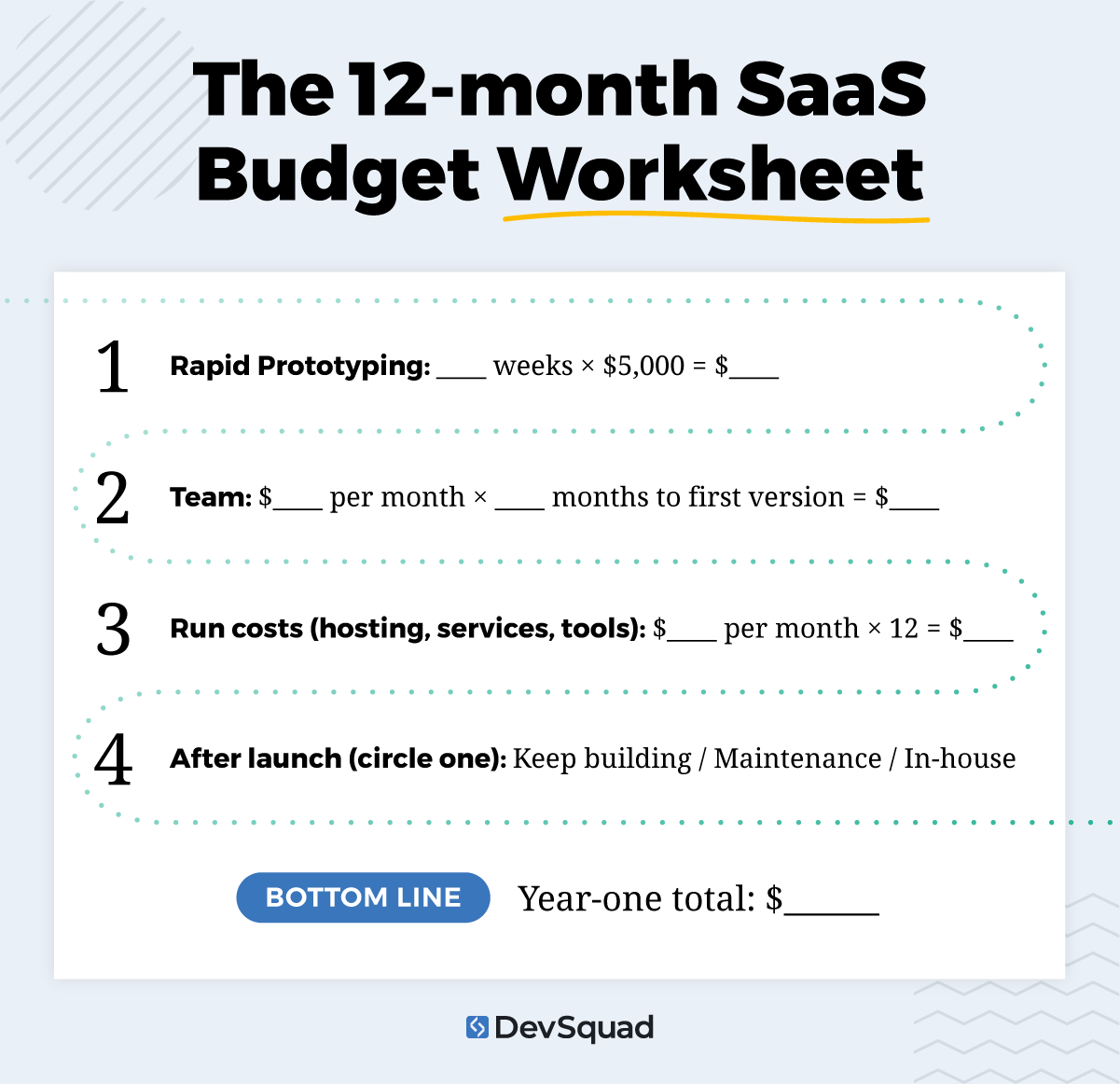 This is a budget you can defend to a cofounder, a board, or yourself.
Comparing partners too? Our roundup of SaaS development companies shows how the options stack up.
Ready to fill in line one? Start with Rapid Prototyping at DevSquad, and find out what your build really needs before you pay for it.
SaaS development cost FAQs
Your SaaS MVP development cost comes down to team size and months. At DevSquad, build squads cost $16K, $20K, or $40K a month, and a first version takes 3 to 9 months. Rapid Prototyping comes first at $5,000 a week. For example, a Standard squad for 6 months comes to $120K in build cost.
At DevSquad, a first version takes 3 to 9 months. Scope matters most, followed by integrations and how strict your business rules are. Small scopes move fast. Drivably shipped in 45 days, and Crew 360 had a working version in under three months. So how long does it take to build an MVP? As long as your scope demands.
It depends on how much change your product needs. After launch, you can keep a full team building, downgrade to a maintenance-level engagement, or bring development in-house. Month-to-month terms mean you can scale down without breaking a contract. Ask your partner what maintenance includes and how quickly you can scale back up.
A useful quote shows five things: team roles and seniority, the number of months, and whether discovery is priced separately. It also lists what's excluded, like hosting, third-party services, and compliance work. Finally, it spells out post-launch terms. If any item is missing, ask for it. Missing items become surprises later.
Get an accurate estimate for your SaaS MVP or project takeover. Contact us to schedule a call.

Phil Alves is the CEO and Founder of DevSquad and DevStats. He’s built and launched 100+ software products for bootstrapped founders, fast-growing startups, and enterprises. Phil writes about SaaS, product strategy, operational complexity, and building scalable development processes. He enjoys aviation, investing, and learning from other SaaS founders.