
A developer built a workaround for your B2B pricing logic. It breaks every time Shopify pushes an update.
Your ERP integration runs through a Zapier flow, and it drops orders during peak season, every single year.
You've bolted on 14 apps to rebuild what a competitor shipped natively two years ago.
That's the moment this article is for.
You don't need a fully custom platform from day one. But once you've hit that moment, the math flips. The cost of staying often exceeds the cost of building what you actually need.
I've talked to dozens of ecommerce founders who spent two years adding plugins and workarounds before they realized the platform itself was the bottleneck. The cost of staying isn't always obvious until you add up the developer hours, the failed integrations, and the revenue you left on the table.
This guide covers the use cases that push businesses toward custom software, the discovery process, when to replatform versus rebuild, key features and frameworks, and how to choose a partner.
Growing ecommerce businesses don't outgrow their platform all at once. They outgrow it use case by use case, one workaround at a time, until the workarounds cost more than a real fix.
When your products can't be configured in a standard product page
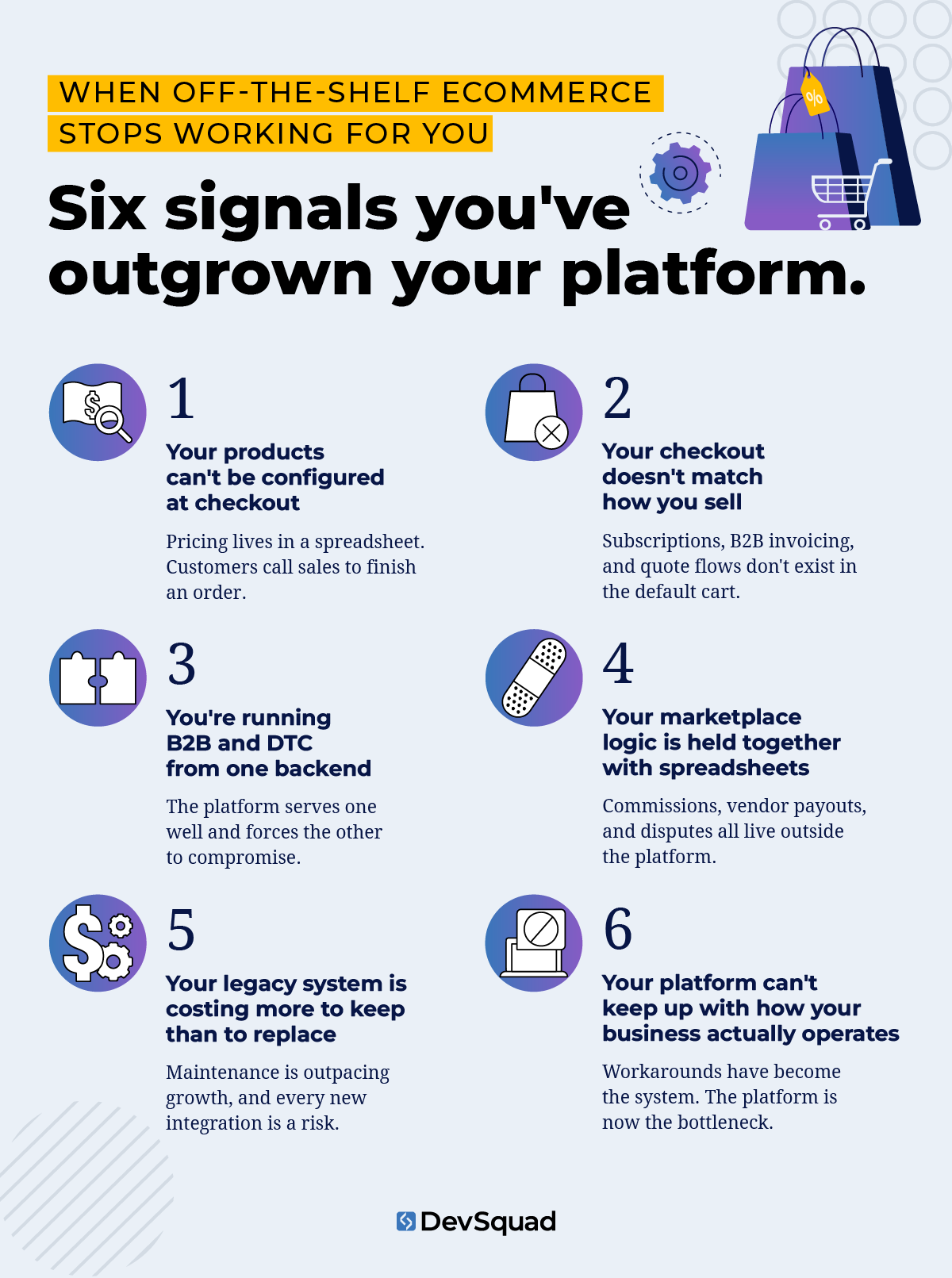
A standard product page with variants doesn't support dynamic pricing rules, customer-specific catalogs, or visual builders. If you sell configurable, made-to-order, or spec-driven products, that gap shows up fast. Customers can't finish checkout without calling sales. Pricing rules live in a spreadsheet outside the platform. Your product team manually edits orders in the backend after the customer has already paid.
Custom ecommerce software replaces that with rules-based product logic, dynamic pricing engines, and configurable builders that let customers self-serve what used to require a phone call.
"Every ecommerce discovery we run for complex product businesses uncovers the same thing: the pricing logic lives in a spreadsheet that someone exports twice a week. Custom software doesn't just move that logic into the platform. It makes it invisible to the customer and automatic for your team." - Nelson Pereira, Technical Product Manager, DevSquad
When your checkout can't support how your business actually sells
Standard checkout logic assumes one buying pattern. Your business probably runs several. Subscription billing needs custom pause and resume logic. B2B needs net-30 invoicing and approval workflows. High-ticket or configurable products need quote-to-order flows that don't exist in a default cart.
When the checkout can't flex, the business works around it badly. Missed payments spike because retry logic belongs to the platform, not you. Sales reps skip checkout entirely and close deals over email. Enterprise buyers refuse to touch the storefront at all.
A custom checkout flow gives you full ownership of billing logic and payment retry rules, matching how your customers actually want to pay.
When you're running B2B and DTC from the same backend
B2B buyers expect tiered pricing, invoice-based checkout, bulk ordering, customer-specific catalogs, and approval workflows. Running that alongside a DTC storefront on one platform creates a forced choice. You either under-serve B2B because the platform is built for DTC, or you over-engineer the DTC experience to absorb B2B edge cases.
Custom ecommerce software removes the trade-off. Independent buyer portals, role-based access, customer-group pricing, and a unified backend let your ops team manage both channels without running duplicate systems.
When your marketplace needs multi-vendor logic the platform can't support
Vendor onboarding handled in a spreadsheet. Commission calculations run as a monthly reconciliation in Excel. Dispute resolution stuck in email threads. These are signals that your platform's marketplace features hit their ceiling, or were never built for your model in the first place.
Custom ecommerce software makes commission logic, vendor dashboards, product moderation queues, and payout rules native to the system instead of bolted on. The marketplace backend, even when the storefront faces customers, is a form of internal use software doing the operational work nobody sees.
When your legacy ecommerce system is becoming a business liability
There's a point where an aging platform stops being a technical debt problem and starts costing real money. Some businesses are still running Magento 1, years after its end-of-life, because nobody wants to own the migration project. A custom storefront built in 2015 now needs a dedicated contractor just to stay online. BigCommerce stores are hitting catalog or API limits that didn't exist three years ago.
Legacy systems like these drain developer time on maintenance instead of growth, and every integration becomes riskier than the last. Modernizing isn't optional once the platform itself is the constraint on what the business can build next.
When your back-office doesn't match your storefront
Your customer-facing experience and your internal ops tools are supposed to be one system. When orders, shipping, and returns run separately from fulfillment, warehouse, and reporting, you get manual reconciliation and slower response times. Ops staff end up maintaining two systems that should never have been two. Custom ecommerce software fixes both sides at once. The internal operations layer gets built into the platform from the start, instead of bolted on after the storefront ships.
How DevSquad runs discovery for custom ecommerce builds
Custom ecommerce software development starts long before a developer writes a line of code. It begins with a collaborative, insight-driven discovery process, one that defines the problem, uncovers internal inefficiencies, and maps a clear path forward.
This stage is essential to building a custom ecommerce platform that’s aligned with your users, business model, and operational workflows. And for companies replacing internal use software or legacy systems, discovery is where transformation begins.
1. Aligning with your business strategy
The first step is understanding your company’s short- and long-term goals. Are you trying to reduce cart abandonment? Expand into wholesale channels? Replace outdated tech? Your development partner should align with your broader company software goals—not just your feature wishlist.
This stage often includes:
Reviewing your revenue model and growth targets
Identifying internal bottlenecks
Auditing existing ecommerce tools and manual workarounds
Clarifying your most urgent business needs
Why this matters: Without strategic alignment, development becomes reactive and disconnected from ROI.
2. Mapping the user experience (internal and external)
Custom ecommerce development requires designing for two key user groups: your customers and your internal team. The discovery process must address both sides of the experience.
That includes:
Interviewing internal teams (sales, fulfillment, support)
Observing real workflows—like how staff process orders or manage returns
Reviewing customer behavior patterns and friction points
Creating journey maps and flow diagrams for each audience
These insights guide UX decisions that are grounded in reality—not guesswork.
"The hardest part isn't coding a custom ecommerce system. It's learning the specific rules and logic the business has built up over years. That's where the actual work lives, and it's also where the real value comes from. AI helps me get up to speed faster, but you can't shortcut the part where you sit with the team and understand how they actually operate." - Ed Cavalcante, Technical Product Manager, DevSquad
After a discovery sprint with a mid-market B2B ecommerce company, DevSquad found that the sales team was manually adjusting every wholesale order after checkout because the platform's pricing rules couldn't support customer-specific catalogs. Three developers had been maintaining a patchwork of Zapier workflows, custom scripts, and manual exports for two years. Discovery surfaced the root problem in week one. The rebuild replaced all of it with a native pricing engine and customer portal, cutting post-order manual work by 90%.
3. Conducting technical discovery
Next, your product and engineering leads dig into your existing architecture. Whether you're replacing legacy software or starting from scratch, you need to uncover what’s working, what’s breaking, and what your ecommerce platform needs to support.
Technical discovery typically includes:
Reviewing current data models and system dependencies
Auditing legacy APIs, CRMs, or inventory tools
Identifying compliance, performance, or scalability concerns
Outlining required integrations (shipping, tax, ERP, etc.)
This is where assumptions become risk. By surfacing technical challenges early, you reduce scope creep and avoid surprises during development.
4. Defining the product scope
Once the business goals and system realities are clear, your team will begin defining the scope for your custom ecommerce solution. Categorize feature priorities using a Now–Next–Later framework.
What goes into the initial build (Now)?
What can wait until after launch (Next)?
What’s on the radar for the future (Later)?
This structured approach keeps development lean and focused, helping you ship a high-impact MVP quickly, without compromising long-term vision.
5. Prototyping and roadmapping
Finally, the discovery process delivers tangible outputs you can use to align your team and drive development forward:
A high-fidelity prototype that simulates the core user experience
A detailed product roadmap based on business impact and technical feasibility
User stories and acceptance criteria to guide your agile sprints
This becomes your execution blueprint.
Discovery is not optional—it’s the product
Rushing into development without a structured discovery process is the fastest path to wasted resources. Ecommerce businesses operate within complex ecosystems and custom ecommerce platforms must reflect that complexity in a simplified, scalable way.
Make sure you are not undermining your business
When to replatform vs. when to rebuild: a decision framework
If your current platform is causing pain, the choice is rarely binary. There are four real paths: extend or customize what you have with apps and code on top of the SaaS layer; replatform to a different SaaS, like Magento to Shopify Plus; build a custom frontend on an existing backend through headless commerce; or go full custom with a development partner. Most buyers only know about the first two.
A 2026 study of 1,000 retail and SaaS decision-makers found that 73% report hidden costs from their current platform, adding an average of 35% to the original contract price.
Cost of staying: what "free" platform updates actually cost
Staying doesn't feel like a decision, which is the problem. Developer hours spent rebuilding a workaround every time the platform updates add up fast. Shopify app fees compound month over month. A checkout flow that doesn't match buyer expectations quietly costs conversions you never trace back to the platform. Every one of these is a custom software development cost you're already paying, just spread out.
One of the first things we do in discovery is ask clients to total up what they've spent on Shopify apps in the last 12 months and how many hours their dev team spent on integrations that broke. The number almost always surprises them. The custom build they thought was too expensive is often cheaper than three more years of maintaining the stack they have.
Migration risk and what it actually takes
Replatforming carries risks most vendor guides skip past. SEO traffic loss from mishandled URL redirects can erase months of search equity in a single launch. Data migration failures hit product catalogs and customer records hardest, especially with custom fields that don't map cleanly to the new platform's schema. The "lift and shift" trap is the most common: broken workflows move to the new platform unchanged. You've paid for a migration and kept the same problems.
Standard mid-market ecommerce migrations typically take 3 to 6 months. Enterprise migrations with ERP integration and B2B workflows take 6 to 12 months. A phased approach with a parallel running period, where both systems operate side by side before full cutover, reduces downtime risk substantially.
Timeline expectations for a custom build
A DevSquad custom ecommerce engagement typically starts with a discovery sprint of 2 to 4 weeks. That sprint produces a prototype and a roadmap before development begins. From there, timelines depend on scope. An MVP covering core storefront and backend systems can reach production in 4 to 6 months. A full custom platform with ERP integrations and multi-vendor support may take 6 to 12 months.
The real difference from a replatform isn't speed. It's what you're building on. Custom builds don't migrate broken logic forward. Discovery surfaces the root problems first, and the build reflects how the business actually operates, not how the old platform forced it to operate.
What custom ecommerce software development actually means
Custom ecommerce software development refers to the process of designing, building, and optimizing a bespoke ecommerce platform tailored specifically to a business's internal needs and growth goals. Unlike off-the-shelf solutions, which offer prebuilt features and generalized functionality, custom ecommerce development creates a solution from the ground up, or rebuilds and modernizes an existing one, to serve specific operational workflows, customer journeys, and competitive advantages.
Built for internal use, not just front-end features
At its core, custom ecommerce software is a type of internal use software, a system designed for your team to operate, manage, and scale the business efficiently. Whether you're creating a company software product to manage your own supply chain or launching a platform to support a high-volume DTC brand, the goal is the same: to create a frictionless and scalable experience for both your team and your customers.
Developing a custom ecommerce website allows you to avoid bloated off the shelf systems and build only what's necessary, no more, no less. And when built right, a custom ecommerce platform supports future iterations, new integrations, and operational flexibility as your business model evolves.
Custom ecommerce software development is especially valuable for:
Brands operating in complex or highly regulated industries
Product types that require configurable or subscription-based checkouts
Internal teams that need custom dashboards or operational tools
Companies migrating from legacy systems that are no longer sustainable
Enterprises seeking more control over data, UX, and performance
Ultimately, a custom approach gives you the power to create differentiated customer experiences while aligning every backend system to how your business really works.
Common features of a custom ecommerce platform
Custom ecommerce development gives you full control over how your platform functions. While every business’s needs are unique, many custom ecommerce platforms share a core set of features built to support growth, efficiency, and flexibility.
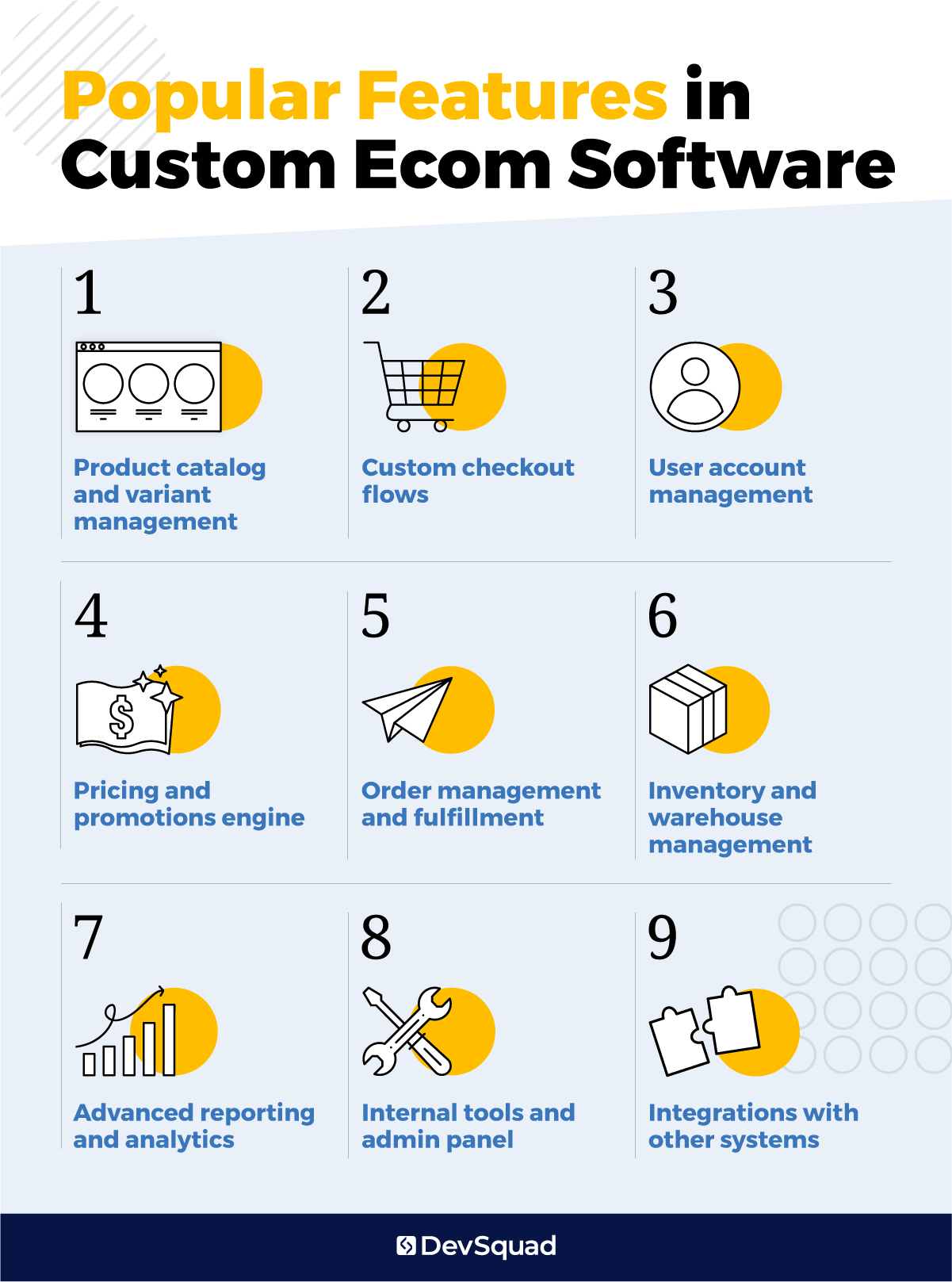
Here are the most common features that ecommerce companies build when creating a tailored platform.
1. Product catalog and variant management
Your product catalog defines how customers shop and how your team manages complexity. A custom ecommerce platform allows for rich product data and complex relationships between SKUs.
Custom product types with attributes specific to your industry
Unlimited product variants (e.g., size, color, material, etc.)
Rules-based product bundles and kits
Configurable product builders (great for DTC and B2B)
Digital and physical product support in the same system
2. Custom checkout flows
Checkout is where revenue is won—or lost. Businesses with unusual purchase logic (like wholesale, pre-orders, or subscriptions) often require a custom flow that off-the-shelf tools can’t support.
Multi-step or single-page checkout options
Guest checkout with email capture
Conditional logic for shipping, taxes, or payment method
Dynamic shipping options based on location or cart contents
Support for subscription billing, trials, or metered usage
3. User account management
Custom platforms support complex user roles and personalized experiences.
Role-based account views for customers, vendors, or staff
Multi-user access for company accounts (great for B2B)
Saved carts, reorder history, and preferred payment methods
Integrated messaging or support ticket access
4. Pricing and promotions engine
When you need more than “10% off,” a custom ecommerce solution gives your team the ability to run complex pricing strategies tied to user behavior, customer groups, or real-time data.
Tiered pricing by customer group or purchase history
Time-based and quantity-based promotions
Unique pricing logic for resellers or subscription users
Stacking or exclusion logic for coupons and discounts
5. Order management and fulfillment
Fulfilling orders is rarely one-size-fits-all. With custom ecommerce software, you can automate the operational workflows that support real-world shipping, exceptions, and edge cases.
Centralized view of all orders, including status and activity logs
Split shipments and partial fulfillment support
Built-in return and refund workflows
Order routing logic for multiple warehouses or dropshipping partners
Custom order tags, notes, and internal flags
6. Inventory and warehouse management
If inventory tracking lives in spreadsheets or disconnected tools, it’s time to bring it into your ecommerce system. Custom internal software can centralize stock visibility and improve operations.
Real-time inventory syncing across multiple channels
Stock movement tracking between warehouse locations
Low-stock alerts and automated reorder logic
Support for barcode scanning or hardware integration
7. Advanced reporting and analytics
Out-of-the-box platforms offer generic dashboards. With a custom ecommerce platform, your reporting is designed around your KPIs.
Custom dashboards for executives, operations, or marketing
Detailed exportable reports (orders, taxes, fulfillment, revenue)
Conversion funnel tracking and abandonment analytics
Role-based access to sensitive data
8. Internal tools and admin panel
Behind the scenes, your internal teams need fast, secure access to the tools that keep the business moving. A well-designed admin panel streamlines daily operations and reduces reliance on developers.
Custom content management system (CMS) for product and page updates
Role-based permissions for marketing, support, and fulfillment staff
Workflow tools for processing returns or reviewing flagged orders
Internal messaging or notification system
9. Integrations with other systems
The real power of custom ecommerce development is its flexibility to connect with the rest of your stack. Whether it’s accounting software or a 3PL, integrations keep your operations lean.
Payment gateways (Stripe, Authorize.net, Braintree)
Tax automation tools (Avalara, TaxJar)
CRM, ERP, and fulfillment system integrations
Marketing and analytics platforms (Klaviyo, GA4, Segment, HubSpot)
Customer support tools (Zendesk, Gorgias)
6 best frameworks for developing custom ecom software
The tech stack behind your custom ecommerce platform plays a critical role in performance, scalability, and long-term maintenance. From the storefront experience to internal dashboards and backend automation, the frameworks you choose directly impact your ability to grow, iterate, and adapt.
Custom ecommerce development typically involves two layers:
The backend: This handles business logic, user accounts, inventory, order management, and integrations—everything behind the scenes.
The frontend: This powers the user interface (UI)—what your customers or internal users see and interact with on the web.
Choosing the right framework for each layer sets the foundation for building reliable, flexible, and secure ecommerce software that works as well internally as it does for customers.
Below are six of the best frameworks for developing a custom ecommerce platform—starting with Laravel, our top pick for backend development.
1. Laravel (backend)
Laravel is our top recommendation for custom ecommerce platforms—especially when building scalable, secure, and maintainable systems.
Why it stands out:
Developer favorite. Laravel has a clean syntax and powerful ecosystem that makes it faster to build and easier to maintain.
Ideal for ecommerce logic. It handles complex workflows, integrations, and custom logic better than many other PHP frameworks.
Security-first. Laravel protects against common web vulnerabilities out of the box.
Efficient development. Teams can move faster with tools like Eloquent ORM, Laravel Queues, and built-in authentication.
Great for internal software. Whether it’s order routing or customer service tools, Laravel powers backend dashboards and custom ops features with ease.
Used with Vue.js or another modern frontend, Laravel offers the flexibility ecommerce companies need to build a future-ready platform.
2. Django (backend)
Built in Python, Django is a strong choice for projects where data models are complex or where Python is already part of the company’s tech stack.
Why consider it:
Comes with a built-in admin interface, great for internal dashboards
Strong security posture, especially for regulated industries
Scales well with experienced teams
Popular for content-heavy ecommerce experiences
Downside: Smaller talent pool compared to Laravel and Node.js.
3. Node.js with Express (backend)
For ecommerce companies that want to go all-in on JavaScript, Node.js is a popular option.
Why it’s used:
Full-stack JavaScript environment
Handles real-time features well (e.g., live inventory, chat, notifications)
Lightweight and flexible
Active open-source ecosystem
Great for fast-moving teams or platforms that rely on dynamic, event-driven data. Not ideal for companies needing complex relational data models unless carefully architected.
4. Next.js (frontend)
When paired with a backend like Laravel or Node, Next.js powers high-performance frontend ecommerce experiences with server-side rendering.
Why it works:
Blazing-fast page loads (great for SEO and conversions)
Seamless dynamic content handling
Works well with headless CMS setups
Supports hybrid static and server rendering
Perfect for ecommerce companies prioritizing performance, search visibility, and content-driven shopping experiences.
5. Vue.js (frontend)
Vue is the go-to frontend framework for Laravel-based ecommerce platforms. The two technologies are deeply compatible and widely used together.
Why developers love Vue:
Simple to learn, powerful to scale
Easy component structure for building dynamic UIs
Reactive data handling for smooth cart and checkout experiences
Excellent developer tooling
Vue powers both storefronts and internal dashboards in many Laravel-based ecommerce builds.
6. React (frontend)
React is widely used for ecommerce frontends, especially in headless commerce or PWA (progressive web app) setups.
Why choose it:
Massive developer community
Highly flexible and component-based
Strong ecosystem of ecommerce integrations
Works well with GraphQL or REST APIs
React shines in fast, modular interfaces—but requires more configuration and architectural decisions than Vue.
How to choose a custom ecommerce development partner
Choosing the right development partner is just as important as choosing your tech stack. The best agencies don’t just write code—they help shape strategy, guide product decisions, and build ecommerce platforms that drive real business results.
Here are five standout agencies in the custom ecommerce space.
1. DevSquad
DevSquad is the gold standard for custom ecommerce software development. Known for its consulting-first approach and fast, strategic delivery, DevSquad helps companies build fully custom ecommerce platforms and internal software systems that scale. Every engagement begins with a discovery sprint to align business goals, user needs, and technical requirements—followed by agile, sprint-based development handled by a dedicated squad.
U.S.-led product strategy and technical leadership
Proven success in B2B, DTC, subscription, and marketplace builds
Specialists in Laravel and Vue.js for fast, scalable solutions
No long-term contracts, no bloated retainers—just real results
Whether you’re modernizing a legacy ecommerce system or launching a completely new platform, DevSquad builds software that’s fast, flexible, and tailored to your business.
2. GoMage
GoMage is a veteran ecommerce agency known for its Magento expertise and performance optimization work. With over 15 years in the industry, the team offers end-to-end ecommerce services, including UX/UI design, headless builds, SEO, CRO, and platform migration.
Their strength lies in improving site speed, Core Web Vitals, and frontend user experience across platforms like Magento, Shopify, and Salesforce Commerce Cloud.
3. Taveno Team
Tavano Team is a NetSuite ecommerce agency that blends technical development with growth-focused marketing strategy. Specializing in SuiteCommerce and NetSuite integrations, they help B2B and B2C brands connect backend systems with customer-facing storefronts. From UX and SEO to ERP integration and data tracking, Tavano Team is a go-to for ecommerce companies operating within the NetSuite ecosystem.
4. Real Agency

Real Agency is a UK-based ecommerce growth partner known for delivering measurable results through platform migrations, conversion optimization, and user experience design. With award-winning work on Shopify Plus and Magento 2, they specialize in helping ambitious retailers grow through strategy-led site rebuilds and performance improvements.
5. Elogic Commerce
Elogic Commerce is a full-service ecommerce development agency with a strong portfolio of B2B and B2C projects across platforms like Adobe Commerce, BigCommerce, and Shopify Plus. With over 500 launched projects and 200+ specialists, Elogic offers everything from marketplace builds and ERP integrations to replatforming and custom storefront design.
Ready for your own custom ecommerce software solution? Learn more about our custom software development services.
Custom ecommerce software development FAQs
Cost depends on scope. Integrations, catalog complexity, and whether you need multi-vendor or B2B functionality all drive the number. An MVP with core storefront and backend systems costs less than a full platform with ERP integrations and marketplace logic. The clearest way to size your number is a discovery sprint, which scopes the build before you commit to a budget.
When the cost of the workaround exceeds the cost of the fix. If you're paying for a dozen apps to replicate native functionality, or rebuilding a customization every time the platform updates, you've already crossed the line. The platform is still working, it's just not working for you anymore.
Discovery typically runs 2 to 4 weeks and produces a prototype and roadmap. From there, an MVP can reach production in 4 to 6 months. A full platform with ERP integrations and multi-vendor support takes 6 to 12 months.
Replatforming moves you from one SaaS platform to another, like Magento to Shopify Plus, taking 3 to 12 months depending on complexity. A full custom build replaces the platform entirely with software built around how your business operates. Replatforming inherits your existing logic, broken or not. A custom build starts from discovery, so root problems get fixed instead of moved.

Phil Alves is the CEO and Founder of DevSquad and DevStats. He’s built and launched 100+ software products for bootstrapped founders, fast-growing startups, and enterprises. Phil writes about SaaS, product strategy, operational complexity, and building scalable development processes. He enjoys aviation, investing, and learning from other SaaS founders.