
A data migration strategy is the set of decisions you make before moving data from an old system to a new one. It covers which data moves, which data stays behind, how the data gets cleaned, how you switch over to the new system (a step called the cutover), and how you check that the result is correct. In a good strategy, you only move the data the new system needs from its first day. Everything else is archived, left in the old system and connected by API, or deleted.
These decisions matter most when the migration is part of a rebuild. If your plan is to move every record, your engineers can spend weeks mapping fields from ten years of data that nobody uses, even after the new platform is ready to launch. Each week of that work pushes your launch date back.
This guide covers each decision in order. If your migration is part of a larger rebuild, our data modernization work starts with these same decisions.
What is a data migration strategy?
A data migration strategy answers four questions before any data moves:
Scope: Which data moves, which stays in place, and which gets deleted?
Quality: Which data needs cleaning, and who decides which record is correct when two records conflict?
Approach: Will you move everything at once, in phases, or with both systems running in parallel?
Proof: How will you check the migrated data, and when is it safe to switch off the old system?
A data migration plan is a separate document. The strategy records the decisions. The plan assigns each decision to a person and a deadline.
Data migration strategy | Data migration plan | |
|---|---|---|
Answers | What moves and why | Who does the work, how, and when |
Example | Closed jobs older than three years go to a read-only archive | The operations lead approves the archive export by the end of month two |
Owned by | Business and technical leaders together | The project manager and engineering team |
Changes when | Business needs change | People, tasks, or dates change |
Make the strategy decisions first. If you write the plan before those decisions are made, you'll have to rewrite it each time a decision changes.
Why do "move everything" data migration plans stall a rebuild?
A "move everything" plan stalls a rebuild because each dataset you add needs its own preparation before launch. Every field has to be mapped to the new system, cleaned, and tested, and your new system can be ready to launch while that work is still in progress.
Three causes account for this delay:
Old data that nobody uses. Retired status codes, discontinued products, and customers who haven't ordered in eight years each need a place in the new system's structure if you move them.
Data that doesn't fit the new system's structure. If three teams used the same free-text notes field in three different ways, one mapping rule can't convert it correctly.
Data that the old vendor won't export cleanly. Some platforms don't provide a complete export, so extracting the data becomes a separate project.
Poor data quality makes all three causes worse. In a survey by Precisely and Drexel University's LeBow College of Business, 64% of organizations named data quality as their top data integrity challenge, up from 50% the year before.
If your current platform resembles these legacy system examples, plan for all three causes.
Before I agree to migrate a dataset, I ask who will open those records after launch and for what task. If nobody can answer, I recommend leaving that data out of the migration.
How do you decide what data to migrate, archive, or leave in place?
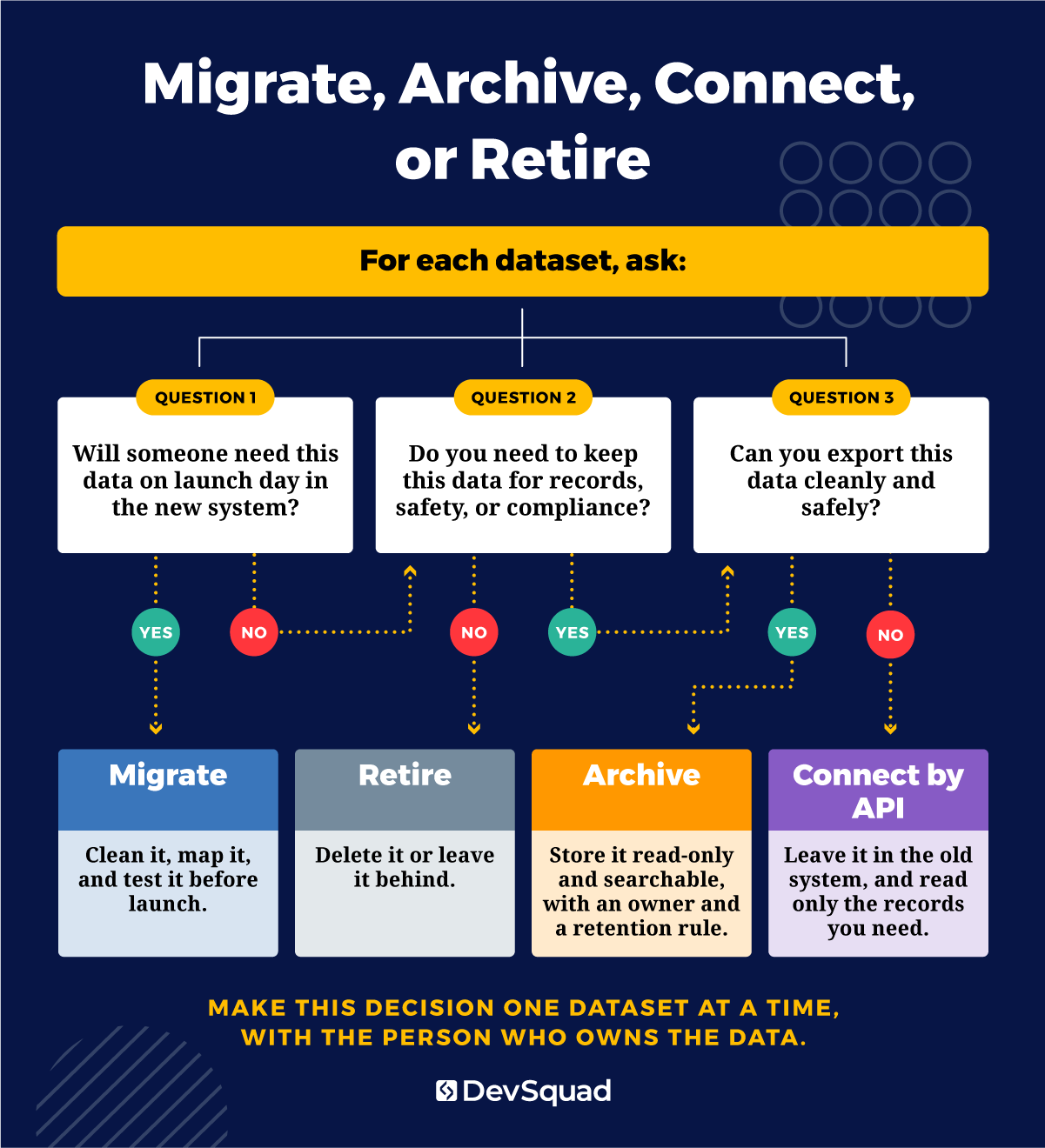
Sort each dataset into one of four groups based on what the new system needs: migrate it, archive it, leave it in the old system and connect to it by API, or retire it. Make this decision one dataset at a time, and include the person who owns and uses that data. Without that person, nobody can say for certain which records the business still relies on, and moving everything becomes the default.
Migrate: data the new system needs every day
This group is the data your team needs on launch day: active customers, open orders and jobs, current pricing, live contracts, and any records people look up every week. To decide, ask whether a user would be unable to do their job on the first day without this data. If the answer is yes, migrate it. This is usually a small part of the old database. Clean it carefully, because the new records your team creates will connect to it.
Archive: history you must keep but rarely touch
Closed jobs, old invoices, and past maintenance records go in the archive. You may need them for audits, disputes, or warranty questions, but nobody edits them. Rather than converting them to fit the new system's structure, export them to a read-only archive your team can search. Keeping the full old system running only to look up history has its own cost of keeping a legacy system. Assign one person to own the archive, and set a rule for how long each type of record is kept.
Leave in place and connect by API
Some data costs more to move than to read where it already is. In that case, the new system requests records from the old one through an API when it needs them, and no data is copied. This option fits when the vendor won't export the data cleanly, or when the data is too sensitive or too large to move safely right now. The next section explains how to decide when to use it.
Retire: data nobody uses
Unused fields, abandoned features, test records, and duplicates can be deleted or left in the old system. A rebuild is the cheapest time to drop them, because every field you keep adds work before launch. To find this data, ask your team which data and which software features they no longer use. Emergent 3's founder described how that question affected him during the scoping of his platform's rewrite:
"I remember sitting down with Phil and Rafael, and they asked, 'What do you not use in the app today? What can we strip out? How can we simplify this?' That opened my eyes to their expertise, and to how much they actually cared." — PK Keller, Founder, Emergent 3
If you drop a feature, you can usually drop the data that only that feature used.
When should you connect legacy data by API instead of migrating it?
Choose an API connection over a migration when moving the data would cost more, or carry more risk, than reading it from the old system. These situations point to an API connection:
The vendor doesn't allow a full export from its database.
The history matters for safety, compliance, or customer disputes, but your team rarely looks at it.
A clean migration would push your launch back by months.
An API connection has costs too. You keep paying for the old system, and the new system depends on it staying available. To limit that dependence, make the connection read-only and write down the specific requests the new system is allowed to make. Our guide on how to integrate legacy systems explains the common ways to set up these connections.
Nationwide Power sells and maintains battery systems for energy infrastructure across the US. Its fifteen years of client history, including maintenance records that matter for safety, were stored in AutoTask, which charged per API request and didn't allow an easy export from its database. DevSquad moved all of the company's daily work into a custom platform and kept AutoTask as an archive that the new platform queries by API for specific records only. The history stayed complete, and the number of API requests driving AutoTask's bill dropped substantially, as described in the Nationwide Power case study.
I'd rather maintain a small, read-only API connection to an old system for years than push a migration the vendor never built its system to support. A few API requests are easy to test and monitor, but data pulled from a system that wasn't designed to export it is often incomplete, and the gaps show up after launch.
How do you clean and map legacy data before you move it?
Before you move legacy data, profile it, map each field you're keeping to the new system's structure, and fix problems before the final load. Cleaning that gets left until cutover is done under time pressure by whoever is available. A legacy data migration strategy schedules that work weeks earlier:
Profile the data. Check each table for duplicates, required fields left blank, and fields that people filled in inconsistently. Finish this list of problems before anyone writes mapping rules.
Map each field. Match each old field to a field in the new system, and record the rule for any change. Examples include a new date format, two status codes combined into one, or one name field split into first and last name.
Clean the records. Decide who resolves conflicts. If two records list different addresses for the same customer, the person who owns that data chooses the correct one, so the developer isn't left to pick.
Run trial loads. A trial load is a test run of the migration. Load the cleaned data into a copy of the new system, check the results, correct the rules, and repeat.
Inconsistent formats are a common problem. In the same Precisely and Drexel LeBow research, 45% of organizations named inconsistent data definitions and formats as a top barrier to high-quality data.
Keep the mapping and cleaning rules in one shared document that both the business owner and the engineers can read. The document records every decision, so anyone can later check why a field was converted the way it was.
Which migration approach fits your cutover: all at once, phased, or parallel?
The right approach for your cutover depends on how much data you have and how much downtime you can accept. Move everything at once (often called a big bang migration) when your data is small enough to move and check in a single window. Move in phases when you can split the system by module, location, or customer group. Run both systems in parallel when you can't afford downtime and the two systems can operate side by side.
Approach | How it works | Best for | Main risk |
|---|---|---|---|
All at once | Stop work in the old system, move all the data, and switch everyone over in one window | Smaller datasets and systems that can go offline briefly | If one step fails, the whole switch is delayed |
Phased | Move one module, location, or customer group at a time | Systems with clear boundaries between their parts | Data used by more than one phase has to stay in sync between the systems |
Parallel | Run both systems together, compare results, then switch | Systems that can't go offline | Your team does the work twice while both systems run |
The best-known phased approach is the strangler fig pattern, named by software developer Martin Fowler. In his write-up on the pattern, he describes building the new system around the old one and replacing one part at a time until the old system can be switched off. The pattern is common in software modernization projects because each step is small enough to test on its own.
Downtime cost should factor into your choice. ITIC's 2024 survey of more than 1,000 firms found that a single hour of downtime costs more than $300,000 for over 90% of mid-size and large enterprises, before any litigation or penalties.
If your business can't be offline for one evening, moving everything at once is a poor fit. Our legacy modernization services team can help you compare these approaches against your own operations and downtime limits.
How do you plan a cutover your team can trust?
To plan a cutover your team can trust, write down every step of the switch to the new system and practice the full process before the real date. Your cutover plan needs:
A data freeze: a fixed time after which nobody enters new data in the old system.
A runbook: a written, step-by-step checklist for the switch, with one named person responsible for each step.
Go and no-go criteria: the checks that must pass before users move to the new system, agreed on before cutover day.
A rollback plan: the steps for returning to the old system if a check fails, when returning is possible.
Rehearsals: at least one full practice run using a copy of your production data.
In some projects, returning to the old system isn't possible. When that's the case, rehearsals and validation are your main way to catch problems, because you only switch over once.
Emergent 3 had no rollback option. Its rewritten school safety platform used a different programming language from the original, so the old and new versions couldn't run at the same time or be rolled out gradually. DevSquad and Emergent 3 shut down the old version and moved roughly 50,000 users to the new platform and its native apps in a single cutover, and the data migration completed without problems. The Emergent 3 case study describes the full rewrite.
How do you validate a data migration?
Validate a data migration in layers, starting with simple counts and finishing with real users doing their normal work in the new system. Data migration validation that stops at record counts can miss errors in what the data means.
Record counts match: each type of record, such as customers, orders, or invoices, has the same count in both systems, minus anything you chose to retire.
Totals match: account balances, open order values, and active customer counts add up to the same numbers in both systems.
Spot checks pass: a sample of records matches field by field.
Business rules hold: every job is linked to a customer, and every invoice has line items.
Real users complete real work: the people who own the data run their daily tasks in the new system and confirm the results are correct.
The fifth layer finds problems the first four can't detect. Record counts can match even when a status code was mapped to the wrong meaning, or when one customer's history was attached to another customer's account. The people who use that data every day are the most likely to notice those errors.
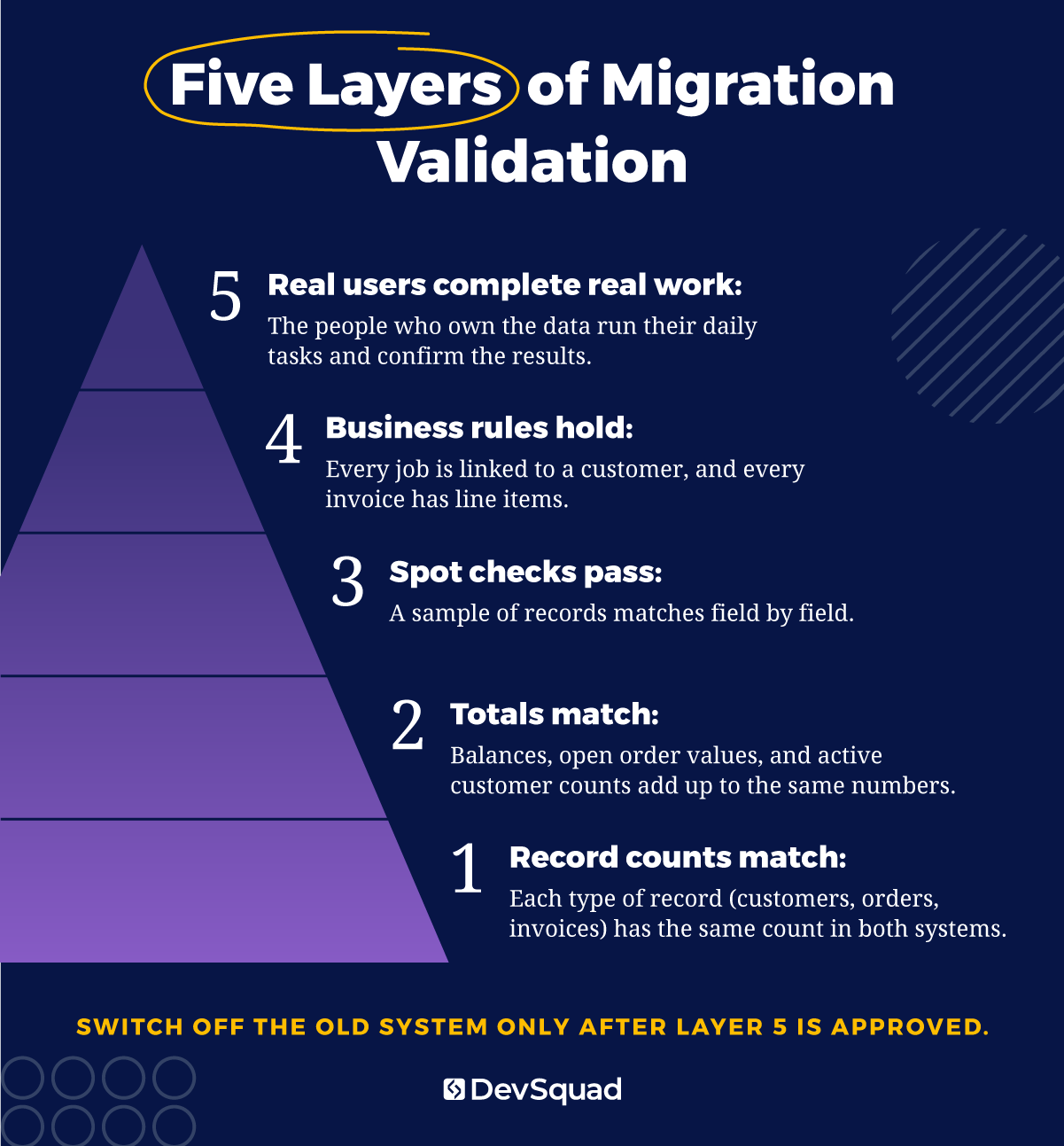
Switch off the old system only after the data owners have checked the results and approved them.
I treat migration scripts like any other production code, so they're versioned, reviewed, and rerun from scratch on every trial load. A script that only works when an engineer runs it by hand, step by step, will break during the real cutover.
What should a data migration plan include?
A data migration plan assigns each decision from your strategy to an owner, a task, and a deadline, covering every step of the data migration process.
Use this data migration checklist as a starting point:
A dataset inventory, with an owner named for each dataset
A migrate, archive, connect, or retire decision for every dataset
Mapping and cleaning rules, written where business and engineering can both read them
A trial load schedule
A cutover runbook and a data freeze window
Validation criteria and the names of the people who sign off
A rollback or contingency plan
Post-launch checks for the first two weeks
Most items on this list come from decisions covered earlier in this guide. The plan adds the names and dates needed to carry them out.
If you're rebuilding with DevSquad, make these data decisions during Sprint Zero, the strategy and planning phase before development starts. Making them early means the migration work is scoped before the build begins, so it doesn't add unplanned work halfway through.
Getting your data migration strategy right
A successful data migration strategy moves the data your new system needs and assigns everything else to a clear group: archive, API connection, or retirement. Following that approach reduces the amount of data work that can delay your launch.
If you're planning a rebuild and want help deciding which data to migrate, archive, connect, or retire, see how our data modernization team works, or contact us to talk through your system.
Data migration strategy FAQs
The timeline depends on how much data you move, how clean it is, how many sources you're combining, and which approach you choose. A small, clean dataset moved all at once can take a few days of work. A phased migration from several messy systems can run alongside a build for months. Moving less data is the most reliable way to shorten your timeline, which is why the scope decisions come first.
There are four main types. Storage migration moves data to new hardware or storage. Database migration moves data to a new database engine or version. Application migration moves data into a new or rebuilt application. Cloud migration moves data from on-premises systems to the cloud. Rebuilding internal software is usually an application migration, and it often includes a database migration as well.
Data migration moves data from one system to another, usually once, so the old system can be retired or reduced. Data integration keeps two or more systems connected on an ongoing basis, so they share data as it changes. Your rebuild may need both. You migrate the data the new system will own, and you integrate with the systems you keep, like the API connection covered earlier.
You can handle it in-house if your team knows the old system well, the data is reasonably clean, and you have engineers available to write and test migration scripts. Bring in a partner when the people who built the old system are gone, the vendor won't cooperate, or the migration is part of a larger rebuild. A partner building the new system can design the data model and the migration together.

Rafael Lunardelli is the CTO at DevSquad and founder of Pinguim Academy. With nearly two decades in software development, he specializes in scalable systems, DevOps, QA, and modern PHP development. Rafael has led enterprise projects at KPMG and now teaches thousands of developers through his Laravel-focused courses, conference talks, and online content.