
Your operation probably runs on four subscriptions, a fragile spreadsheet and someone who copies numbers between them every Friday. If you want a firm to replace that setup, here is the short answer. The best internal tools development companies in 2027 are DevSquad, Atomic Object, Pell Software, Susco Solutions and Six Feet Up, with EnterBridge completing our six. All six build software for the people who run your operations day to day.
You might not need any of them. When your process looks like everyone else's, a low-code platform can put a basic admin panel in front of your team within days. A development firm is worth paying for when the tool has to follow your own rules for pricing, approvals and scheduling. It is also worth paying for when someone has to keep that tool running for years after launch. I'm the CTO at DevSquad, and our internal software development team builds these systems every day. Because DevSquad is on this list, we held ourselves to the same evidence as every other company.
The article opens with a comparison table and the criteria behind the ranking. Each company then gets its own section, with the facts, the proof and the kind of buyer it suits. After the six companies comes an honest look at building the tool yourself in Retool or Appsmith. A simple way to decide between the two paths follows. The article closes with five questions to ask before you sign and answers to common buyer questions.
Internal tools development companies compared
Every figure in this table comes from the company's Clutch profile or its own published pricing.
Company | HQ | Best for | Team model | Clutch rating |
DevSquad | Utah, US | Replacing stacked SaaS with one system | Prototype first, then monthly squad | 2 reviews (2018) |
Atomic Object | Grand Rapids, Michigan | Complex tools built with your team | US-based consultancy team | 4.9 (52 reviews) |
Pell Software | Denver, Colorado | Integrations and tools on smaller budgets | Small US-based in-house team | 5.0 (31 reviews) |
Susco Solutions | Harvey, Louisiana | Field workforce and legacy .NET conversions | Project team or staff augmentation | 4.9 (11 reviews) |
Six Feet Up | Fishers, Indiana | Python tools you'll take in-house | Senior Python and Django team | 5.0 (27 reviews) |
EnterBridge | Richmond, Virginia | Pricing and ops tools for distributors | Long-term custom systems partner | 4.9 (16 reviews) |
The firms price their work in different ways, so the starting budget column won't line up neatly. DevSquad offers Rapid Prototyping and month-to-month development subscriptions, while the other five publish a minimum project size and an hourly rate. A $25,000 minimum tells you the smallest project a firm will accept, and your own tool may cost a good deal more.
Ratings also need context. A 5.0 from 11 reviews carries less weight than a 4.9 from 52. Review counts change every week, so check each Clutch profile before you add a firm to your shortlist.
How we selected these internal tools companies (and why DevSquad is on its own list)
Rankings in this category tend to follow one pattern. A vendor lists itself first, fills the remaining spots with software platforms and offers little evidence for any of it. We wanted a list of the best internal tools companies that you can verify yourself.
Each company had to pass a three-source check. We looked at its Clutch profile and its own service or project page. We also required at least one named operational outcome from a client review or case study. Homepages and rankings published by other companies didn't count as evidence.
We then weighted the four factors that most affect how well an internal tool holds up over time:
Criterion | Weight |
Internal and operational tool track record | 35% |
Code and data ownership, plus handover | 25% |
Verified review evidence, including criticism | 20% |
Pricing transparency | 20% |
Track record carries the most weight because software for an operations team has different demands from an app built for consumers. Ownership comes next. A tool that only the original vendor can change keeps you paying that vendor, much as you once paid for a subscription. Reviews count criticism as well as praise, because the way a firm handles a late project says more than a perfect score. Pricing transparency matters because you should be able to tell whether a firm fits your budget before the first call.
Six companies passed the check, so the list has six entries rather than a round number filled out with weaker firms. DevSquad was scored on the same weights.
When I evaluate an internal tools partner, I treat it like reviewing a pull request, a developer's proposed code change. Can the next developer change this safely? A tool that works on launch day but has its business rules scattered through the code is a liability you pay for in year two.
DevSquad wrote this list and ranked itself first, so please judge us by the same evidence as everyone else. Our DevSquad reviews and the three case studies below are a good place to start.
1. DevSquad
Verdict: Best for 8-figure operators who want to retire several subscriptions and own one system that matches how they already work.
 At a glance:
HQ: Utah, US
Team model: Rapid Prototyping first, then a monthly build squad
Starting budget: Rapid Prototyping, then a month-to-month development subscription with no long-term contract
Typical first version: 3 to 9 months
What the minimum buys. Phase 1 is Rapid Prototyping. In it, a solutions architect, a technical product manager and a tech lead work with you. Together you define the problem and the people who will use the tool. You come away with a clickable prototype, a technical architecture and a prioritized roadmap.
Before any production code is written, the team spends time with the people who do the work today. They learn your formulas, your hand-offs and the spreadsheet tabs your staff rely on. The prototype then gives you something concrete to test and debate while changes are still inexpensive.
Phase 2 is a month-to-month development subscription with a dedicated build squad. Every subscription includes a technical product manager, a tech lead, quality assurance (QA) testing, UX/UI design and an AI coding assistant. There's no long-term contract, and you can move to a maintenance plan after launch.
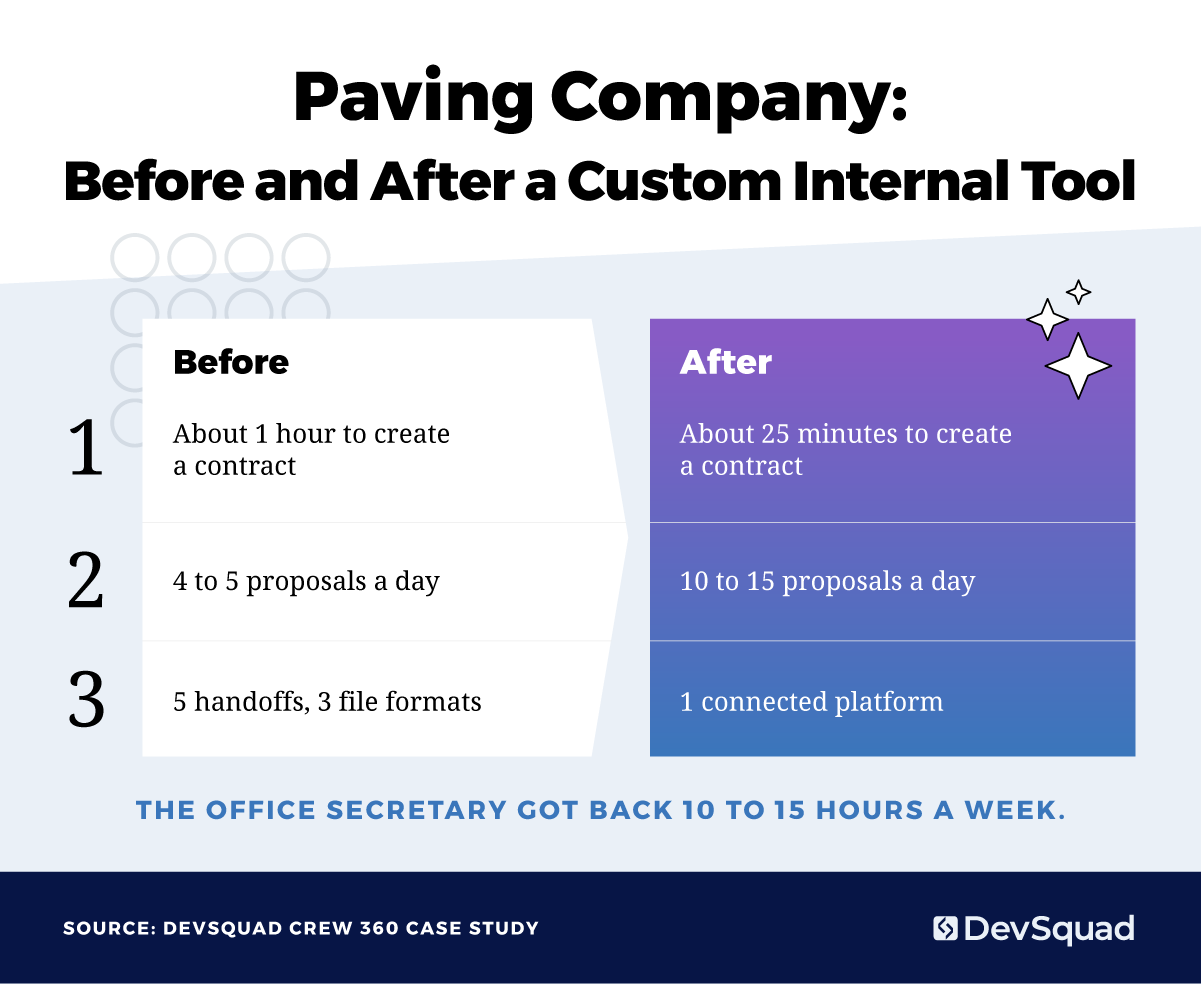
Proof. Tarheel Paving built Crew 360 with us. Before the project, each paving job passed through five handoffs and three file formats. We rebuilt the process the estimators already followed, including their formulas, as a quote-to-crew platform with mobile apps for field crews. Tarheel's team was using the first working version in under three months.
Contract creation on small and medium jobs dropped from about an hour to about 25 minutes. Estimators went from four or five proposals a day to ten to fifteen. The secretary recovered 10 to 15 hours a week, and Tarheel retired a paid time-tracking subscription.
At Transparent Maintenance, an Atlanta building maintenance company, one quote-to-invoice platform for staff and outside contractors replaced text messages, spreadsheets and paper invoices.
What clients say about DevSquad
We also automated internal IT workflows for Box, including the process for handling lost devices, so the security team could act without waiting on IT. Before that, onboarding and offboarding depended on spreadsheets and manual work.
"We were able to move from spreadsheets and a lot of work on the systems side to everything being handled by our ticketing system and help staff." — John Allen, Senior Software Engineer, Box
Who it suits. Choose DevSquad if you want custom internal tools planned, designed, tested and built by one monthly team. That team keeps improving the tools after launch. DevSquad is a poor fit if you need a one-off admin panel for a few thousand dollars or prefer a fixed-price contract.
We're doing this ourselves right now, replacing several of the SaaS tools DevSquad paid for with one internal tool built around our own processes. The hardest part was the patience to get the first automated process live. Every feature after that has been cheaper to ship.
2. Atomic Object
Verdict: Best for companies with an in-house team that wants a senior partner on a complex internal tool, and a budget to match.
 At a glance:
HQ: Grand Rapids, Michigan, with offices in Ann Arbor, Chicago and Raleigh (founded 2001)
Team model: Employee-owned, 100% US-based consultancy (50 to 249 people)
Starting budget: $25,000+ minimum; $150 to $199/hr
Clutch: 4.9 from 52 reviews
Proof. Soar Technology, an AI software company in Ann Arbor, had been tracking its internal work in Excel. Atomic Object interviewed three of its people, studied the spreadsheets and designed three web-based tools for metric tracking and labor forecasting. The design phase cost about $60,000 and ran from December 2017 to May 2018. When Soar reviewed the work, its own engineers were deciding whether to build the tools in-house or with Atomic Object.
That flexibility shows up across the profile. Clutch's review summary praises Atomic Object's design process and its role as a strategic partner. It also notes that some clients wanted clearer scoping at the start to avoid budget overruns. One reviewer, a power management company, offered advice worth repeating: plan how finished work will move into your own organization before the project ends.
What the minimum buys. A $25,000 minimum at $150 to $199 an hour is enough to start a project with a senior team. Clutch lists $50,000 to $199,999 as the most common project size, based on 37 reviews, so plan your budget around that range. Ask early how they would split your tool into phases and which part they would build first.
Who it suits. Atomic Object makes the most sense when your own engineers will share ownership of the tool. It also suits you if you want senior help on the hardest parts. If your budget is below $25,000 or the hourly rate is a stretch, another firm on this list will suit you better.
See the Atomic Object Clutch profile.
3. Pell Software
Verdict: Best for smaller budgets and integration-heavy tools, built by a fully US-based team.
 At a glance:
HQ: Denver, Colorado (founded 2019)
Team model: 10 to 49 people, 100% US-based and in-house
Starting budget: $5,000+ minimum; $100 to $149/hr
Clutch: 5.0 from 31 reviews
Pell builds custom dashboards, workflow software and operational systems. It also builds API integrations, which let two systems share data automatically, along with custom customer relationship management (CRM) and enterprise resource planning (ERP) systems. Its most common project size on Clutch is under $10,000, based on 19 reviews, so Pell is comfortable with small, focused jobs.
Proof. Select Sand & Gravel, a construction logistics company, got a map-based quoting tool with route analysis and stored quotes. Its general manager reported faster quote generation and quicker quote lookups.
Northstar, a demolition and remediation company, hired Pell to move data out of an old ERP and into a new web-based health and safety platform. The project cost $20,000 to $25,000, and Pell documented the work so Northstar's team could continue it in-house.
The one recurring complaint in Clutch's review summary is occasional delays when scope changed mid-project. Settle the scope before work begins and you'll avoid most of that risk.
What the minimum buys. At $100 to $149 an hour, the $5,000 minimum covers a small, well-defined job. Think of one data sync, one report or one screen. Pell also lists a software support package on Clutch. It includes monthly software audits and reports, 24/7 monitoring and a dedicated account strategist. That helps if you want the same team maintaining the tool after launch.
Who it suits. Pell is a strong option for a single focused tool or a sync between systems you already pay for. For a large platform used across several departments, a firm with a product strategy practice will serve you better.
See the Pell Software Clutch profile.
4. Susco Solutions
Verdict: Best for midmarket companies with field crews, or an aging .NET system that needs converting. At a glance:
HQ: Harvey, Louisiana, in the New Orleans area (founded 2005)
Team model: 10 to 49 people; a full project team, or developers who join your own team (staff augmentation)
Starting budget: $50,000+ minimum; $150 to $199/hr
Clutch: 4.9 from 11 reviews
Susco focuses on custom business software, legacy system conversions, mobile apps for field workers and client portals. Much of its legacy work involves .NET, Microsoft's long-running development framework. Clutch shows $200,000 to $999,999 as its most common project size, based on 10 reviews, and 70% of its clients are midmarket.
Proof. An HVAC services company used to require its field technicians to log hours and equipment in person at the office every week. Susco rewrote that system as a web app, and the client's project manager says it now saves over 100 hours a week.
A shipbuilding logistics company also hired Susco to replace an ERP written in VB6, an older Microsoft programming language. The reviews include criticism worth weighing. That project ran several months late because some of the old system's logic took longer to convert than estimated. One client wished Susco had asked more questions and offered more options. Another found its rates higher than other vendors it considered, while still rating the value well.
On the shipbuilding project, Susco tracked every feature in a QuickBase app, scheduled each item for work and held a weekly status meeting. The same client praised the code's organization. Business logic sat in one clearly defined layer, and the code that handles requests stayed simple. That structure makes the system easier for the next developer to maintain.
Who it suits. Susco works well when you know exactly what you need and want it built cleanly. If you want a partner who will question your scope and propose alternatives, the reviews suggest looking elsewhere.
See the Susco Solutions Clutch profile.
5. Six Feet Up
Verdict: Best for data-heavy Python tools, especially if you plan to bring development in-house.
 At a glance:
HQ: Fishers, Indiana (established 1999)
Team model: Senior Python and Django team, 10 to 49 people
Starting budget: $50,000+ minimum; $200 to $300/hr
Clutch: 5.0 from 27 reviews
Proof. A US financial services firm wanted new features built in Python, a language its developers had never used. Six Feet Up built a business dashboard app for finance professionals using Django and Wagtail. Django is a widely used Python framework, and Wagtail is a content management system built on it. It connected the new app to the client's existing platform through Okta single sign-on, so staff log in once to reach both. The team started from Six Feet Up's own Django template, which collects practices from years of earlier projects.
The client hired new developers specifically to learn from Six Feet Up's team, and those developers then took over the app. A planned handover like this one is worth asking any partner about. Six Feet Up's project list also includes "Geospatial Analysis from 30 Minutes to Seconds" for a US distribution company.
What the minimum buys. At a $50,000 minimum and $200 to $300 an hour, Six Feet Up has the highest rates on this list. The money buys senior Python engineers. You'll get the most value if your developers work beside them from the start, as the finance client's new hires did.
Who it suits. Six Feet Up fits teams that work in Python and expect to own the code later. If hourly rate is your main constraint, start with another firm on this list.
See the Six Feet Up Clutch profile.
6. EnterBridge
Verdict: Best for distributors, construction suppliers and other mid-market firms that need pricing and operations tools from a long-tenured partner. At a glance:
HQ: Richmond, Virginia, with an office in Lehi, Utah (founded 2001)
Team model: Long-term custom systems partner, 10 to 49 people
Starting budget: $25,000+ minimum; hourly rate not published
Clutch: 4.9 from 16 reviews
EnterBridge describes itself on Clutch as building tailored business systems for mid-market and enterprise clients since 2001. Its work includes custom tools and RPA bots, which are software robots that handle repetitive clicks and data entry. A regional healthcare system, for example, used EnterBridge to send insurance claim denials electronically instead of by hand.
Proof. Ferguson, a large North American distributor, has worked with EnterBridge since 2013. According to its solutions architect, Ferguson's pricing team uses a suite of EnterBridge-built tools to update prices daily. Tools built more than five years ago still run in production.
At the small end, Bonfire Collective, a residential real estate developer, paid less than $10,000 for a financial projection tool. Its CFO says the tool saves 5 to 10 hours a month. Both projects involve back-office logic that rarely fits an off-the-shelf product. The one critical note on the profile came from a client who wanted more collaborative working sessions to speed progress.
What to ask about budget. EnterBridge doesn't publish an hourly rate, so ask for it before you schedule discovery. Ask too whether they would price your project as a fixed scope, as time and materials, or as an ongoing retainer. Clutch lists a $25,000 minimum, yet the most common project size in its reviews is under $10,000, based on 6 reviews. Ask which applies to a project like yours before you share process documents. It's also worth asking who on their team will maintain your pricing logic after launch, and how they will document it.
Who it suits. EnterBridge is a good match when your problem is pricing or back-office logic in a distribution business. If you need a published hourly rate before the first conversation, one of the other firms will be easier to evaluate.
See the EnterBridge Clutch profile.
If you'd rather build it yourself: Retool and Appsmith
You don't always need a development firm. If someone on your team is comfortable working with data, a low-code internal tool builder may be enough. It can put a standard admin panel on top of a database you already have. That can move you off a spreadsheet in days, and the person who knows the process can often build the screens themselves.
Low-code platforms reach their limits in three situations. Your business rules become complex, people outside your company need access, or per-seat fees approach the cost of a custom build. Work done on the platform usually can't be carried over into custom code, so reaching one of those limits means starting again.
Retool
Retool is the best-known low-code platform for internal tools. You drag components onto a screen, connect them to your databases and APIs, and add JavaScript where you need custom logic. It suits a technical operations or data team that needs a standard panel quickly.
Retool's free plan covers up to five users. On paid plans billed annually, Team costs $10 per builder and $5 per internal user each month, and Business costs $50 and $15. Builders are people who create or edit apps, and internal users are employees who only use them. Outside users, such as clients or contractors, require the Business plan. The first 50 are free, and the monthly price per user then steps down from $8 to $4 as volume grows. Self-hosting is limited to the Enterprise plan, which has custom pricing.
Estimate the cost at the team size you expect next year, because a price that seems small for five people adds up for fifty.
I'd tell you to use Retool for a simple panel that reads from one database. The problem starts when your pricing rules or approval logic live in JavaScript snippets nobody tests. At that point you've built technical debt and attached a subscription to it.
Appsmith
Appsmith is an open-source alternative with a similar drag-and-drop builder and JavaScript support. Its free Community edition runs on your own servers with no license fee, but you take on upgrades, backups, hosting and security patches yourself.
Paid plans charge one rate for every user, with no separate fee for the people who build apps. The free cloud plan covers up to five users. Business costs $15 per user per month for up to 99 users, and Enterprise starts at $2,500 a month for 100 users.
It fits a team that already has someone comfortable managing servers. Before you install it, decide who will own that maintenance and who takes over if that person leaves. Without a named owner, the tool falls behind on updates quickly.
Platform or custom firm: how to tell which one you need
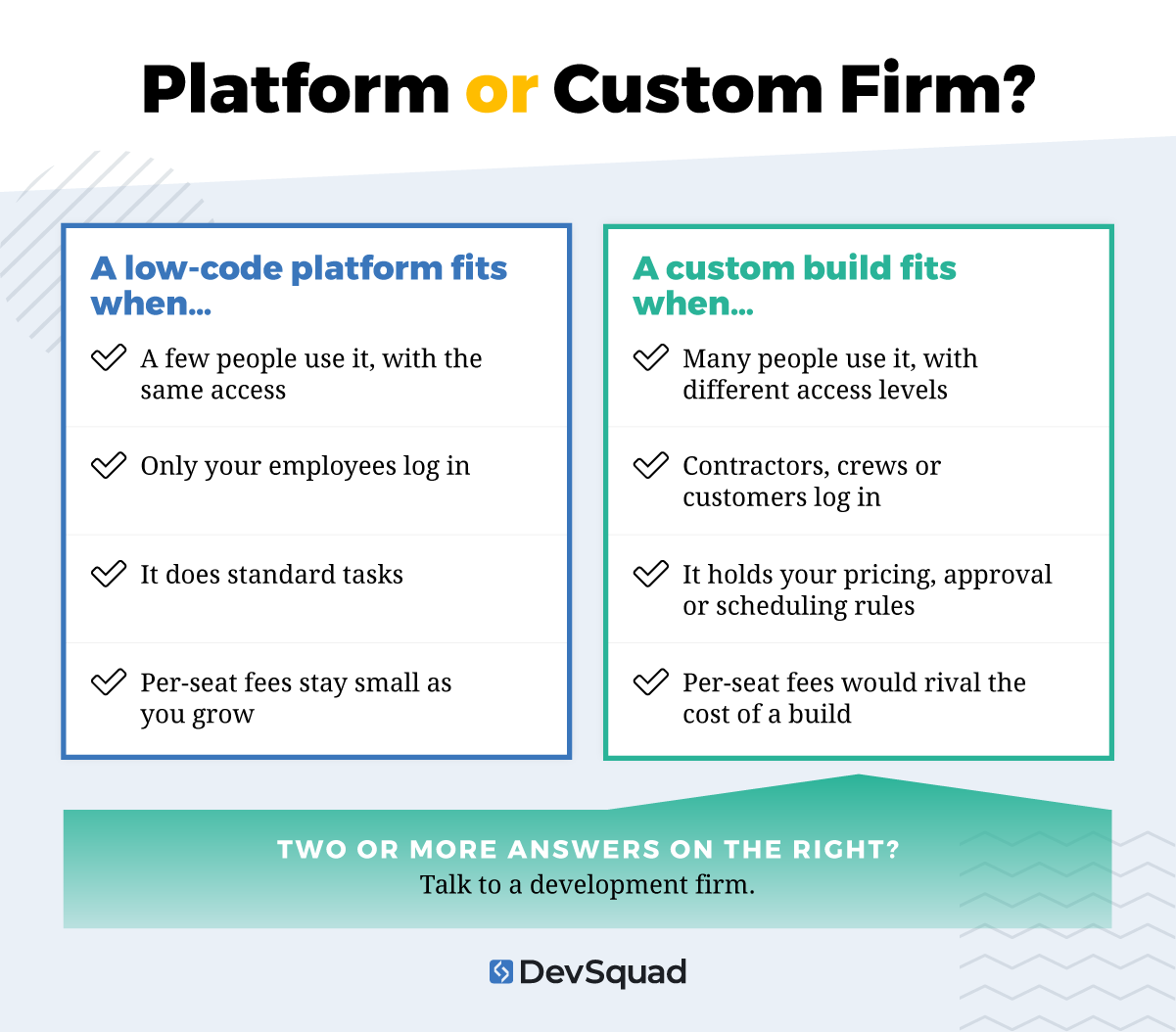
The decision between a platform and a custom build starts with your process. If it looks much like your competitors' processes, a platform or an off-the-shelf tool will probably serve you well. If your process is part of the reason customers choose you, it's worth having software built around it.
Choosing a tool first and reshaping your process to fit it tends to backfire, so map the process before you compare options. These four questions make the decision clearer:
How many people and roles will use the tool? A handful of users with the same access fits a platform well.
Will anyone outside your company log in? Access for contractors, crews or customers points toward custom software. Permissions, expiring accounts and audit trails get complicated quickly.
Does the tool hold the rules for how you price, approve or schedule work? Those rules are company knowledge, and they belong in code you own.
How will per-seat fees grow with your team? Compare the platform's fees at your expected size with the cost of a custom build.
If every answer points to a platform, start there and keep the rest of your budget in reserve. If two or more answers point to custom software, talk to a development firm before you invest months in workarounds. A platform that doesn't fit will need a new workaround every time your process changes.
You may also end up with a mix. A custom system can sit on top of software you keep, alongside business process automation tools that handle simpler jobs.
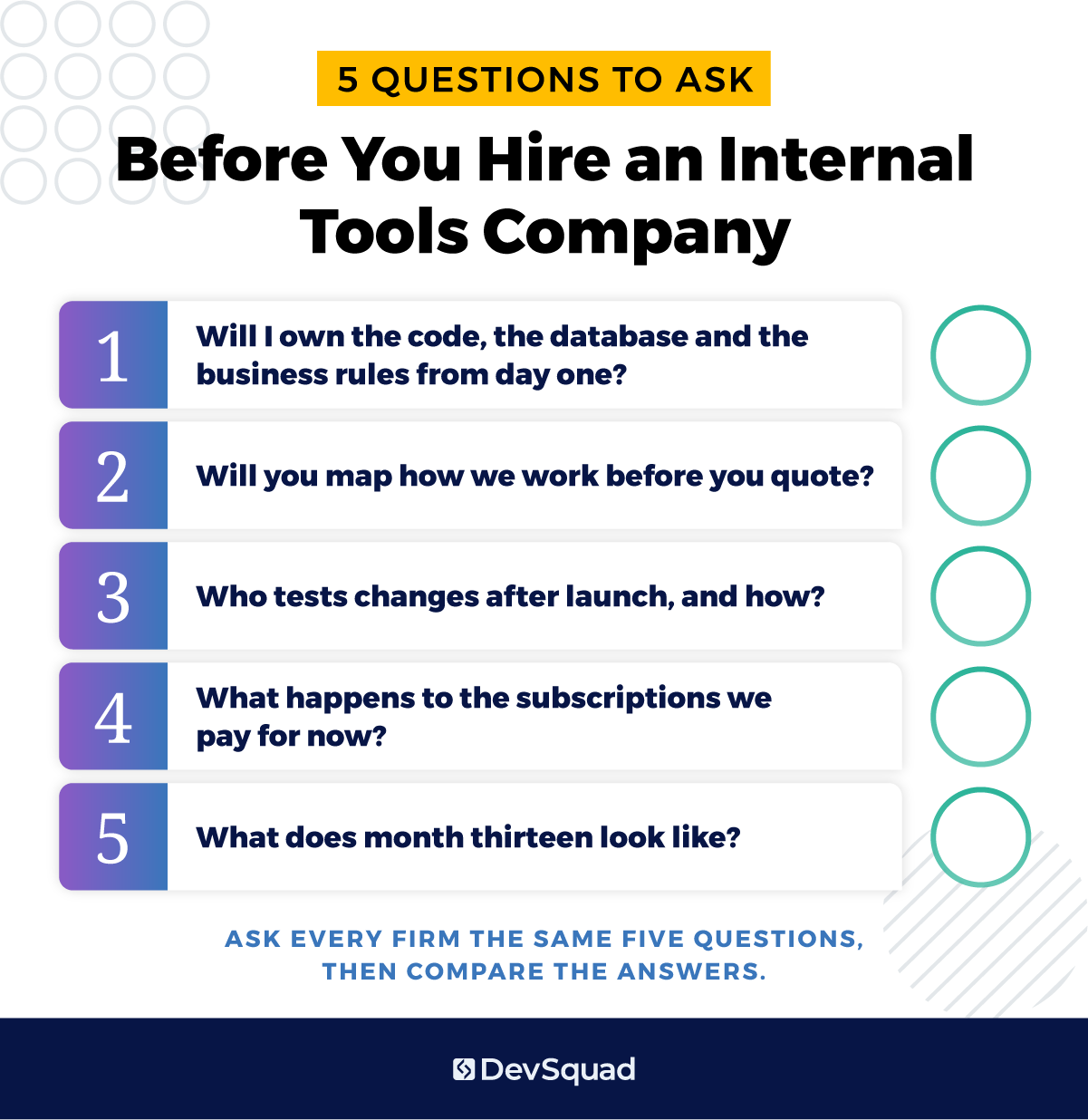
5 questions to ask before you hire an internal tools company
These five questions help you tell firms that build working operational software apart from firms that mainly design screens.
Will I own the code, the database and the business rules from day one?
Ownership comes down to three things. The source code sits in a repository you control, and the data lives in your own database. You also pay no license fee to keep the tool running.
Your business rules matter just as much. The logic behind your pricing, approvals and scheduling is competitive knowledge, so ask how the firm will document it for whoever maintains the tool next. A useful test is to ask what you would keep if you ended the relationship tomorrow. A firm that answers clearly and quickly has usually planned for that day.
Will you map how we work before you quote?
A quote based only on your feature list produces software that matches the list rather than your operation. Your team's real process usually includes exceptions and workarounds that never make it onto a list. A good firm sits with the people who do the work and standardizes the process before anyone writes code.
"You cannot compare locations that do not work the same way. At a multi location consignment retail franchise, ten stores had no shared system at all. Some had bought software, some had bought different software, and some had none, and each owner ran the place by their own rules. One system had to come before any comparison." — Sandro Boçon, Product Manager, DevSquad
If a firm quotes without that step, expect the estimate to grow once the real process comes to light.
Who tests changes after launch, and how?
Ask whether the firm writes automated tests, which are pieces of code that check your business rules every time something changes. Then ask who runs QA when a change goes live. Errors in internal tools rarely crash anything. A broken pricing calculation keeps running until someone notices the wrong numbers at month-end.
A distribution company came to DevSquad with an internal ordering tool a previous contractor had built in a hurry. Its pricing rules were scattered through the code, and nothing was tested, so every small change broke something in invoicing. The team spent the first month writing tests around the existing behavior before adding a single feature. After that, change requests stopped showing up as month-end surprises.
Ask to see an example of a test from a past project. A firm that can't produce one is leaving the testing to your team.
What happens to the subscriptions we pay for now?
An honest answer usually includes keeping some of them. A good firm will tell you which subscriptions to retire, which to keep and which to connect to the new system. Be cautious about any promise to replace everything in one release, since some tools hold years of history you'll still need.
"Some software charges you for every request your business makes. A backup power services company was paying their platform per API call, so the more the company worked, the more the software cost. We could not remove the tool entirely, but we moved the daily work into a custom product and cut the request volume sharply. Growth should not make your software bill grow with it." — Caio Alves, Product Manager, DevSquad
Before you sign, ask for a written list of the tools that will be retired and the date each one goes.
What does month thirteen look like?
Month thirteen is shorthand for life after launch, once the first build is finished. Ask who will be on call, how new changes are scoped and priced, and whether you can reduce the size of the team. Find out what happens when the person who requested the tool leaves your company. DevSquad clients can move to a maintenance plan after launch, and every firm on this list should be able to describe its own version. A strong answer names the people involved, their response times and how the monthly cost changes when you scale down.
Who we left out, and why
Plenty of internal software development companies didn't make this list, and we left out three groups deliberately. Large staff-augmentation and offshore firms compete mainly on headcount and price. Talent marketplaces connect you with individual contractors whom you then manage yourself. Some fixed-price shops offer no evidence of internal tools work beyond rankings they published themselves.
Any of these can still be the right choice for you. A marketplace contractor, for example, can work well if you already employ an engineering manager to run the project. None of them met our three-source standard for internal tools, though. For a broader custom build, see our list of the best custom software development companies.
Where to start
Start with the one manual process that costs your team the most hours each week. Write down every tool and spreadsheet it touches, who uses each one, and roughly how many hours the process takes.
Bring that page to your first call with any internal tools agency on this list. The strongest firms will ask detailed follow-up questions, and those conversations will quickly show you which firms fit.
For ideas on where to begin, these internal use software examples show what other operators have built. When you're ready to discuss your own process, see how DevSquad approaches custom software.
Internal tools development companies FAQs
Cost depends on the firm and the scope of your tool. Published minimums on this list range from $5,000 at Pell Software to $50,000 at Susco Solutions and Six Feet Up. Published hourly rates run from $100 to $300. DevSquad offers Rapid Prototyping and month-to-month development subscriptions with no long-term contracts. Ask each firm to break its quote into discovery, build and support costs so the numbers are comparable.
Retool is a good choice when the tool is a standard panel over one database and someone on your team can maintain it. A development firm makes more sense when the tool holds your pricing, approval or scheduling rules. The same applies when outside users need access or per-seat costs keep rising. Some companies use both, with a platform for simple screens and custom code for the logic unique to their business.
At DevSquad, the first version of an internal tool typically launches in 3 to 9 months, and smaller, focused tools move faster. Crew 360's first working version was in Tarheel's hands in under three months. Scope affects the timeline more than any other factor. Starting with the single process that costs you the most hours, then expanding once it works, keeps the first version on a short schedule.
You should, provided your contract says so. Make sure it gives you the source code in a repository you control and your data in your own database. It should also let you run the tool without a license fee. Ask the firm to document your business rules as part of the project. That way, a different developer could take over later without rebuilding the tool from the beginning.
It can replace many of them, though rarely all. Crew 360 retired a paid time-tracking subscription and moved that work into its own platform. Some tools are worth keeping and connecting instead, especially when years of history live inside them. Ask any firm for a written plan that shows which subscriptions end, which stay and when each change will happen.

Rafael Lunardelli is the CTO at DevSquad and founder of Pinguim Academy. With nearly two decades in software development, he specializes in scalable systems, DevOps, QA, and modern PHP development. Rafael has led enterprise projects at KPMG and now teaches thousands of developers through his Laravel-focused courses, conference talks, and online content.