
You already know you need a SaaS product. What you don't know yet is whether you should build it, or whether something that already exists could do the job for less.
That's a different question than the one most SaaS development guides answer. Most assume you've already decided to build, and jump straight into definitions, tech stacks, and step-by-step processes. If you're past that question, this guide covers all of that too, further down.
Over the years, I've worked with SaaS companies of every size. I've found the build-versus-buy decision is just as critical as validating the MVP itself. Really understanding your actual options and your resources first is what determines which one is right for you.
Below, we'll walk through how to make that call. We'll also look at three real SaaS products DevSquad has built, including two that started with someone else's failed attempt. And we'll lay out what an engagement with a development agency actually costs, in plain terms, not a vague range.
Build vs. buy: how to decide
Before you weigh in-house teams against agencies against freelancers, there's a decision that comes first. Should you build custom software at all, or is there a SaaS tool that already does what you need? A lot of budget gets wasted by skipping straight past this question.
What are you actually replacing?
If you're trying to replace one specific tool that almost fits, look hard at whether "almost" is a real dealbreaker. It might just be a feature request you haven't made yet.
A mid-market company we've talked to nearly signed off on a custom scheduling tool. A closer look showed the SaaS platform they were unhappy with actually supported the workflow they needed. They'd just never turned the feature on. If you're replacing a manual process, a spreadsheet, or nothing at all, that's a much stronger case for building.
"Don't do it if you don't need to do it. Will it save time? Will it reduce costs? Will it generate revenue, or any extra value to the company? Can't it be done with simple software that we already have? Those are the questions to ask." — Nelson Pereira, Technical Product Manager, DevSquad
How much product management capacity do you actually have?
Custom software doesn't stop needing attention at launch. Someone has to own the roadmap and keep it moving, whether that's an in-house hire or a partner acting on your behalf. A roadmap without a named owner drifts into a list of half-finished features nobody prioritized. A development partner can only build from the priorities you actually hand them. If nobody can take that ownership on right now, buying is usually the safer call.
How long can you afford to wait?
Off-the-shelf software is live today. A focused custom build, even with the right partner, typically takes three to nine months. If a competitor is closing the gap this quarter, that timeline alone can rule out building, no matter how strong the long-term math looks.
Does this need to be a differentiator, or does it just need to work?
Building usually wins when the software is core to how you win. If it's a back-office function every company needs and nobody competes on, buying almost always wins instead. A billing engine that lets you price in a way competitors can't match is worth building. A time-tracking tool your ops team uses internally, with no customer ever seeing it, usually isn't. Scalability is part of this calculus. An off-the-shelf tool scales by upgrading a subscription tier, while custom software scales exactly the way you design it to, for better or worse.
Getting started is its own hurdle, separate from any of the above.
"The biggest hurdle is having the patience to get that first start going. It's an investment of time and money to get your first automated process running. But once you push past that barrier, the patience, and the fear of building your own software, you start to see all the possibilities and advantages of having something that's truly yours." — Rafael Lunardelli, CTO, DevSquad
If buying isn't the right fit, the next decision is who builds it for you, which is where the rest of this guide picks up.
What is a SaaS application?
A SaaS application is any software that utilizes the software-as-a-service business model, meaning that clients pay a monthly subscription or annual contract value to receive software and customer support.
The term SaaS is frequently used in the business-to-business (B2B) arena. SaaS products are used by corporate professionals and small business owners every day. Some of the most common types of SaaS products include customer resource management systems (CRMs), marketing software, and accounting software.
Key benefits of developing a SaaS application
A SaaS application affords your business several key benefits:
Popularity: About 75% of business applications are now SaaS. By choosing the SaaS model you can meet users' expectations.
Costs: SaaS applications are less expensive to develop than on-premise solutions.
Delivery: SaaS products can be easily delivered to customers via a cloud provider. Immediately upon purchase, customers can unlock the right features according to their plan.
Maintenance: Especially when built with modern frameworks like Laravel and Vue.js, SaaS platforms can be maintained in a cost-effective way. Product teams can add new features quickly.
Scalable: SaaS products are far more scalable than traditional software. Through optimizing the performance of your servers and features, you can continuously grow your user base.
Real SaaS builds: DevSquad case studies
If you've made it this far, you've likely already decided building is the right call, or you're close. Case studies in this space tend to be vague, "we helped a client grow," with no name, no number, and no way to check it.
That kind of proof is easy to write and impossible to verify. It's worth being suspicious of it on any agency's site, including this one, when names and numbers are missing. Here are three real, named SaaS products DevSquad has built, what the problem actually was, and what happened.
Swell: rebuilding after two failed dev teams
Two prior development teams had already tried and failed to deliver a stable, market-ready product for Swell. DevSquad rebuilt the customer experience platform from the ground up, streamlined the feature set, and redesigned the product strategy. The platform relaunched in just three months. Swell reached profitability quickly after the relaunch. The company has continued expanding since, adding new web, desktop, and mobile applications, with DevSquad continuing on as the ongoing development team.
Why build was the right move: two different teams had already tried to force an existing approach to work, and failed both times. At that point the problem wasn't the tech stack, it was the product strategy underneath it, and no off-the-shelf tool fixes that.
"They take time to understand our own go-to-market strategy and build our product with that in mind." — Drew Sparks, Cofounder and CEO of Swell
StatSocial: launching a new product in under 6 months
StatSocial needed to launch a new social insights platform, Silhouette, while its internal team stayed focused on running existing products. They tried building it in-house first with a templated UX and hit a wall. There wasn't enough bandwidth to build it properly without pulling focus from everything else already running. DevSquad stepped in to lead product strategy, redesign the user experience, and collaborate directly with StatSocial's own developers. The first version of Silhouette launched in under six months, helping StatSocial bring the product to market one to two years faster than expected.
Why build was the right move: there was no SaaS product to buy here. Silhouette's whole value was that it didn't exist yet. The real constraint was internal bandwidth, not whether the idea was technically feasible.
"We probably saved one to two years in terms of development time. I'm excited that we have a partner." — Michael Hussey, Founder and President of StatSocial
CountingWorks PRO: scaling past infrastructure limits
CountingWorks PRO needed to overcome infrastructure limitations, UX issues, and the ongoing friction caused by multiple previous development teams. DevSquad rebuilt the platform from the ground up, focused on scalability, performance, and maintainability. The redesigned product increased platform capacity 10X, reduced customer support friction, and let leadership focus on growing the business instead of managing developers.
Why build was the right move: the product already existed and already had paying customers, so this was never actually a build-vs-buy decision. It was rebuild vs. keep patching something that was actively losing them capacity every month it stayed as-is.
"I have peace of mind that I found a partner, not a vendor. Someone who is there for the long run." — Lee Reams, CEO at CountingWorks
Three different starting points, one common thread: by the time DevSquad got involved, none of them were choosing between build and buy anymore. They were choosing who to trust to actually build it.
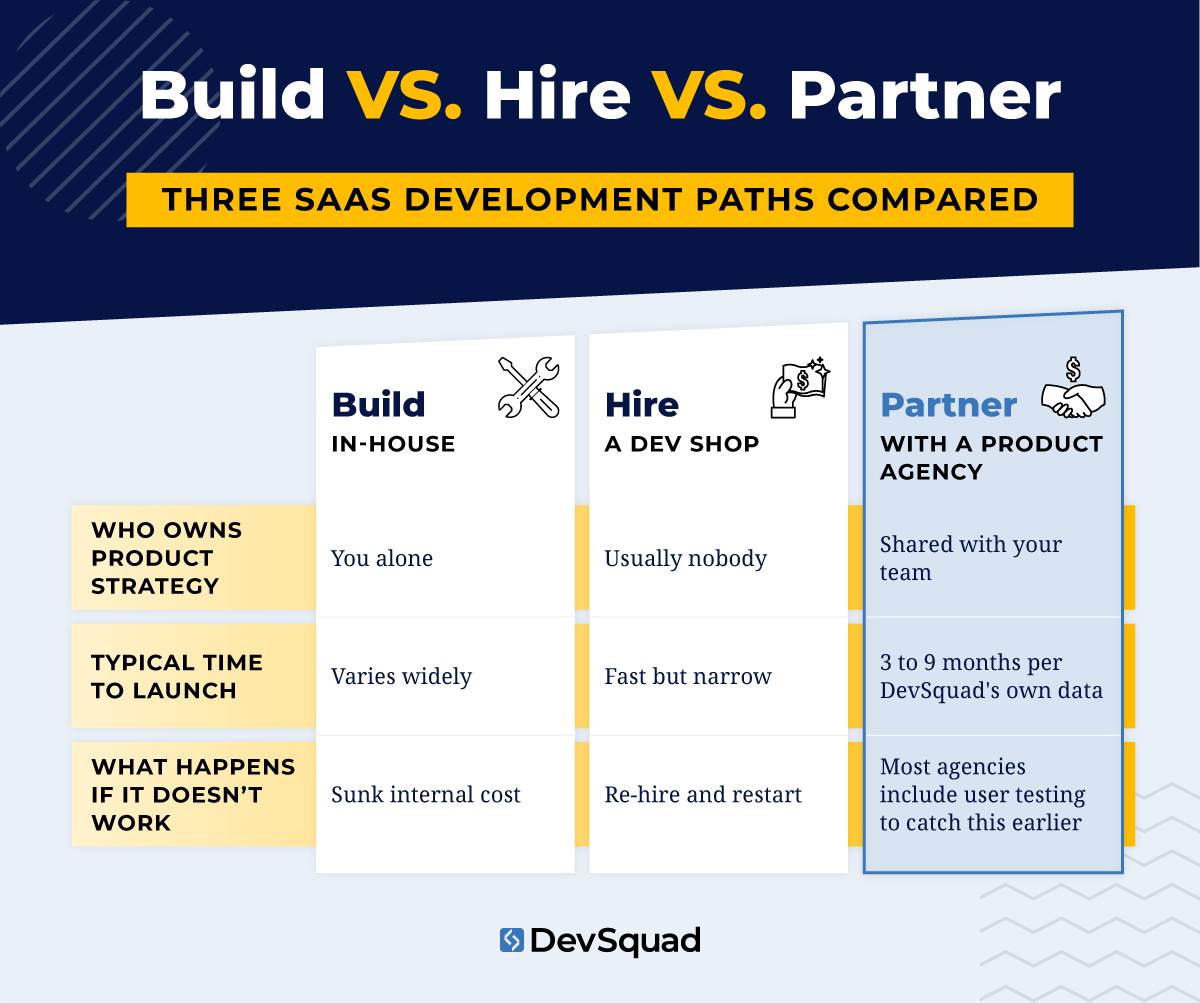
Pricing and engagement models for SaaS development
Typically when it comes to pricing, SaaS development pages give you a range and move on, "$50,000 to $250,000." There's no explanation of what changes the number, what you actually get, or what happens if it's not working out. That's not enough to make a real budgeting decision against.
Here's how it actually works with a development agency, using DevSquad's own model as a concrete example instead of a hypothetical one.
DevSquad charges a fixed monthly fee per Squad. The size of your Squad, and so the fee, depends on how many developers, product managers, QA analysts, and designers your product actually needs. That's decided after an initial call rather than guessed upfront. You pay month to month. There's no multi-year contract locking you in, and no penalty for scaling the team up or down as the product's needs change. Compare that to the vague ranges most competing guides publish. A number with no visibility into team composition, contract length, or your options if the relationship isn't working tells you very little.
Part of what keeps that fee reasonable is where the software development services actually come from: LATAM-based talent combined with a library of pre-built components. Together, that gets you a full cross-functional team for close to the cost of one U.S.-based developer.
The bigger number to watch isn't the monthly fee anyway. It's what you're actually committing to.
"Businesses should not attempt to build custom software if they think it is a 'pay once and done' situation. When you build custom software, you are not just buying a tool. You are becoming the owner of that software." — Mauricio Kiyama, VP of Product, DevSquad
When I look at a SaaS pricing or engagement page, the number that matters least to me is the sticker price. What matters more is whether it's a monthly commitment you can walk away from, or a multi-year contract you'll be defending in a board meeting.
Most SaaS builds through an agency like DevSquad follow a five-stage arc:
Product strategy session: defining the plan before any development starts.
Prototyping and real user testing: with the option to stop here if the testing doesn't hold up.
MVP development: DevSquad's own average is about six months to a launch-ready version.
Ongoing improvement: after launch.
Handover: for teams that eventually want to bring development in house.
That last option matters more than it sounds. A real engagement model tells you upfront what happens if you want to leave, not just what happens if you stay.
None of this replaces doing your own math. A pricing page that tells you the billing structure, the team composition, and the exit path is a fundamentally different kind of answer. A vague range with no explanation attached tells you almost nothing.
For context, hiring even one experienced full-time developer in the US typically runs well past $120,000 a year in salary alone. That's before benefits, before a product manager, before a designer, and before anyone is testing whether users actually want what gets built. A Squad-based monthly fee is doing the work of several of those hires at once. That's a big part of why the total looks so different from a DIY in-house budget on paper.
Key roles and responsibilities for SaaS development
Below, we take a look at the essential roles required to develop a SaaS product, as well as their main responsibilities.
 Product strategists
You’ll want a few people on board for product strategy so you don’t operate on assumptions. Founders, co-founders, CTOs, financial advisors, and agency strategists can all assist in finding product-market fit.
Responsibilities:
Market research
Clarifying the product vision
Determining technical feasibility
Keeping developing under budget
Defining key metrics to track
Product manager
You’ll also need a product manager on board to both manage and support your developers. Ideally, this person will have technical experience and might have been a developer in the past, so they truly understand how to manage everyone effectively.
Responsibilities:
Create and maintain the backlog
Develop the product roadmap
Manage the entire product development lifecycle
Collaborate with all other roles throughout development
Track and analyze product metrics
Collaborate on go-to-market messaging
Developers
Depending on the complexity of your product, the size of your team, and the development frameworks you choose, you will need a combination of frontend, backend, and full-stack developers.
Responsibilities:
Write clean and maintainable code
Develop features according to the product roadmap
Test and debug code
Review code
Work with DevOps and QA teams
UX designer
The UX designer is a critical part of the success of your product. You want a designer who can create Silicon Valley-style design and meet user expectations for software that is intuitive and easy to learn.
Responsibilities:
Conduct user research
Create user personas and user journey maps
Design wireframes, prototypes, and mockups
Collaborate with developers to ensure design clarity
Test and optimize UX
QA testers
It’s important to also have QA testers on your team. While developers should test their own code, it’s not enough to only have developers available for testing. QA engineers specialize in finding bugs through a variety of methods.
Responsibilities:
Develop test plans and test cases
Execute manual and automated tests
Perform regression testing during product updates
Report on bugs
Collaborate with developers to proactively ensure quality
DevOps engineers
DevOps engineers manage software deployment and continuous delivery. They also ensure the performance of your product and servers.
Responsibilities:
Implement continuous integration and continuous deployment (CI/CD) pipelines
Improve infrastructure provisioning and configuration
Manage cloud services and resources (AWS, Azure, etc.)
Implement containerization with Docker nd Kubernetes
Improve uptime and disaster recovery practices
Top hiring methods for SaaS application development
If you've decided building makes sense, the next question is who actually builds it. You need to hire all of the essential roles and get everyone working together on the same page. That's true whether it's a team you hire in house or one you bring in through a partner.
Here are the top hiring methods.
In-house teams
For established companies, in-house teams are the most common method for managing SaaS development. Sometimes, talent is hired on in a contract position, but usually people are full-time employees.
Pros:
When you hire in-house, you guarantee that employees are working 100% on your product and can devote all of their working hours to your company. You can create in-house development playbooks, securely own all of your proprietary data, and have full control over the entire development process.
Cons:
Managing a SaaS development team requires a lot of experience. Most new startups lack management expertise. If you attempt to assemble an in-house team yourself, you run the risk of failing to keep everyone on track and progressing towards delivering value to users. You could end up wasting hundreds of thousands of dollars very quickly.
Product agencies
Another option is to hire a software development agency that manages the process end-to-end. This company should offer all of the talent you need as well as optimized development playbooks to ensure a fast go-to-market speed.
Pros:
Product agencies fully manage the entire development process, so you can focus on customer strategy, marketing, and sales. The right agency should offer services to help you validate your product, including strategy workshops, prototyping, and user testing. They should help you deliver value to your end users—and not just focus on coding.
Cons:
When working with a SaaS development agency, you won’t have complete control over the product. Your agency will be utilizing their favorite development practices and calling a lot of the shots. Make sure to communicate with them regularly about the customer strategy to ensure that you’re aligned.
You could run into issues if and when you want to take over the product and develop it in-house. So before you select a company, make sure they offer smooth handover and will train your team as needed.
Freelancers
You can also assemble a team of freelancers, or add freelancers to your in-house team to quickly augment your staff when you’re behind on hiring.
Pros:
It can take just a few days to hire a freelancer from a platform like Toptal or Turing. Many of these freelancer networks offer some sort of vetting process, such as skills tests and interviews, so much of the vetting is done for you. This way, you can quickly access the talent you need and keep SaaS development team moving forward.
Cons:
Of course, just because a freelancer is vetted doesn’t mean they will seamlessly fit into your existing team. They’ll come with their own favorite frameworks and their own ideals surrounding best practices. It can take a lot of time to get someone onboarded, and there’s no guarantee that they’ll be able to deliver what they promised during the interview.
Outsourced dev shops
The last option is dev shops. These companies are similar to product agencies in that the process is fully managed, but they tend to focus less on product strategy and more on delivering good code.
Pros:
On the plus side, if you choose the right dev shop, you’ll get optimized, lightweight code. The team will likely spend their time making your technology more scalable and managing microservices, message queues, cloud infrastructure, and containerization. The uptime and performance should be high.
Cons:
On the downside, dev shops that overly technical in their focus tend to ignore product strategy. They’re so busy perfecting performance that they completely fail to see the true purpose of the product. They don’t develop prototypes, ask deep questions about your industry, or speak directly with target users.
If you work with this type of agency, you’ll need to constantly wrangle their efforts and keep them on track with delivering real value.
The best languages and development frameworks for SaaS applications
To develop a SaaS application, whether a web app, mobile app, or desktop app, you need the right frameworks. These are the best for building SaaS:
Laravel - Laravel is our top choice for SaaS application development. Laravel makes it easy for developers to write lightweight, readable code. Plus it has tons of ready-to-go modules that reduce the cost of your project, allowing developers to quickly implement essential features instead of coding everything from scratch.
Vue.js - Vue.js is the top JavaScript framework for web applications. Vue.js is simple to write and maintain for skilled JavaScript and HTML developers.
Node.js - Node.js makes JavaScript quicker, in order to eliminate wait times between requests. The result is a faster, smoother experience for your end user. You also get the ability to use JavaScript as a unified programming language for the server side and client side of your application.
React - Powerful for both web applications and mobile applications, React helps us create intuitive and simple user interfaces at a much faster speed than other UX options.
Electron - Electron is a framework for creating native desktop applications using languages designed for websites, primarily HTML, CSS and JavaScript. By enabling developers to use these widely known languages to build web apps, Electron allows developers to save time and write code that works across multiple operating systems (iOS, Windows, and Linux).
How to build a SaaS application
There are 9 key steps to building a SaaS application.

Ideate the problem: Start off with a strategy workshop where all stakeholders discuss the target user and define their main problems. Stick to three to four related problems you can solve with one platform.
Design a prototype: Once you’ve determined the ideal solution for your target user, have your UX designer create a prototype. We highly recommend that you start off with a low-fidelity prototype first so that designers can focus on the core user flows without worrying about design elements.
Validate your prototype with real users: Next, find target users with our favorite platform, UserTesting. Show them your prototype and get their unbridled feedback. Develop a high-fidelity prototype once your life one is validated and get feedback from additional users. Make sure that the prototype solves their most pressing problem and that they’re willing to pay for it.
Create the backlog: Now it’s time to craft the backlog required to develop this product. Add all of the essential development tasks to your backlog in Jira.
Develop the first version: Work together as a team to develop the minimum viable product, also known as Version 1 of your product.
Test your application - Have your quality assurance team test the product, using both automated and manual testing methods. Have QA testers explore the app ad hoc as real users would. Fix any issues.
Deploy your application: After the initial round of development and testing, it’s time for your DevOps team to securely deploy your application to the cloud. Launch it with beta testers, sell it to target companies, and start generating revenue.
Develop new features: As you go along, you’ll need to continuously add new features from your roadmap. Prioritize features that have a high impact on your target users and will encourage people to sign up.
Continuously test and deploy updates: Make sure to also test your app continuously as well. Your DevOps team should deploy updates weekly or every two weeks. Hot fixes will also be required to resolve bugs that are detected by your QA team or users.
SaaS application development best practices
To develop a SaaS app that competes to win, follow these essential best practices.
Use a dual-track agile approach
It’s not enough to follow an agile style approach to SaaS development. You need to take things up a notch with dual-track agile.
Dual-track agile offers a way to continuously improve your product after you launch Version 1. Your strategy and design team will concurrently run delivery sprints so that all new ideas are vetted before they get added to the product roadmap. Meanwhile, the delivery team works on building ideas that have already been approved.
Create a prototype and test it with users
Make sure that you prototype your concept—no matter how confident you feel about your SaaS idea or how well you know your audience.
The prototyping and user testing process is essential for reducing business risk. It’s your chance to get real user feedback before you invest tens of thousands of dollars into development.
Rely on the Jobs to Be Done framework
If you get stumped when coming up with a solution to users’ problems, try the Jobs to Be Done framework (JTBD).
JTBD helps you clarify your target audience and product value by focusing on the tasks that users want to complete. The simplest example is this: people don’t buy a hammer because they want a hammer, but because they want to hang a picture.
Write a list of the most important goals users want to achieve with your platform. Break those goals down into tasks. Now, you’ve got the start of a user story map that can guide your MVP.
Hire a technical product manager
Product managers struggle to manage engineers if they don’t have technical expertise and prior development experience. That’s because they try too hard to control the team, when what they really need to do is support developers.
Google figured this out over 20 years ago, when they kickstarted their Associate Product Manager program to train up computer scientists to be technical PMs.
But unfortunately, too many companies are still giving PM roles to people who only know how to focus on business strategy. You can have your founder and product strategist focused on business initiatives. Make sure that whoever is in charge of devs has technical skills.
Adopt a product engineering mindset
It’s dangerous to hire and build a team of developers that is focused too heavily on technical details. If they only obsess over delivering error-free code, you’re in trouble.
Your engineers should be focused on building a product—not coding. It’s a mindset shift. Coding is secondary to the ultimate goal of building useful features.
You can help your engineers make this mindset shift by continuously speaking about user needs in meetings. Make sure that all technology improvements have a real purpose.
Use technology that makes it easy to put users first
Some frameworks make it easier to focus on users than others. Laravel is the ideal development framework for SaaS companies for a variety of reasons. The excellent documentation allows developers to make decisions according to architecture best practices.
The platform focuses heavily on the developer experience and has a ton of pre-built fundamental SaaS features so your team can focus on building functionality for your unique target audience.
Cost of SaaS application development
The average cost to develop a new SaaS application is $75,000 to $100,000. This rate is based on hiring a SaaS development agency for a time period of 5 to 7 months—the ideal timeline for launching a minimum viable product.
Of course, many SaaS applications cost far more to develop, especially if the agency isn’t skilled in MVP strategy or takes too long to develop the concept.
When developing with an in-house team, the cost will also be much higher, as you’ll need to pay for all of the required benefits for full-time employees. If you're vetting vendors, check out our shortlist of the best SaaS development companies.
FAQs about SaaS application development?
Still need more insights? Check our answers to frequently asked questions about SaaS application development.
A SaaS application refers to the business model of a recurring subscription (annual or monthly) for cloud-based software. Most SaaS applications operate as web apps, meaning they’re accessible through any modern web browser. However, some SaaS companies also offer a desktop application.
A web application, on the other hand, doesn’t refer to the business model, but rather any application accessible via a web browser. Many ecommerce websites and social media platforms are actually web applications.
The SaaS business model has infiltrated every industry and department, from accounting to marketing and beyond. Some of the world’s most successful SaaS companies include Salesforce, Stripe, Adobe, HubSpot, Shopify, Mailchimp, Atlassian, Zoom, Grammarly, Miro, Dropbox, and Slack.
When launching a brand new SaaS company, you can choose to create an in-house team, hire freelancers, outsource to a dev shop, or hire a product development agency. In theory, all of these methods are viable. The right answer comes down to how much funding you have and how much management experience you have. If you have millions in funding, it usually makes sense to hire an in-house team. But if you’re bootstrapping your startup, you’re better off hiring a product agency that can guide you through idea validation, development, and continuous improvement.
For established companies, it makes sense to hire talent in-house. This way, you get full control over the development process and you can build and optimize your own development playbooks over time. If you're behind on hiring, choose a freelance platform that vets talent with skills tests. If you're launching a new product, such as an internal-use application or API, work with a product development agency, who can fully own that product and launch it quickly. If you're a private equity-backed operator managing this decision across a portfolio, DevSquad's PE Value Creation Squad is built specifically for that kind of engagement.
The most affordable way to create and launch a new SaaS product is with a product development agency that offers strategy, including workshops, prototyping, and real user testing. This way, you’ll get all of the development talent you need to work on product-market fit and launching an MVP. You’ll lower your expenses and business risk by consolidating strategy and development under a single vendor.
It depends on your Squad size, but the billing structure matters as much as the number itself. A well-structured agency engagement charges a fixed monthly fee sized to the team your product actually needs. That's billed month to month, not locked into a multi-year contract. See the Pricing and engagement models section above for the full breakdown of how that works.
A product agency owns strategy alongside code, running discovery, prototyping, and user testing before writing production code. A dev shop tends to focus more narrowly on delivering clean, optimized code to a spec you hand them. There's usually less emphasis on whether that spec solves the right problem. Both can produce good software; the difference is who's responsible for deciding what gets built in the first place. A practical way to tell them apart before you sign anything: ask whether user testing is part of the proposed process. If testing isn't mentioned, you're likely looking at a dev shop.
Yes. Swell, StatSocial, and CountingWorks PRO are three real, named examples covered earlier in this guide. Each had a different starting point, a failed prior attempt, a bandwidth constraint, and an infrastructure ceiling, and each has a specific, verifiable outcome. For more examples across other industries, see DevSquad's SaaS case studies.
Building a SaaS business? Explore DevSquad’s unique approach to strategy and development.
Or, learn more about what sets our SaaS development agency apart.

Dayana Mayfield is a SaaS copywriter and content marketer specializing in SaaS marketing, positioning, and go-to-market strategy. She has consulted for over 195 SaaS companies, focusing on both traffic and conversions. She has been featured in Entrepreneur, Forbes, and Business Insider. Outside of work, Dayana writes SciFi novels and spends her evenings surviving auditions, rehearsals, and tech week as a proud theater mom.