
Do you feel like your product is starting to collect dust? Maybe the UI looks outdated, new users keep dropping off at the same point, or your team is drowning in support tickets and technical debt.
You’re not alone—and there’s a way forward.
Plenty of SaaS teams reach this inflection point. With the right strategy, a product redesign can re-energize your roadmap, strengthen user satisfaction, and position your product for continued success. Don’t believe us, take these product redesign examples as proof that successful transitions are possible.
Once you’re convinced, this post is here to prepare you for the process. We’ll walk you through what’s involved in a successful redesign—when to do it, how to plan, what to avoid, and how to execute with confidence.
What’s involved in a product redesign?
A product redesign realigns your digital product with user expectations, business goals, and current technology standards. For SaaS products, this process strengthens usability, performance, and visual consistency—often without disrupting backend systems or existing users.
Here’s what’s typically involved:
1. Aligning product strategy
Redesigns begin with a clear strategy. Teams revisit core user needs and business objectives to confirm the product is solving the right problem and supporting business growth. This foundation shapes design and development decisions throughout the process.
2. Redefining UX and UI
The design phase includes updating screen layouts, user flows, and interaction patterns. This work improves usability and supports intuitive navigation. High-fidelity prototypes help stakeholders and users visualize the updated experience before a single line of code is written.
3. Rebuilding the front end
Modern frameworks like React or Vue support faster, more flexible interfaces. The frontend rebuild matches the new designs and improves performance, accessibility, and maintainability across the product.
4. Integrating with existing systems
Redesigns often require seamless integration with legacy systems. The development team creates new APIs or extends current ones to support a smooth user experience—without introducing instability or downtime.
5. Launching through progressive rollout
The new interface rolls out to a small segment of users first. This phased approach helps teams gather feedback, monitor performance, and avoid introducing risk across the entire user base. Rollbacks remain an option during early rollout stages.
A full product redesign combines design thinking, technical strategy, and incremental execution. Done well, it enhances your product’s appeal, increases user satisfaction, and extends the lifespan of your technology investment.
When should you consider a product redesign?
A product redesign can drive significant improvements in user experience, engagement, and product performance. But it’s not always easy to determine the right time to make the move. The most successful teams recognize specific signals that indicate their product is due for change.
Consider a redesign when you notice the following:
Users are struggling with your interface: When support tickets, user feedback, or usability testing reveal friction in core workflows, it’s time to act. Clunky navigation, confusing page layouts, or outdated design patterns slow users down and increase churn.
Your product looks outdated: Visual design has a direct impact on credibility and user perception. If your UI feels stale or inconsistent with modern standards, you risk falling behind competitors—regardless of how powerful your features are.
User needs have changed: As your customer base matures, their priorities shift. New workflows emerge. Old features may no longer be relevant. When usage patterns change, your product must adapt to remain valuable.
You’re shifting your positioning or entering a new market: Changes in target audience, industry, or go-to-market strategy often require a new product experience that aligns with those shifts and meets new user expectations.
Your frontend technology is slowing you down: Technical debt in the frontend—whether it’s outdated frameworks or layers of patchwork code—can make even small updates difficult. When your team spends more time maintaining the UI than improving it, it's time for a redesign.
Your brand has evolved: A brand refresh or repositioning requires consistency across all user touchpoints. If your product’s look and feel no longer matches your identity, updating the design brings alignment and reinforces brand trust.
Spotting these signals early allows you to plan a proactive redesign.
The 3 types of product redesigns
Not every redesign requires rebuilding your entire product from scratch. The best approach depends on the severity of the issues you're solving, the scope of your goals, and the internal resources available. Broadly, there are three types of product redesigns—each with a different level of depth, effort, and impact.
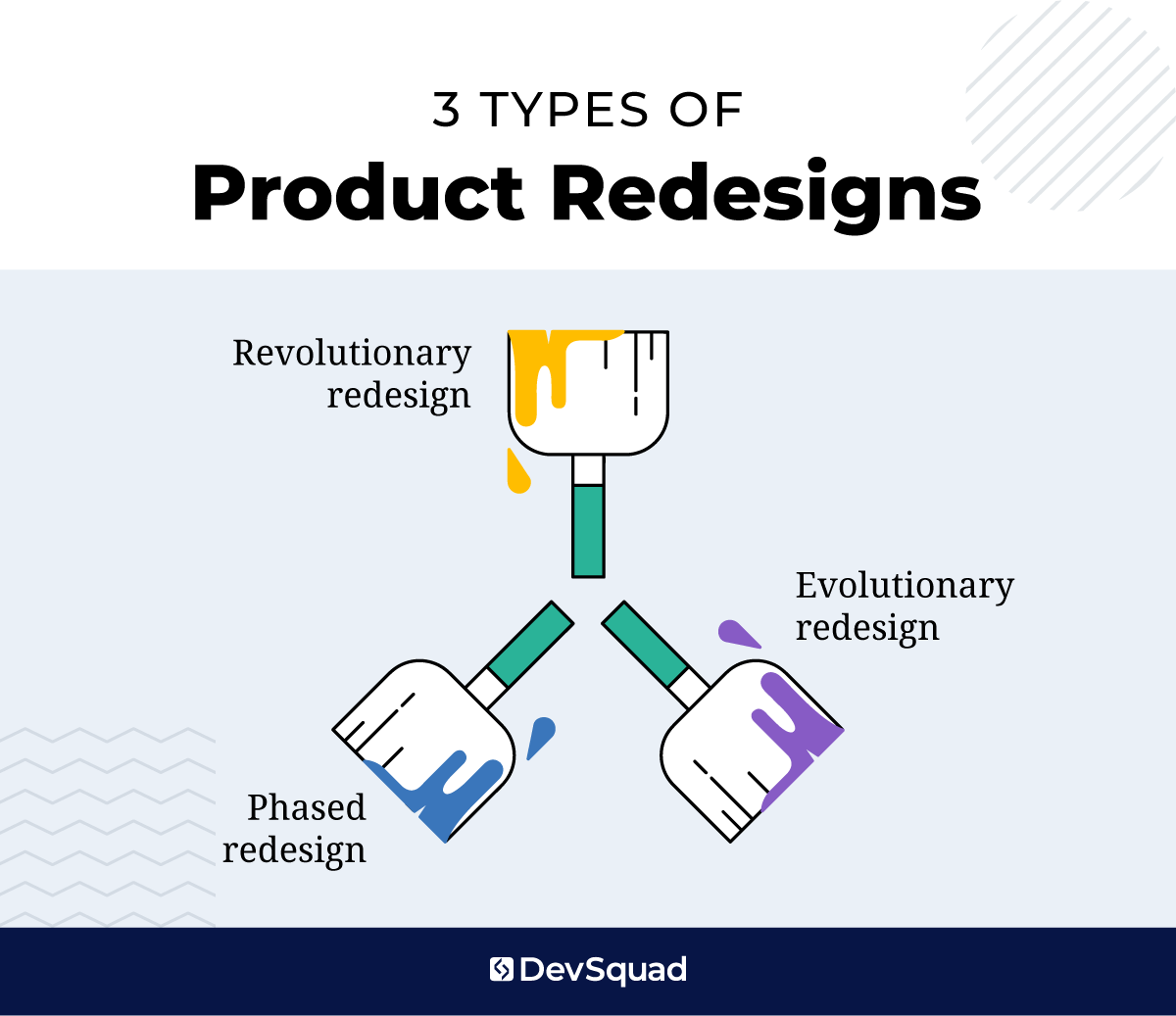
1. Revolutionary redesign (aka complete redesign)
This is a ground-up transformation of your product’s user experience, visual design, and often the underlying frontend codebase. Teams take this approach when the current UI is deeply misaligned with user expectations or when making incremental updates would be inefficient or ineffective.
This redesign is the most resource-intensive, but it offers the clearest break from legacy issues.
You may need a revolutionary redesign if:
The interface is significantly outdated, harming user trust or sales
User workflows no longer reflect real-world behavior
You’re repositioning the product to enter a new market or serve a different type of customer
Your current frontend stack can’t support the design changes you need
There’s heavy technical debt that slows development and feature velocity
2. Evolutionary redesign (aka iterative redesign)
This approach introduces ongoing improvements to the design without dramatically altering the structure or flow of the product. Changes are released gradually and often validated through regular user feedback and analytics.
This type of redesign is ideal for teams that want to stay agile and continuously improve the product without introducing major disruption.
Choose an evolutionary redesign when:
You’ve identified usability issues or friction in specific workflows
Users are struggling with small elements of the UI—not the whole product
You want to improve performance and UX without destabilizing the experience
There’s consistent engagement, but some patterns show room for refinement
3. Phased redesign (aka incremental redesign)
A phased redesign breaks the larger redesign effort into discrete, manageable stages. Rather than rebuilding everything at once, teams tackle one area or user flow at a time, often in parallel with ongoing product development. This approach allows you to make meaningful improvements with minimal risk to current operations.
A phased redesign is effective when:
Your team is already managing active users and can’t afford major downtime
You need to modernize the product while preserving critical backend systems
You want to roll out changes gradually to reduce risk and monitor user response
A full redesign isn’t feasible due to time, budget, or bandwidth constraints
Common pitfalls to avoid when redesigning a product
Redesigns can be transformative, but they can also become expensive detours if handled poorly. In fact, many of the challenges that derail redesigns are closely related to the broader reasons why startups fail. Poor strategic alignment, weak messaging, and unrealistic expectations show up not just in new product launches but also in redesign initiatives.
Below are the most common mistakes that can compromise your redesign efforts:
Redesigning without clear objectives: Without specific goals, such as reducing churn, increasing trial-to-paid conversions, or supporting a new customer segment, the project becomes reactive and directionless.
Focusing only on visuals: A modern UI won’t solve a broken experience. A successful SaaS product redesign improves both the form and the function, always anchored in how users interact with the product.
Ignoring real user data: If you rely solely on internal opinions or leadership assumptions, you’re likely to solve the wrong problems. User behavior, support feedback, and usage analytics should drive design decisions.
Overestimating user interest in change: Users don’t always welcome change, even if it's positive. If you remove familiar workflows or shift navigation patterns without preparing them, frustration follows.
Failing to adapt to current market conditions: A redesign that reflects your internal goals but ignores shifts in user expectations or competitive positioning is a missed opportunity. Your product must evolve with the market.
Disrupting users with a sudden rollout: Rolling out the full redesign to your entire user base all at once creates unnecessary risk. A progressive rollout allows for feedback, validation, and a fallback plan.
Neglecting internal team insights: Support, sales, and engineering teams have frontline visibility into user frustrations. Excluding them from the redesign process means missing critical context and patterns.
Underestimating development effort: Design can outpace what’s feasible to implement, especially when legacy systems are involved. Without technical validation early in the process, timelines and budgets often implode.
Unrealistic expectations: A new design won’t fix every problem or guarantee growth overnight. Overconfidence leads to rushed decisions, misallocated resources, and disappointment when metrics don’t spike immediately.
Misaligned messaging or positioning: If your redesign updates the look but fails to revisit your brand message or product value proposition, the end result may look better—but still fall flat.
Trying to change everything at once: Redesigning UI, revising architecture, shifting pricing models, and repositioning the product all at once spreads your team thin and blurs the impact of any one change.
No plan for post-launch measurement: Without a plan to measure key metrics post-launch—like task completion rates, trial conversions, or support ticket volume—you won’t know whether the redesign delivered results.
How to prepare for an effective redesign
Redesigning a product while managing an existing one starts with preparation. And that preparation can’t be treated as an afterthought or something squeezed in between sprint planning and support tickets. It’s a distinct effort with its own strategy, timeline, and deliverables.
Too often, teams dive into redesign work without stepping back to ask the foundational questions. What exactly needs to change? Why? What are the risks of redesigning, and what are the risks of doing nothing?
This phase is where successful redesigns are won or lost. Here's how to prepare:
Conduct redesign research
Before you make any decisions, you need to understand how users are actually engaging with your product. Look for patterns in behavior, usability testing results, and support logs. Analyze session recordings, run surveys, or speak directly with customers to identify where the friction lies.
You’re not just validating that issues exist—you’re uncovering the root causes of user frustration and mapping them to business impact. That insight will inform everything that follows.
Identify redesign objectives
Redesigning for the sake of “fresh visuals” leads to surface-level improvements with no strategic value. Instead, define measurable objectives. Are you trying to improve trial-to-paid conversions? Reduce time to value? Modernize for a new target segment?
Your objectives will guide scope, resource allocation, and success metrics. They’ll also help you resist scope creep and low-impact design debates.
Select redesign approach
Whether you’re planning a complete redesign, incremental updates, or something in between, your approach matters. It affects how you plan, test, and roll out changes. Be realistic about your internal capacity and user expectations, and choose a path that aligns with your timeline, risk tolerance, and technical constraints.
Obtain a third party perspective
Even the most experienced teams have blind spots. Internal teams often operate under long-standing assumptions that go unchallenged, especially when they’ve built or maintained the product for years.
Bringing in a third-party perspective helps you spot those assumptions, evaluate the problem space more objectively, and pressure test your proposed solutions. This is true whether you’re redesigning in-house or with a development partner. Look for experts who bring product strategy, validation methods, and agile execution—not just design output.
Align stakeholders on the product redesign roadmap
Redesigns stall or fall apart when there’s a disconnect between leadership, product, design, and engineering. Before any actual redesign work begins, gather stakeholders to align on the timeline, scope, objectives, and approach. Make decisions now that prevent rework later. Document them.
Consensus at this stage is more than a formality—it’s the foundation of momentum. Without it, even the best redesign plans will lose steam once real-world complexity sets in.
Step-by-step process for redesigning a product
Once your team has completed the preparation, it’s time to move into execution. Here is a structured approach that reflects how high-performing product teams execute redesigns.
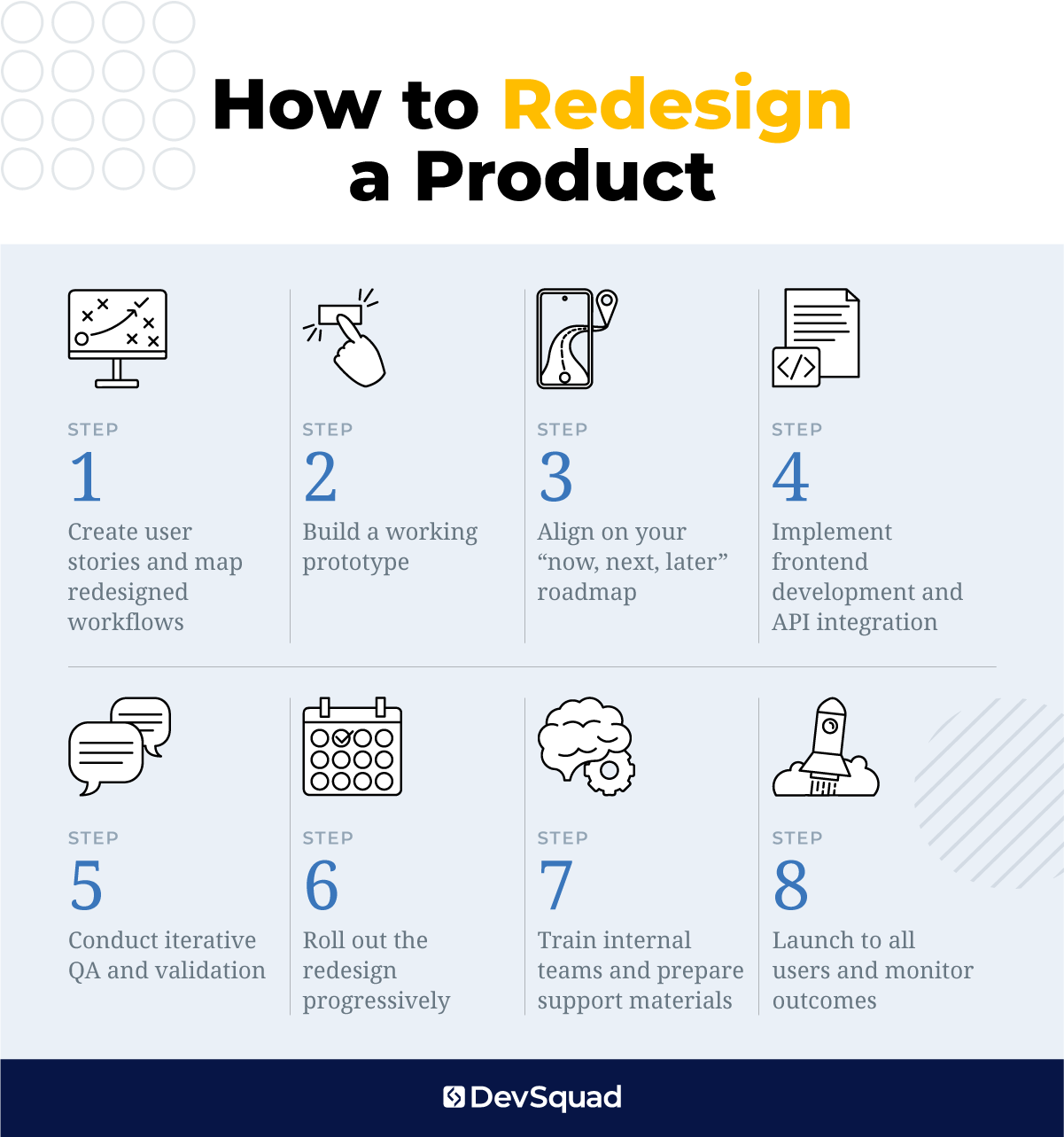
Step 1: Create user stories and map redesigned workflows
Translate your objectives into actionable user stories. Focus on critical workflows that were identified during research—onboarding, core tasks, feature discovery. This step is about designing around the way users actually behave and what they need to achieve.
Work closely with UX designers and product managers to prototype new flows that reflect user expectations and eliminate friction.
Step 2: Build a working prototype
Develop a high-fidelity prototype that mirrors your proposed solution. Use this prototype to simulate the new experience and test assumptions. Validate it with both internal stakeholders and external users through moderated testing, click tests, and interviews.
Your goal here is directional feedback, not perfection. Confirm that the new design is actually more intuitive and supports the goals you set earlier.
Step 3: Align on your “now, next, later” roadmap
With validated designs in hand, break the work into phases. Prioritize based on risk, user impact, and development complexity. Group tasks into clear stages: what’s getting built now, what’s queued for next, and what comes later.
This roadmap should remain flexible but grounded in your overall redesign strategy—whether it’s revolutionary, evolutionary, or phased.
Step 4: Implement frontend development and API integration
Begin engineering the redesigned UI using modern frameworks and libraries suited to your stack. Where applicable, integrate with existing backend systems using updated or newly developed APIs.
This phase must include rigorous collaboration between design, frontend developers, and backend engineers to resolve system constraints and edge cases early.
Step 5: Conduct iterative QA and validation
Don’t wait until the end to test functionality. Instead, build quality assurance into each phase with dual-track sprints that validate usability, performance, and visual fidelity.
Use test automation where possible, but supplement with manual QA to capture real-world usage scenarios, responsive behavior, and accessibility compliance.
Step 6: Roll out the redesign progressively
Start with a limited release to a controlled user segment. Monitor key product metrics—task completion, time-on-task, support ticket volume—and gather feedback. This real-world testing phase gives your team time to address bugs, usability gaps, and unexpected reactions before scaling.
Depending on your audience size, consider multiple rollout stages before full release.
Step 7: Train internal teams and prepare support materials
Before public launch, align customer support, sales, and success teams. Provide them with updated documentation, product demos, and walkthroughs so they can guide users confidently through the new experience.
This internal rollout is critical to avoiding misalignment between what users see and what your team communicates.
Step 8: Launch to all users and monitor outcomes
Release the full redesign with performance monitoring, user feedback loops, and support coverage in place. Revisit your original redesign objectives and measure success against them.
The redesign doesn’t end at launch. It’s the beginning of a new product lifecycle—one that should evolve through continuous feedback and iteration.
Frequently asked questions
How is a product redesign different from ongoing agile iteration?
Agile iteration focuses on small, continuous improvements within the existing design and structure. A product redesign is a deliberate, strategic overhaul of key elements—such as UX flows, UI components, and technology stack—based on broader goals like repositioning or modernization. Redesigns have a defined scope, objectives, and often require more upfront planning than typical agile cycles.
Do I need to redesign my product if user engagement is strong but the UI is outdated?
Yes—if your UI feels outdated, it can impact credibility and slow down new user adoption, even if existing users remain engaged. Visual design plays a key role in product perception. A redesign in this case supports brand alignment, future-proofing, and stronger positioning in competitive markets.
What role should customer support and sales play in a redesign?
Customer-facing teams hear user pain points every day. Their insights help identify usability gaps, onboarding issues, and messaging friction. Involving them early ensures the redesign addresses real problems and equips these teams to communicate changes effectively once launched.
Can I redesign my product without disrupting existing users?
Yes, with a thoughtful rollout plan. Use feature flags, progressive rollout strategies, and opt-in previews to introduce changes gradually. Supporting materials, guided walkthroughs, and strong communication reduce user friction and increase adoption of the new experience.
What’s the best way to test a redesign before launch?
Start with high-fidelity prototypes and run usability tests with real users. Supplement this with A/B testing, click tracking, or limited beta releases. Early validation helps you spot UX issues before development and makes sure the redesign solves real user problems.
How do I measure whether a redesign was successful?
Measure success against the goals you set during preparation like increased conversion, reduced churn, higher engagement, or better task completion. Use product analytics, customer feedback, and support trends to evaluate performance after launch.
What are the risks of not redesigning when the product clearly needs it?
Delaying a redesign can lead to lower customer satisfaction, reduced growth, and mounting technical debt. Outdated design harms trust, frustrates users, and creates inefficiencies that compound over time. Waiting too long puts you behind competitors and makes recovery harder.
The advantages of partnering with a development agency for your product redesign
When you commit to a product redesign, you're entering unfamiliar territory—new design patterns, possibly a new frontend framework, and infrastructure choices that haven't been made yet. Internal teams often try to get ahead by training for the unknown, but that’s a guess at best. It’s far more effective to train once the solution is defined and delivered.
That’s where the right development partner comes in.
A specialized agency brings fresh perspective, proven processes, and up-to-date technical expertise. They lead the strategy, execute the build, and then train your internal team on what was actually implemented. Instead of theory, your team learns how to manage and evolve a real system—with context, clarity, and confidence.
This is exactly what we do at DevSquad. We lead with strategy, invest heavily in planning and validation, and build modern, maintainable solutions. We also provide a smooth transition, whenever you're ready.
Are you thinking about a product redesign? Learn more about our redesign process.